











> ## Documentation Index
> Fetch the complete documentation index at: https://docs.topsort.com/llms.txt
> Use this file to discover all available pages before exploring further.

# Twilio Segment

> Learn how to integrate Topsort Events with Twilio Segment

export const IntegrationsCard1A = () => {
  return <>
      <style>{`
        .integrations-card-1a {
          display: flex;
          flex-direction: column;
          background-color: #f0f2f4;
          border: 1px solid rgba(0, 0, 0, 0.08);
          border-radius: 12px;
          padding: 1.25rem 1.5rem;
          gap: 0.25rem;
          color: #25253b;
          box-shadow: 0 1px 3px rgba(0, 0, 0, 0.02);
          transition: box-shadow 0.2s ease, border-color 0.2s ease, transform 0.2s ease;
          margin-top: 2rem;
        }

        .integrations-card-1a:hover {
          box-shadow: 0 4px 12px rgba(0, 0, 0, 0.06);
          border-color: rgba(0, 0, 0, 0.12);
        }

        .dark .integrations-card-1a {
          background-color: #25253b;
          color: #f6f8fa;
          border-color: rgba(255, 255, 255, 0.08);
          box-shadow: 0 1px 3px rgba(0, 0, 0, 0.1);
        }

        .dark .integrations-card-1a:hover {
          box-shadow: 0 4px 12px rgba(0, 0, 0, 0.2);
          border-color: rgba(255, 255, 255, 0.12);
        }

        .integrations-card-1a-avatar-row {
          display: flex;
          margin-left: 14px;
          flex-wrap: nowrap;
        }

        .integrations-card-1a-avatar {
          width: 44px;
          height: 44px;
          border-radius: 50%;
          border: 2px solid #f0f2f4;
          margin-left: -14px;
          object-fit: cover;
          box-shadow: 0 2px 6px rgba(0, 0, 0, 0.08);
          pointer-events: none;
          cursor: default;
        }

        .dark .integrations-card-1a-avatar {
          border-color: #25253b;
          box-shadow: 0 2px 8px rgba(0, 0, 0, 0.2);
        }

        .integrations-card-1a h2 {
          margin: 0;
          line-height: 1.25;
          font-size: clamp(1.25rem, calc(0.875rem + 1.25vw), 1.75rem);
          font-weight: 700;
          letter-spacing: -0.025em;
          color: #111827;
        }

        .dark .integrations-card-1a h2 {
          color: #f9fafb;
        }

        .integrations-card-1a-subtitle {
          font-size: 0.9375rem;
          font-weight: 500;
          line-height: 1.5;
          color: #4b5563;
          margin: 0;
        }

        .dark .integrations-card-1a-subtitle {
          color: #d1d5db;
        }

        .integrations-card-1a p {
          margin: 0;
          line-height: 1.5;
          font-size: 0.875rem;
          color: #374151;
        }

        .dark .integrations-card-1a p {
          color: #d1d5db;
        }

        .integrations-card-1a a {
          color: #0500ff;
          text-decoration: none;
          font-weight: 500;
          transition: color 0.15s ease;
        }

        .integrations-card-1a a:hover {
          color: #0400cc;
        }

        .dark .integrations-card-1a a {
          color: #8280ff;
        }

        .dark .integrations-card-1a a:hover {
          color: #a19fff;
        }

        @media (max-width: 640px) {
          .integrations-card-1a-avatar {
            width: 38px;
            height: 38px;
            margin-left: -12px;
          }

          .integrations-card-1a-avatar-row {
            margin-left: 12px;
          }
        }

        @media (min-width: 1280px) {
          .integrations-card-1a p {
            font-size: 0.6875rem;
            line-height: 1.4;
            letter-spacing: -0.01em;
          }

          .integrations-card-1a h2 {
            font-size: clamp(1rem, calc(0.75rem + 1vw), 1.25rem);
          }

          .integrations-card-1a-subtitle {
            font-size: 0.75rem;
          }
        }
      `}</style>
      <div className="integrations-card-1a">
        <div className="integrations-card-1a-avatar-row">
          <img src="/images/integration-team/agustin.webp" alt="Agustin - Integrations Team Member" loading="lazy" className="integrations-card-1a-avatar" />
          <img src="/images/integration-team/amelia.webp" alt="Amelia - Integrations Team Member" loading="lazy" className="integrations-card-1a-avatar" />
          <img src="/images/integration-team/bernardita.webp" alt="Bernardita - Integrations Team Member" loading="lazy" className="integrations-card-1a-avatar" />
          <img src="/images/integration-team/borumy.webp" alt="Borumy - Integrations Team Member" loading="lazy" className="integrations-card-1a-avatar" />
          <img src="/images/integration-team/felipe.webp" alt="Felipe - Integrations Team Member" loading="lazy" className="integrations-card-1a-avatar" />
          <img src="/images/integration-team/gui.webp" alt="Gui - Integrations Team Member" loading="lazy" className="integrations-card-1a-avatar" />
          <img src="/images/integration-team/javiera.webp" alt="Javiera - Integrations Team Member" loading="lazy" className="integrations-card-1a-avatar" />
          <img src="/images/integration-team/linn.webp" alt="Linn - Integrations Team Member" loading="lazy" className="integrations-card-1a-avatar" />
          <img src="/images/integration-team/marcio.webp" alt="Marcio - Integrations Team Member" loading="lazy" className="integrations-card-1a-avatar" />
          <img src="/images/integration-team/mateus.webp" alt="Mateus - Integrations Team Member" loading="lazy" className="integrations-card-1a-avatar" />
          <img src="/images/integration-team/max.webp" alt="Max - Integrations Team Member" loading="lazy" className="integrations-card-1a-avatar" />
          <img src="/images/integration-team/rodrigo.webp" alt="Rodrigo - Integrations Team Member" loading="lazy" className="integrations-card-1a-avatar" />
        </div>

        <h2>Need help with your Topsort integration?</h2>

        <p className="integrations-card-1a-subtitle">
          Talk to us, the integrations engineering team.
        </p>

        <p>
          Reach us via <strong>your dedicated messaging channel</strong> or at{" "}
          <a href="mailto:support@topsort.com">support@topsort.com</a>.
        </p>

        <p>
          If you're not a customer yet,{" "}
          <a href="https://www.topsort.com/book-a-demo">book a demo</a> with our
          sales team instead.
        </p>
      </div>
    </>;
};

If you're using Twilio Segment to track events on your site, you can send events to Topsort directly by adding the Topsort Destination in your Segment account. Please refer to [Topsort documentation](https://segment.com/docs/connections/destinations/catalog/actions-topsort/) on the Twilio Segments knowledge base.

As a prerequisite for this integration, you must have a Segment account and a working Source (website or app).

<Steps>
  <Step title="Understand Required Events">
    Topsort uses three main events, all mapped from Segment's eCommerce Spec:

    | Topsort Event | Default Segment Mapping |  Alternate Mapping  |
    | :-----------: | :---------------------: | :-----------------: |
    | `impressions` |      Product Viewed     | Product List Viewed |
    |    `clicks`   |     Product Clicked     |    Product Added    |
    |  `purchases`  |     Order Completed     |          —          |

    * Avoid sending duplicated clicks. If both Product Clicked and Product Added are fired from the same user action, choose only one.
    * If you're using custom events, reach out at [support@topsort.com](mailto:support@topsort.com) to map them properly.
  </Step>

  <Step title="Add the Topsort Destination in Segment">
    1. In Segment, go to Connections > Catalog > Destinations
    2. Search for Topsort, then click Add Destination
    3. Select the relevant Source (your site or app)

    <Frame>
      <img src="https://mintlify.s3.us-west-1.amazonaws.com/topsort/images/ad-server/events/segment-app.png" alt="Segment App" />
    </Frame>
  </Step>

  <Step title="Configure Destination Settings">
    1. In the Topsort Manager Platform, go to Settings > API Integration
    2. Copy or create your Marketplace API Key
    3. Back in Segment, open the Topsort destination's Settings tab and paste your API Key

    <Frame>
      <img src="https://mintlify.s3.us-west-1.amazonaws.com/topsort/images/ad-server/events/segment-settings.png" alt="Segment Settings" />
    </Frame>

    The API Key allows Segment to send events to your Topsort account.
  </Step>

  <Step title="Enable Track Events and Add Metadata">
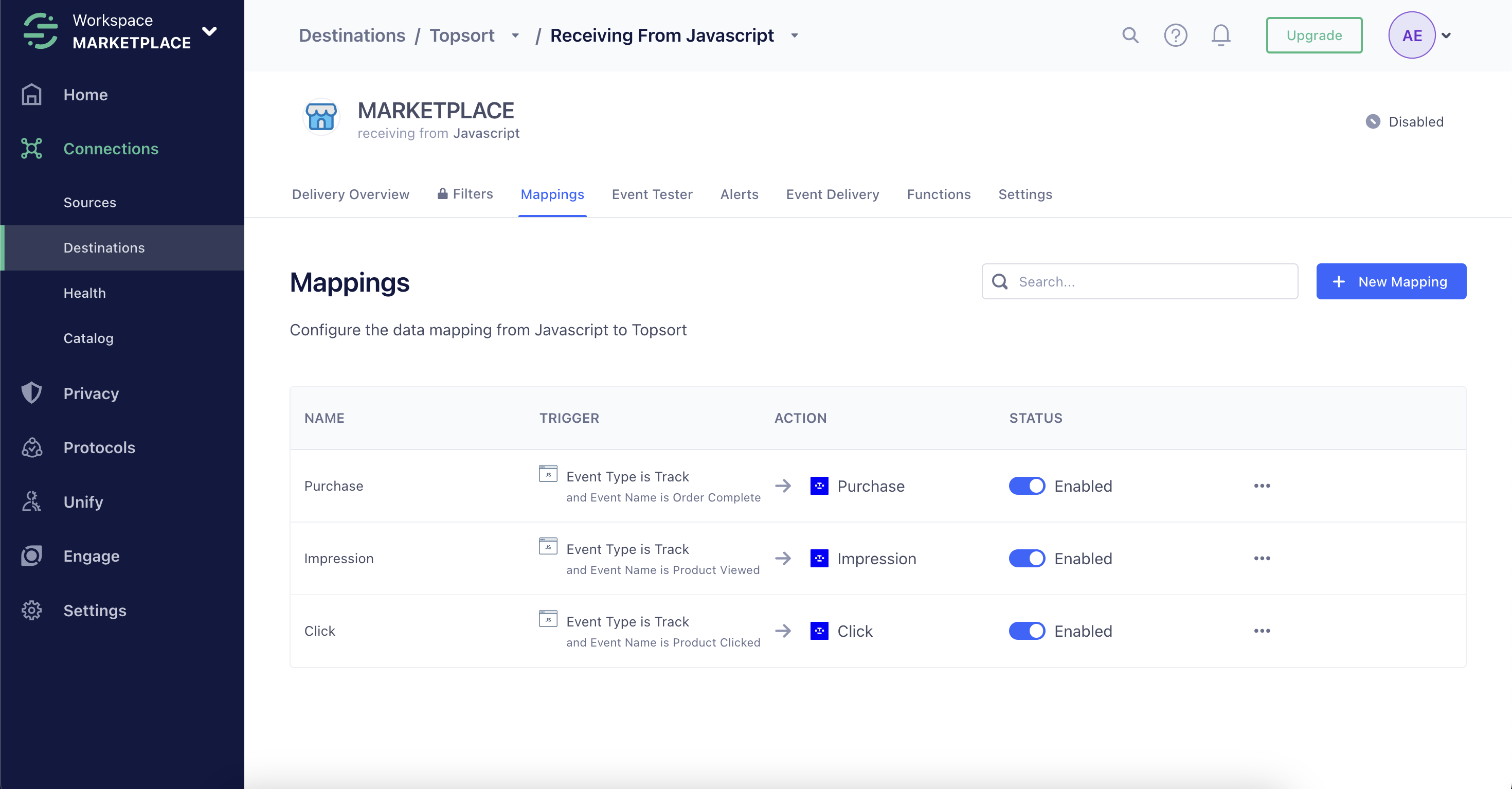
    1. Only enable the Track events you're actively sending from your site

    <Frame>
      <img src="https://mintcdn.com/topsort/1RZV69Uhic79Ylqv/images/ad-server/events/segment-mappings.png?fit=max&auto=format&n=1RZV69Uhic79Ylqv&q=85&s=3bfab807dbddbe24a12b650ee6933f80" alt="Segment Mappings" width="2940" height="1534" data-path="images/ad-server/events/segment-mappings.png" />
    </Frame>

    Prevent double-counting by reviewing your event firing logic.

    2. Add the `resolvedBidId` field to:

    * Product Viewed events
    * Product Clicked events

    The `resolvedBidId` uniquely identifies the promoted winner of the auction. You can retrieve it from the Auctions API or Proxy response.

    Example call:

    ```javascript theme={null}
    analytics.track('Product Clicked', {
      productId: '12345',
      resolvedBidId: '67890' // required for Topsort attribution
    });
    ```
  </Step>

  <Step title="Identify Users">
    Topsort recommends identifying logged users with Segment's identify method. Example:

    ```javascript theme={null}
    analytics.identify('361b1fdfbeaa9d64a13c033eb9f970dc6740f6bc', {
      email: 'john.doe@example.com'
    });
    ```

    Logged-out users are tracked with an `anonymousId`. If using server-side sources, include at least userId or anonymousId. Once a user is identified, each call to Segment's Track method automatically records the user ID. Users that are not logged in can be tracked using an anonymousId.
  </Step>
</Steps>

<IntegrationsCard1A />
