> ## Documentation Index
> Fetch the complete documentation index at: https://docs.topsort.com/llms.txt
> Use this file to discover all available pages before exploring further.
# Developer Logs
> Access and interpret API logs in the Topsort admin platform
## Where to Find Logs
Navigate to **Dev Tools** tab in your Topsort Ad Platform to access real-time logs for your API key.
## Log Availability
| Environment | What's Logged | Retention |
| -------------- | ------------------------------- | --------- |
| **Staging** | All API requests and responses | 30 days |
| **Production** | Errors and failed requests only | 30 days |
As your production API usage scales up, successful requests may be filtered from logs to improve performance. Errors and debugging information will always be available.
## Understanding Log Entries
### Successful Requests
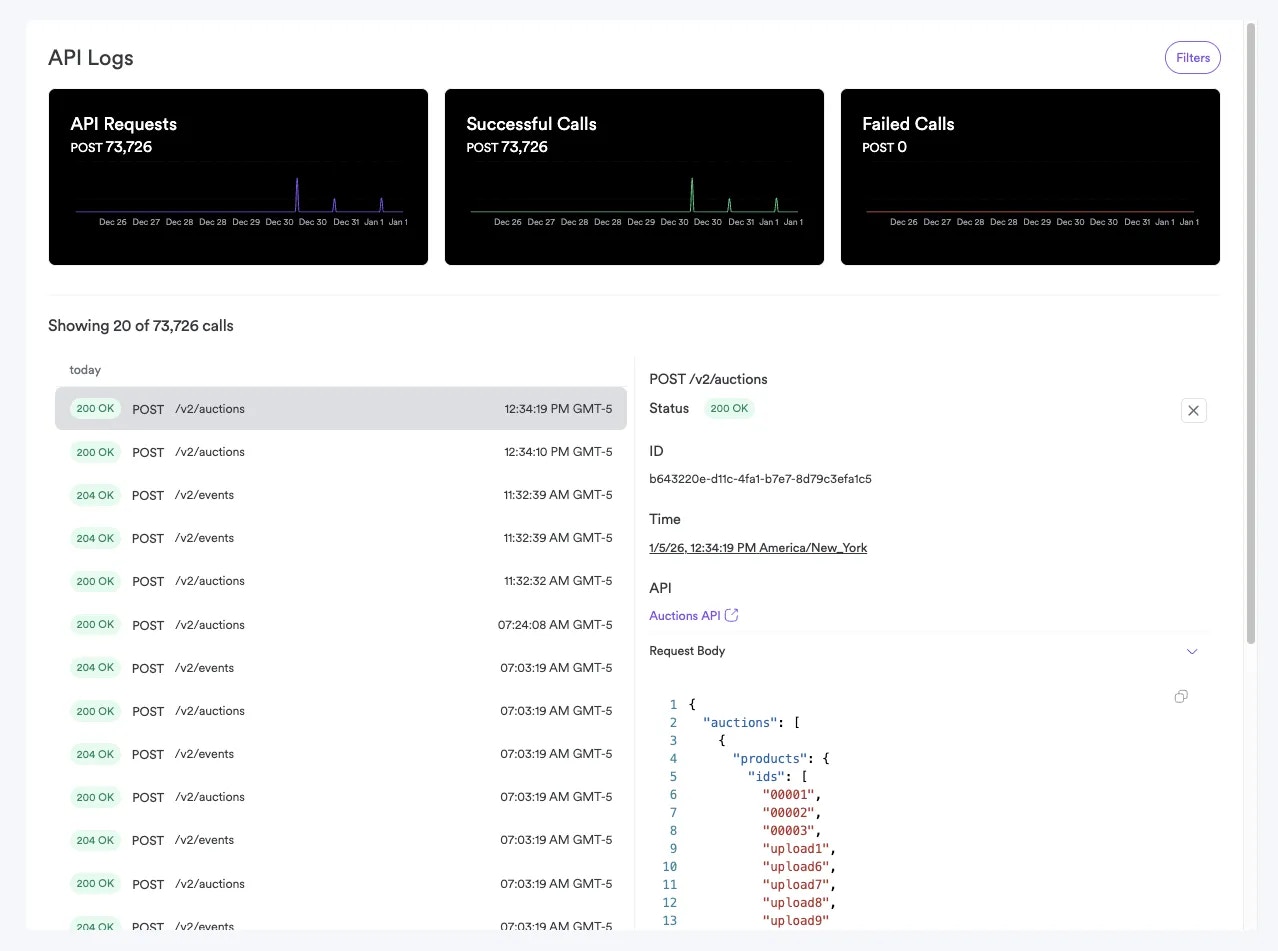 Successful API calls show:
* **Status:** HTTP 200/201/204 status codes
* **Timestamp:** When the request was made
* **Endpoint:** Which API endpoint was called
* **Response time:** How long the request took
* **Request size:** Size of request/response data
### Error Entries
Successful API calls show:
* **Status:** HTTP 200/201/204 status codes
* **Timestamp:** When the request was made
* **Endpoint:** Which API endpoint was called
* **Response time:** How long the request took
* **Request size:** Size of request/response data
### Error Entries
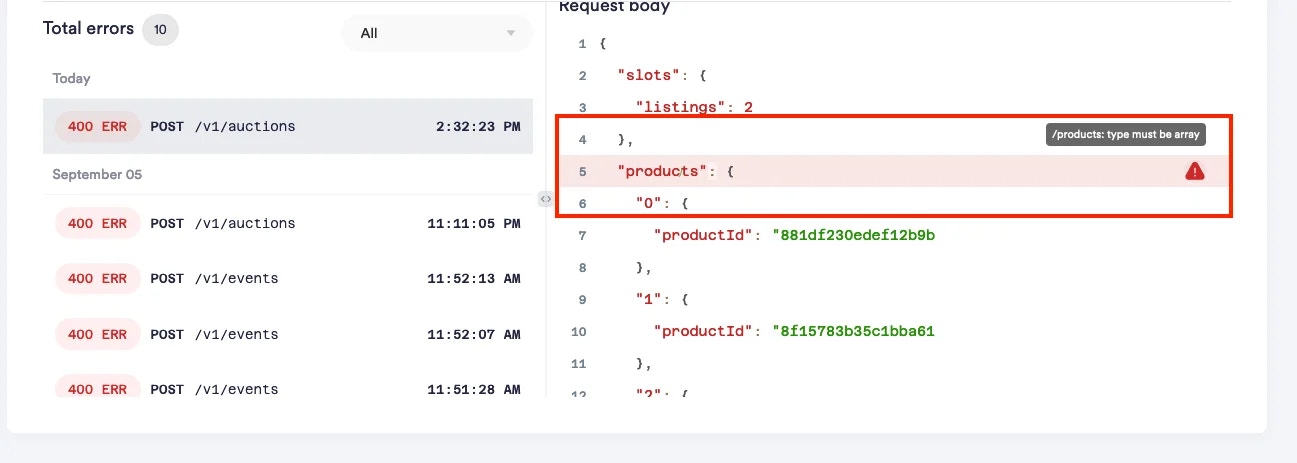 Failed requests include additional debugging information:
* **Status:** HTTP error code (400, 401, 403, etc.)
* **Error details:** Specific error code and message
* **Request body:** What data was sent (for debugging)
* **Stack trace:** Internal error details (when available)
## Common Log Patterns
### Authentication Issues
```
401 Unauthorized - invalid_api_key
Missing Authorization header
```
**Solution:** Add `Authorization: Bearer YOUR_API_KEY` header
### Validation Errors
```
422 Unprocessable Entity - invalid_product_id
Product 'sku_123' not found in catalog
```
**Solution:** Verify product exists and is spelled correctly
### Rate Limiting
```
429 Too Many Requests - rate_limited
X-RateLimit-Remaining: 0
```
**Solution:** Implement exponential backoff retry logic
## Using Logs for Debugging
### 1. Events Not Appearing in Dashboard
Look for:
* **200 status** on `/events` calls
* **Validation errors** in event payload
* **Timestamp issues** (`occurredAt` in future or too old)
### 2. Empty Auction Results
Check:
* Campaign budget status
* Product availability in catalog
* Auction request format
### 3. Attribution Problems
Review event logs for:
* Consistent user ID usage
* Proper `resolvedBidId` from auctions
* Timing of click/purchase events
## Best Practices
### Log Monitoring
* Check logs after deploying new integration code
* Monitor error rates during high-traffic periods
* Set up alerts for recurring error patterns
### Troubleshooting Workflow
1. **Reproduce the issue** in staging environment
2. **Check recent logs** for error patterns
3. **Verify request format** against [API documentation](/api-reference)
4. **Test with minimal payload** to isolate the problem
5. **Contact support** with log timestamps for complex issues
## Privacy and Data Handling
* Logs may contain sensitive data from your requests
* Production logs automatically expire after 30 days
* Access to logs is restricted to admin users only
* Personal data in logs follows standard data retention policies
## Need Help?
If you're seeing persistent errors in your logs:
1. **Note the timestamp** of problematic requests
2. **Copy the exact error message** and request details
3. **Contact support** with this information for faster resolution
Our team can access detailed server-side logs to help diagnose complex integration issues.
Failed requests include additional debugging information:
* **Status:** HTTP error code (400, 401, 403, etc.)
* **Error details:** Specific error code and message
* **Request body:** What data was sent (for debugging)
* **Stack trace:** Internal error details (when available)
## Common Log Patterns
### Authentication Issues
```
401 Unauthorized - invalid_api_key
Missing Authorization header
```
**Solution:** Add `Authorization: Bearer YOUR_API_KEY` header
### Validation Errors
```
422 Unprocessable Entity - invalid_product_id
Product 'sku_123' not found in catalog
```
**Solution:** Verify product exists and is spelled correctly
### Rate Limiting
```
429 Too Many Requests - rate_limited
X-RateLimit-Remaining: 0
```
**Solution:** Implement exponential backoff retry logic
## Using Logs for Debugging
### 1. Events Not Appearing in Dashboard
Look for:
* **200 status** on `/events` calls
* **Validation errors** in event payload
* **Timestamp issues** (`occurredAt` in future or too old)
### 2. Empty Auction Results
Check:
* Campaign budget status
* Product availability in catalog
* Auction request format
### 3. Attribution Problems
Review event logs for:
* Consistent user ID usage
* Proper `resolvedBidId` from auctions
* Timing of click/purchase events
## Best Practices
### Log Monitoring
* Check logs after deploying new integration code
* Monitor error rates during high-traffic periods
* Set up alerts for recurring error patterns
### Troubleshooting Workflow
1. **Reproduce the issue** in staging environment
2. **Check recent logs** for error patterns
3. **Verify request format** against [API documentation](/api-reference)
4. **Test with minimal payload** to isolate the problem
5. **Contact support** with log timestamps for complex issues
## Privacy and Data Handling
* Logs may contain sensitive data from your requests
* Production logs automatically expire after 30 days
* Access to logs is restricted to admin users only
* Personal data in logs follows standard data retention policies
## Need Help?
If you're seeing persistent errors in your logs:
1. **Note the timestamp** of problematic requests
2. **Copy the exact error message** and request details
3. **Contact support** with this information for faster resolution
Our team can access detailed server-side logs to help diagnose complex integration issues.