> ## Documentation Index
> Fetch the complete documentation index at: https://docs.topsort.com/llms.txt
> Use this file to discover all available pages before exploring further.
# Toppie API Keys
> Programmatic access to manage campaigns and analytics across retail media networks
export const ChangelogActions = () => {
return <>
;
};
July 16, 2025
Toppie
New Feature
**Why It's Important**
API keys enable secure, programmatic access to Toppie's unified retail media platform. Whether you're automating campaign management, building custom dashboards, or integrating Toppie data into your existing workflows, API keys provide the foundation for scaling your retail media operations beyond the UI.
## What's New
We're rolling out API keys for Toppie, our demand-side platform that streamlines retail media buying across multiple retailers. All Toppie API endpoints will now require secure, **token-based authentication.**
## Key Benefits
**Automate Campaign Operations**:
Build workflows that create, manage, and optimize campaigns across multiple retailers without manual intervention.
**Custom Integrations**:
Connect Toppie data to your BI tools, reporting dashboards, or internal systems for unified retail media analytics.
**Secure Access Control**:
Role-based permissions ensure team members only access the data and capabilities they need.
## How to Create API Keys
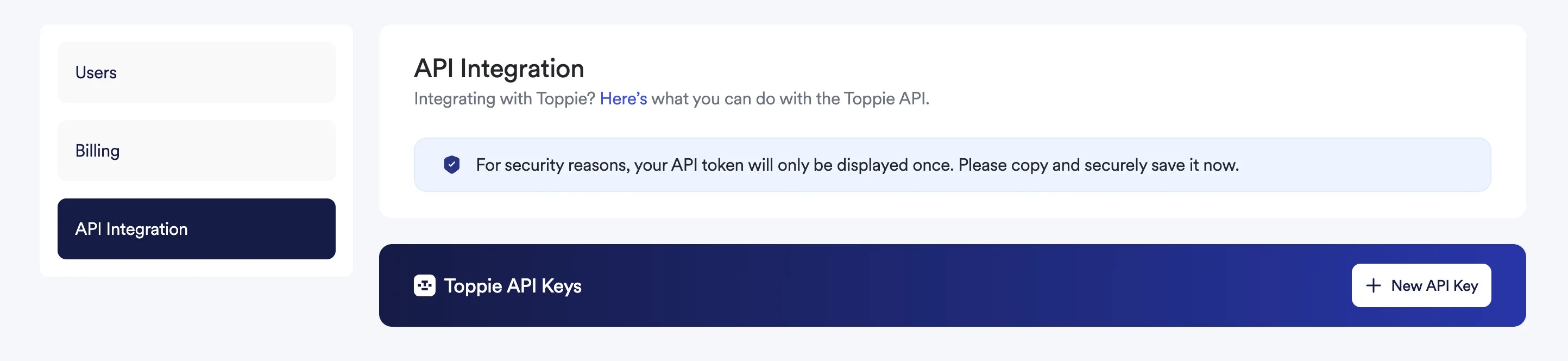
1. Navigate to **Settings** in your Toppie dashboard
2. Select **API Integration** from the left-hand navigation
3. Click the **"+ New API Key"** button
4. **Important:** Copy and save your API key immediately—it will only be displayed once for security
5. Store your API key in a secure location (password manager, secrets management system, etc.)
## Using Your API Keys
Once you have your API key, you can start making requests to the Toppie API. Include your key in the request headers for authentication.
### Example Request
```bash theme={null}
curl -X GET https://api.topsort.com/toppie/v1/campaigns \
-H "Authorization: Bearer YOUR_API_KEY_HERE" \
-H "Content-Type: application/json"
```
### Available Endpoints
Explore the full capabilities of the Toppie API:
* Product Catalog Access
* Campaign Lifecycle Management
* Advanced Analytics and Reporting
Visit our [Toppie API Reference](/en/api-reference/toppie-api/%5Bbeta%5D-get-toppie-campaigns) for complete documentation.
## Questions?
Contact your Toppie account manager for assistance with API integration or to discuss advanced use cases for programmatic campaign management.
 ## Using Your API Keys
Once you have your API key, you can start making requests to the Toppie API. Include your key in the request headers for authentication.
### Example Request
```bash theme={null}
curl -X GET https://api.topsort.com/toppie/v1/campaigns \
-H "Authorization: Bearer YOUR_API_KEY_HERE" \
-H "Content-Type: application/json"
```
### Available Endpoints
Explore the full capabilities of the Toppie API:
* Product Catalog Access
* Campaign Lifecycle Management
* Advanced Analytics and Reporting
Visit our [Toppie API Reference](/en/api-reference/toppie-api/%5Bbeta%5D-get-toppie-campaigns) for complete documentation.
## Questions?
Contact your Toppie account manager for assistance with API integration or to discuss advanced use cases for programmatic campaign management.
## Using Your API Keys
Once you have your API key, you can start making requests to the Toppie API. Include your key in the request headers for authentication.
### Example Request
```bash theme={null}
curl -X GET https://api.topsort.com/toppie/v1/campaigns \
-H "Authorization: Bearer YOUR_API_KEY_HERE" \
-H "Content-Type: application/json"
```
### Available Endpoints
Explore the full capabilities of the Toppie API:
* Product Catalog Access
* Campaign Lifecycle Management
* Advanced Analytics and Reporting
Visit our [Toppie API Reference](/en/api-reference/toppie-api/%5Bbeta%5D-get-toppie-campaigns) for complete documentation.
## Questions?
Contact your Toppie account manager for assistance with API integration or to discuss advanced use cases for programmatic campaign management.