> ## Documentation Index
> Fetch the complete documentation index at: https://docs.topsort.com/llms.txt
> Use this file to discover all available pages before exploring further.
# Toppie Campaigns Tab
> Centralized campaign management interface for viewing, filtering, and managing all your Toppie campaigns
export const ChangelogActions = () => {
return <>
;
};
August 3, 2025ToppieNew Feature
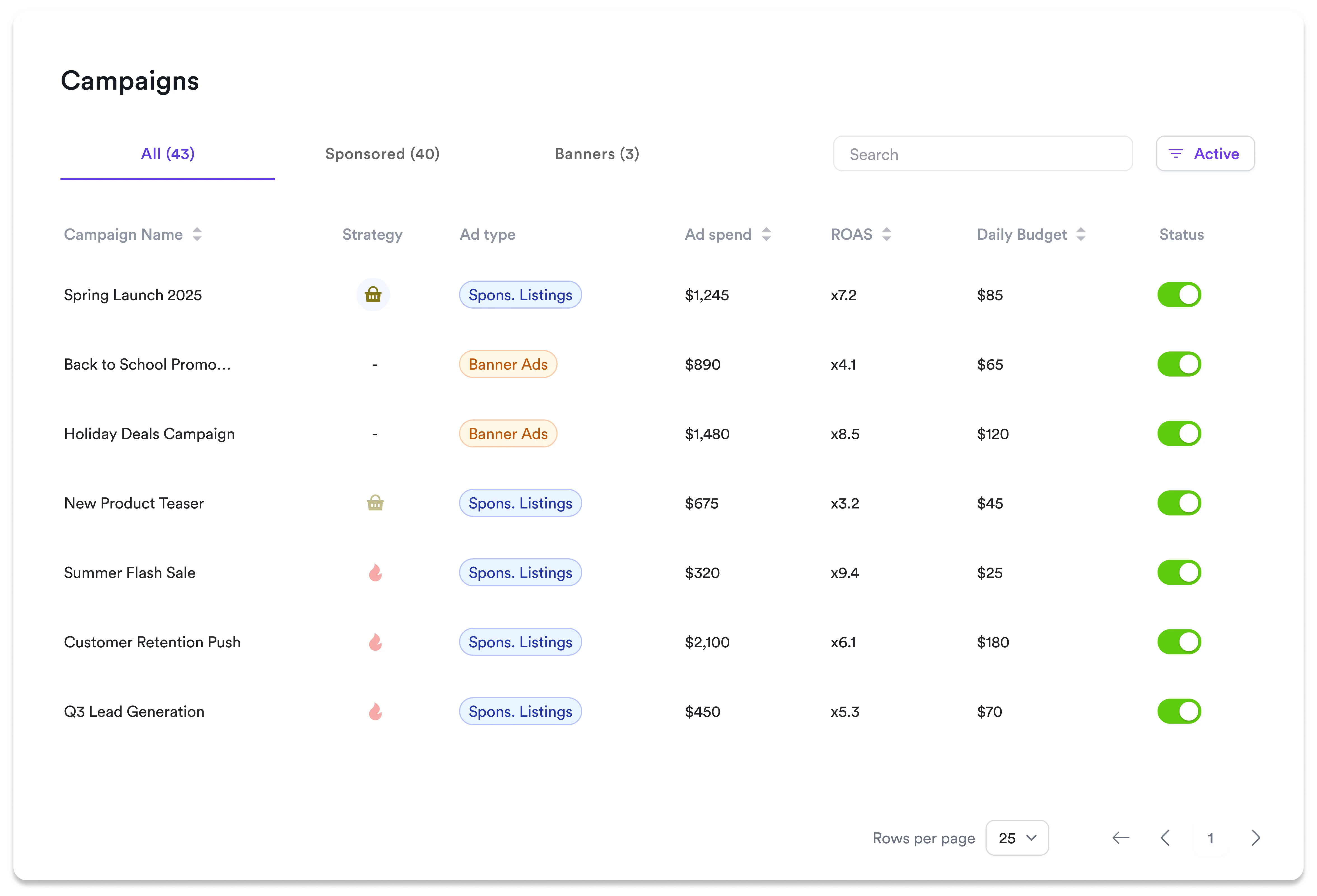
We've released the **Campaigns Tab** in Toppie, providing a centralized hub for managing all your advertising campaigns across retail media networks. This new interface streamlines campaign oversight and enables efficient performance monitoring from one unified dashboard.
## Key Benefits
**Unified Campaign View**:
See all your Sponsored Listings and Banner Ads campaigns in one organized interface
**Real-Time Monitoring**:
Track ad spend, ROAS, and daily budgets with live performance updates
**Quick Campaign Control**:
Instantly activate, pause, or modify campaigns without navigating between pages
**Smart Filtering**:
Filter by campaign type, status, or search by name to find campaigns quickly
**Detailed Analytics Access**:
Click into any campaign for comprehensive performance data and trend analysis
## Campaign Management
### Core Features Available
* Campaign filtering by type (All, Sponsored, Banners)
* Real-time performance metrics display
* Campaign status management (Active/Inactive toggles)
* Search functionality across all campaigns
* Direct access to detailed campaign analytics
### How to Use
1. Navigate to the **Campaigns** tab in your Toppie dashboard
2. Use filter tabs to view specific campaign types or see all campaigns
3. Monitor key metrics (Ad spend, ROAS, Daily Budget) directly from the list view
4. Toggle campaign status using the Active/Inactive controls
5. Click on any campaign name to access detailed performance analytics and settings
***
The Campaigns Tab is available now in your Toppie dashboard. Talk to your Topsort representative about optimizing your campaign management workflow and exploring advanced features within the new interface.
 ## Key Benefits
**Unified Campaign View**:
See all your Sponsored Listings and Banner Ads campaigns in one organized interface
**Real-Time Monitoring**:
Track ad spend, ROAS, and daily budgets with live performance updates
**Quick Campaign Control**:
Instantly activate, pause, or modify campaigns without navigating between pages
**Smart Filtering**:
Filter by campaign type, status, or search by name to find campaigns quickly
**Detailed Analytics Access**:
Click into any campaign for comprehensive performance data and trend analysis
## Campaign Management
### Core Features Available
* Campaign filtering by type (All, Sponsored, Banners)
* Real-time performance metrics display
* Campaign status management (Active/Inactive toggles)
* Search functionality across all campaigns
* Direct access to detailed campaign analytics
### How to Use
1. Navigate to the **Campaigns** tab in your Toppie dashboard
2. Use filter tabs to view specific campaign types or see all campaigns
3. Monitor key metrics (Ad spend, ROAS, Daily Budget) directly from the list view
4. Toggle campaign status using the Active/Inactive controls
5. Click on any campaign name to access detailed performance analytics and settings
***
The Campaigns Tab is available now in your Toppie dashboard. Talk to your Topsort representative about optimizing your campaign management workflow and exploring advanced features within the new interface.
## Key Benefits
**Unified Campaign View**:
See all your Sponsored Listings and Banner Ads campaigns in one organized interface
**Real-Time Monitoring**:
Track ad spend, ROAS, and daily budgets with live performance updates
**Quick Campaign Control**:
Instantly activate, pause, or modify campaigns without navigating between pages
**Smart Filtering**:
Filter by campaign type, status, or search by name to find campaigns quickly
**Detailed Analytics Access**:
Click into any campaign for comprehensive performance data and trend analysis
## Campaign Management
### Core Features Available
* Campaign filtering by type (All, Sponsored, Banners)
* Real-time performance metrics display
* Campaign status management (Active/Inactive toggles)
* Search functionality across all campaigns
* Direct access to detailed campaign analytics
### How to Use
1. Navigate to the **Campaigns** tab in your Toppie dashboard
2. Use filter tabs to view specific campaign types or see all campaigns
3. Monitor key metrics (Ad spend, ROAS, Daily Budget) directly from the list view
4. Toggle campaign status using the Active/Inactive controls
5. Click on any campaign name to access detailed performance analytics and settings
***
The Campaigns Tab is available now in your Toppie dashboard. Talk to your Topsort representative about optimizing your campaign management workflow and exploring advanced features within the new interface.