> ## Documentation Index
> Fetch the complete documentation index at: https://docs.topsort.com/llms.txt
> Use this file to discover all available pages before exploring further.
# Banners—Slot Reserve Prices for Manual Bidding
> Set minimum CPM and CPC reserve prices per banner slot to ensure optimal revenue thresholds
export const ChangelogActions = () => {
return <>
;
};
August 4, 2025Ad PlatformImprovement
We've added **slot-level reserve prices** for banner campaigns, allowing marketplaces to set minimum **CPM** and **CPC** thresholds for individual banner slots. This granular control ensures optimal monetization while maintaining campaign performance standards.
## Key Benefits
**Granular Revenue Control**:
Set specific minimum bid thresholds for each banner slot based on placement value and performance
**Intelligent Fallback Logic**:
Slots without specific reserve prices automatically inherit marketplace-level reserve settings
**Campaign Validation**:
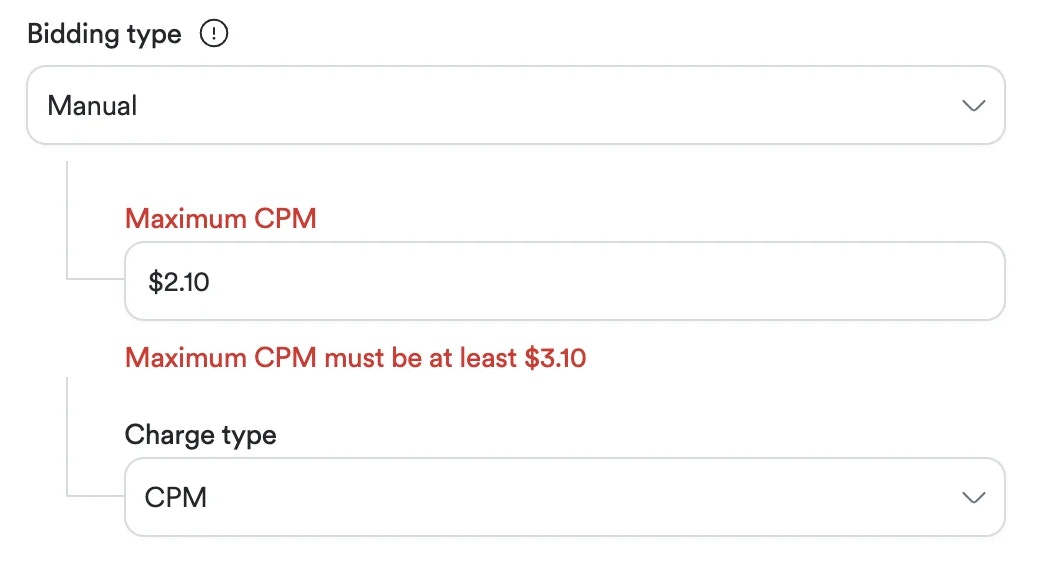
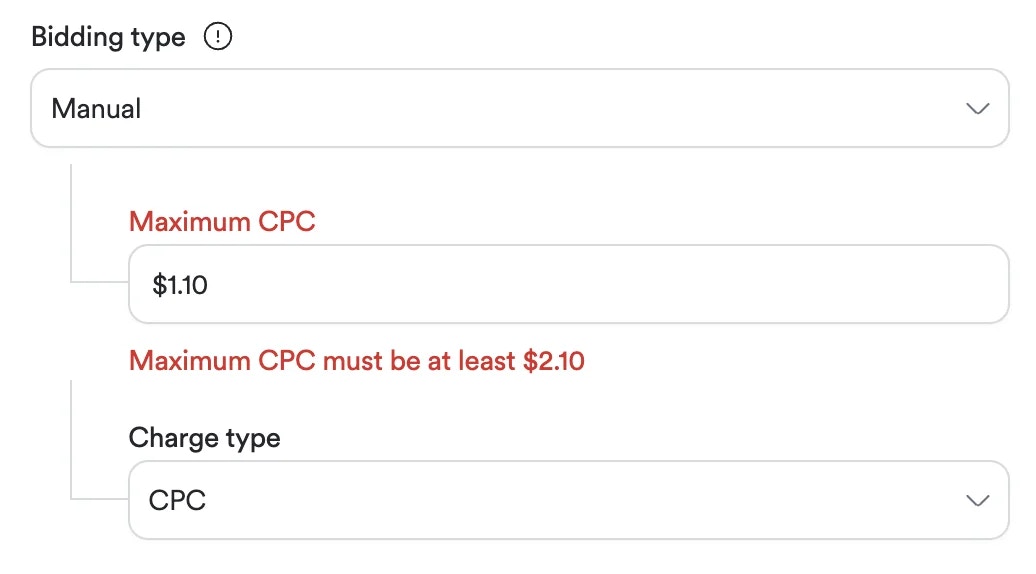
Manual bidding campaigns receive clear warnings when bids fall below slot reserve thresholds
**Centralized Management**:
All slot reserve prices are stored and managed through central services for consistency
## How It Works
### Reserve Price Hierarchy
When evaluating banner campaigns, the system follows this priority order:
1. **Slot Reserve Price** - If set, this takes precedence
2. **Marketplace Reserve Price** - Used as fallback when no slot-specific price exists
### Campaign Impact
* **Manual Bidding Campaigns**: Must meet or exceed slot reserve prices to participate in auctions
* **Autobidding Campaigns**: Bid amounts automatically adjust to meet minimum slot requirements
* **Exclusive Campaigns**: Unaffected by reserve price restrictions
## Setting Slot Reserve Prices
To set or update reserve prices for your banner slots, please follow these steps:
1. **Prepare a CSV File**: Create a configuration file listing the `slot_id` and your desired minimum `cpm_reserve_price` and `cpc_reserve_price` reserve prices for each banner slot.
2. **Contact Your Representative**: Share the CSV file with your Topsort account manager. Our team will handle the configuration and apply the new thresholds.
3. **Monitor Performance**: After the changes are live, monitor your campaign participation and slot revenue to ensure the new reserve prices are meeting your goals.
## Validation and Warnings
When creating or editing manual bidding campaigns, the system will:
* Check bid amounts against relevant slot reserve prices
* Display warnings like "Maximum \[CPM/CPC] must be at least \$\[slot reserve price]" when thresholds aren't met
* Prevent campaign participation if bids remain below minimum requirements
***
Slot reserve prices for banner campaigns are available now. Contact your Topsort representative to optimize your slot pricing strategy and maximize banner ad revenue.
 ## Key Benefits
**Granular Revenue Control**:
Set specific minimum bid thresholds for each banner slot based on placement value and performance
**Intelligent Fallback Logic**:
Slots without specific reserve prices automatically inherit marketplace-level reserve settings
**Campaign Validation**:
Manual bidding campaigns receive clear warnings when bids fall below slot reserve thresholds
**Centralized Management**:
All slot reserve prices are stored and managed through central services for consistency
## How It Works
### Reserve Price Hierarchy
When evaluating banner campaigns, the system follows this priority order:
1. **Slot Reserve Price** - If set, this takes precedence
2. **Marketplace Reserve Price** - Used as fallback when no slot-specific price exists
### Campaign Impact
* **Manual Bidding Campaigns**: Must meet or exceed slot reserve prices to participate in auctions
* **Autobidding Campaigns**: Bid amounts automatically adjust to meet minimum slot requirements
* **Exclusive Campaigns**: Unaffected by reserve price restrictions
## Setting Slot Reserve Prices
To set or update reserve prices for your banner slots, please follow these steps:
1. **Prepare a CSV File**: Create a configuration file listing the `slot_id` and your desired minimum `cpm_reserve_price` and `cpc_reserve_price` reserve prices for each banner slot.
2. **Contact Your Representative**: Share the CSV file with your Topsort account manager. Our team will handle the configuration and apply the new thresholds.
3. **Monitor Performance**: After the changes are live, monitor your campaign participation and slot revenue to ensure the new reserve prices are meeting your goals.
## Validation and Warnings
When creating or editing manual bidding campaigns, the system will:
* Check bid amounts against relevant slot reserve prices
* Display warnings like "Maximum \[CPM/CPC] must be at least \$\[slot reserve price]" when thresholds aren't met
* Prevent campaign participation if bids remain below minimum requirements
***
Slot reserve prices for banner campaigns are available now. Contact your Topsort representative to optimize your slot pricing strategy and maximize banner ad revenue.
## Key Benefits
**Granular Revenue Control**:
Set specific minimum bid thresholds for each banner slot based on placement value and performance
**Intelligent Fallback Logic**:
Slots without specific reserve prices automatically inherit marketplace-level reserve settings
**Campaign Validation**:
Manual bidding campaigns receive clear warnings when bids fall below slot reserve thresholds
**Centralized Management**:
All slot reserve prices are stored and managed through central services for consistency
## How It Works
### Reserve Price Hierarchy
When evaluating banner campaigns, the system follows this priority order:
1. **Slot Reserve Price** - If set, this takes precedence
2. **Marketplace Reserve Price** - Used as fallback when no slot-specific price exists
### Campaign Impact
* **Manual Bidding Campaigns**: Must meet or exceed slot reserve prices to participate in auctions
* **Autobidding Campaigns**: Bid amounts automatically adjust to meet minimum slot requirements
* **Exclusive Campaigns**: Unaffected by reserve price restrictions
## Setting Slot Reserve Prices
To set or update reserve prices for your banner slots, please follow these steps:
1. **Prepare a CSV File**: Create a configuration file listing the `slot_id` and your desired minimum `cpm_reserve_price` and `cpc_reserve_price` reserve prices for each banner slot.
2. **Contact Your Representative**: Share the CSV file with your Topsort account manager. Our team will handle the configuration and apply the new thresholds.
3. **Monitor Performance**: After the changes are live, monitor your campaign participation and slot revenue to ensure the new reserve prices are meeting your goals.
## Validation and Warnings
When creating or editing manual bidding campaigns, the system will:
* Check bid amounts against relevant slot reserve prices
* Display warnings like "Maximum \[CPM/CPC] must be at least \$\[slot reserve price]" when thresholds aren't met
* Prevent campaign participation if bids remain below minimum requirements
***
Slot reserve prices for banner campaigns are available now. Contact your Topsort representative to optimize your slot pricing strategy and maximize banner ad revenue.