> ## Documentation Index
> Fetch the complete documentation index at: https://docs.topsort.com/llms.txt
> Use this file to discover all available pages before exploring further.
# Listings—Category Reserve Prices for Manual Bidding
> Manual bidding validation now includes category-level reserve prices alongside marketplace minimums
export const ChangelogActions = () => {
return <>
;
};
August 4, 2025Ad PlatformImprovement
We've enhanced **manual bidding validation** for sponsored listings to include category-level reserve prices. The system now validates bids against both marketplace and category reserve prices, ensuring optimal revenue protection across all product categories.
## Key Benefits
**Category-Specific Protection**:
Different product categories can have tailored reserve prices based on their market value and performance
**Flexible Validation Logic**:
Products in multiple categories only need to meet the reserve price of one category, not all
**Clear Error Messaging**:
Advertisers receive specific feedback showing the minimum required bid for their target categories
**Enhanced Revenue Control**:
Marketplaces can optimize pricing strategies at the category level for maximum monetization
## How Validation Works
### Reserve Price Hierarchy
When setting manual bids, the system validates against:
1. **Marketplace Reserve Price** - Global minimum threshold
2. **Category Reserve Prices** - Category-specific minimums
### Multi-Category Logic
For products spanning multiple categories, the bid must meet **at least one** category's reserve price requirement, providing flexibility while maintaining revenue protection.
## Updated Validation Process
1. Advertiser sets a manual bid for their sponsored listings campaign
2. System retrieves reserve prices for the marketplace and all relevant product categories
3. Bid is validated against both marketplace and category minimums
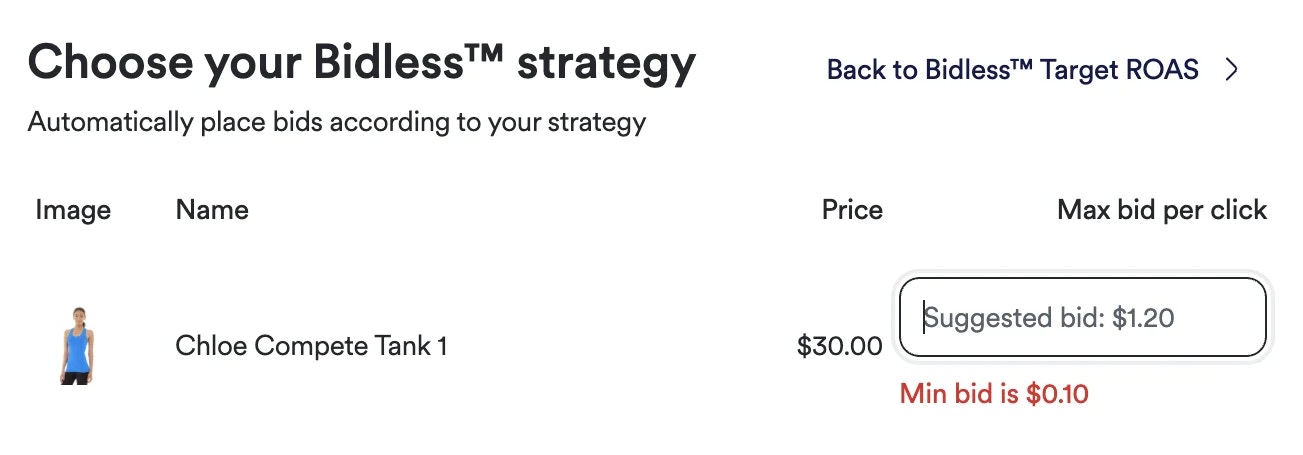
4. If the bid falls below requirements, an error displays: **"Min bid is \$\[category reserve price]"**
5. Campaign cannot proceed until bid meets minimum threshold requirements
## Error Messages
When bids don't meet requirements, advertisers will see specific guidance:
* **Below marketplace minimum**: "Min bid is \$\[marketplace reserve price]"
* **Below category minimum**: "Min bid is \$\[category reserve price]"
* **Below both**: The higher of the two minimums is displayed
***
Category reserve price validation for manual bidding is active now across all sponsored listings campaigns. Work with your Topsort representative to configure category-specific reserve prices that optimize both advertiser participation and marketplace revenue.
 ## Key Benefits
**Category-Specific Protection**:
Different product categories can have tailored reserve prices based on their market value and performance
**Flexible Validation Logic**:
Products in multiple categories only need to meet the reserve price of one category, not all
**Clear Error Messaging**:
Advertisers receive specific feedback showing the minimum required bid for their target categories
**Enhanced Revenue Control**:
Marketplaces can optimize pricing strategies at the category level for maximum monetization
## How Validation Works
### Reserve Price Hierarchy
When setting manual bids, the system validates against:
1. **Marketplace Reserve Price** - Global minimum threshold
2. **Category Reserve Prices** - Category-specific minimums
### Multi-Category Logic
For products spanning multiple categories, the bid must meet **at least one** category's reserve price requirement, providing flexibility while maintaining revenue protection.
## Updated Validation Process
1. Advertiser sets a manual bid for their sponsored listings campaign
2. System retrieves reserve prices for the marketplace and all relevant product categories
3. Bid is validated against both marketplace and category minimums
4. If the bid falls below requirements, an error displays: **"Min bid is \$\[category reserve price]"**
5. Campaign cannot proceed until bid meets minimum threshold requirements
## Error Messages
When bids don't meet requirements, advertisers will see specific guidance:
* **Below marketplace minimum**: "Min bid is \$\[marketplace reserve price]"
* **Below category minimum**: "Min bid is \$\[category reserve price]"
* **Below both**: The higher of the two minimums is displayed
***
Category reserve price validation for manual bidding is active now across all sponsored listings campaigns. Work with your Topsort representative to configure category-specific reserve prices that optimize both advertiser participation and marketplace revenue.
## Key Benefits
**Category-Specific Protection**:
Different product categories can have tailored reserve prices based on their market value and performance
**Flexible Validation Logic**:
Products in multiple categories only need to meet the reserve price of one category, not all
**Clear Error Messaging**:
Advertisers receive specific feedback showing the minimum required bid for their target categories
**Enhanced Revenue Control**:
Marketplaces can optimize pricing strategies at the category level for maximum monetization
## How Validation Works
### Reserve Price Hierarchy
When setting manual bids, the system validates against:
1. **Marketplace Reserve Price** - Global minimum threshold
2. **Category Reserve Prices** - Category-specific minimums
### Multi-Category Logic
For products spanning multiple categories, the bid must meet **at least one** category's reserve price requirement, providing flexibility while maintaining revenue protection.
## Updated Validation Process
1. Advertiser sets a manual bid for their sponsored listings campaign
2. System retrieves reserve prices for the marketplace and all relevant product categories
3. Bid is validated against both marketplace and category minimums
4. If the bid falls below requirements, an error displays: **"Min bid is \$\[category reserve price]"**
5. Campaign cannot proceed until bid meets minimum threshold requirements
## Error Messages
When bids don't meet requirements, advertisers will see specific guidance:
* **Below marketplace minimum**: "Min bid is \$\[marketplace reserve price]"
* **Below category minimum**: "Min bid is \$\[category reserve price]"
* **Below both**: The higher of the two minimums is displayed
***
Category reserve price validation for manual bidding is active now across all sponsored listings campaigns. Work with your Topsort representative to configure category-specific reserve prices that optimize both advertiser participation and marketplace revenue.