> ## Documentation Index
> Fetch the complete documentation index at: https://docs.topsort.com/llms.txt
> Use this file to discover all available pages before exploring further.
# Toppie Analytics
> Comprehensive campaign performance analytics for agencies and retailers to understand demand and optimize performance
export const ChangelogActions = () => {
return <>
;
};
August 5, 2025ToppieNew Feature
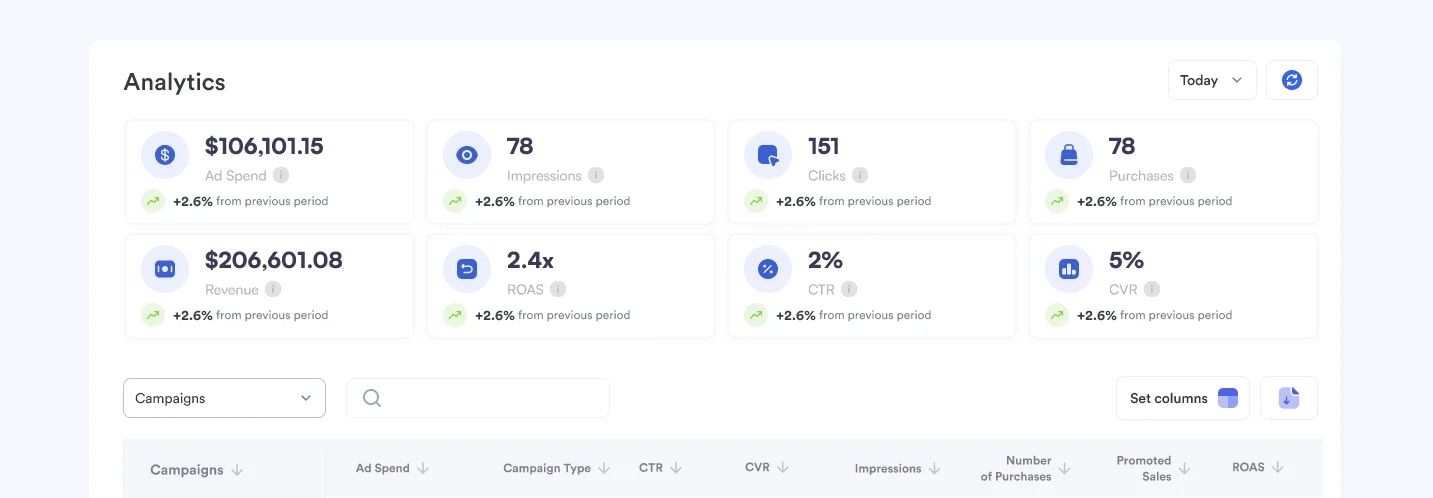
We've launched **Toppie Analytics**, providing comprehensive visibility into campaign performance for both agencies running campaigns and retailers hosting them. The new analytics suite enables data-driven optimization and builds transparency across the entire Toppie ecosystem.
## Key Benefits
**Campaign Optimization**:
Understand what's working and adjust strategies in real-time
**Budget Allocation Insights**:
Make informed decisions about spending across marketplaces and products
**Platform Transparency**:
See exactly how advertising spend translates to results
**Demand Insights**:
Make informed decisions about spending across marketplaces and products
**Reduced Manual Reporting**:
Access all performance data directly within the platform
## For Agencies and Brands
### Core Metrics Available
* Ad spend and budget utilization across retail partners
* Impressions and reach by marketplace
* Clicks and click-through rates (CTR)
* Purchases and conversion rates (CVR)
* Revenue and return on ad spend (ROAS)
### Campaign Management
1. Filter by specific brands or individual campaigns
2. Select custom date ranges for analysis
3. Choose which columns to display
4. Sort by any metric for quick insights
5. Download reports for external analysis
## For Retailers and Marketplaces
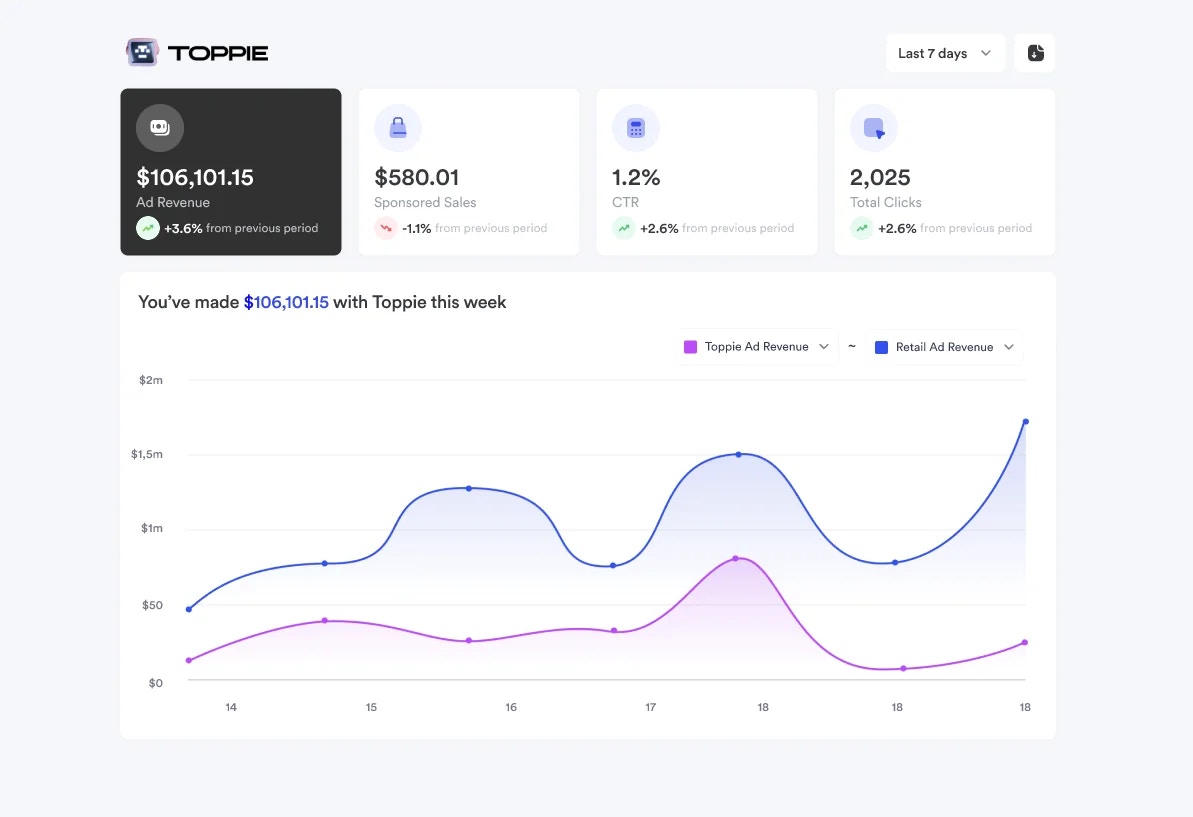
Retailers can now view performance analytics for Toppie campaigns running on their platforms, including:
* Campaign performance metrics from agency demand
* Revenue generated from Toppie campaigns
* Impression and click data for campaigns on their inventory
* Insights into which products and categories are driving the most agency demand
***
Talk to your Topsort representative about getting access to Toppie analytics feature in the [**Retail Media Platform**](https://www.topsort.com/retail-media) or in your Toppie dashboard and start exploring campaign performance data from your perspective in the ecosystem.
 ### Core Metrics Available
* Ad spend and budget utilization across retail partners
* Impressions and reach by marketplace
* Clicks and click-through rates (CTR)
* Purchases and conversion rates (CVR)
* Revenue and return on ad spend (ROAS)
### Campaign Management
1. Filter by specific brands or individual campaigns
2. Select custom date ranges for analysis
3. Choose which columns to display
4. Sort by any metric for quick insights
5. Download reports for external analysis
## For Retailers and Marketplaces
### Core Metrics Available
* Ad spend and budget utilization across retail partners
* Impressions and reach by marketplace
* Clicks and click-through rates (CTR)
* Purchases and conversion rates (CVR)
* Revenue and return on ad spend (ROAS)
### Campaign Management
1. Filter by specific brands or individual campaigns
2. Select custom date ranges for analysis
3. Choose which columns to display
4. Sort by any metric for quick insights
5. Download reports for external analysis
## For Retailers and Marketplaces
 Retailers can now view performance analytics for Toppie campaigns running on their platforms, including:
* Campaign performance metrics from agency demand
* Revenue generated from Toppie campaigns
* Impression and click data for campaigns on their inventory
* Insights into which products and categories are driving the most agency demand
***
Talk to your Topsort representative about getting access to Toppie analytics feature in the [**Retail Media Platform**](https://www.topsort.com/retail-media) or in your Toppie dashboard and start exploring campaign performance data from your perspective in the ecosystem.
Retailers can now view performance analytics for Toppie campaigns running on their platforms, including:
* Campaign performance metrics from agency demand
* Revenue generated from Toppie campaigns
* Impression and click data for campaigns on their inventory
* Insights into which products and categories are driving the most agency demand
***
Talk to your Topsort representative about getting access to Toppie analytics feature in the [**Retail Media Platform**](https://www.topsort.com/retail-media) or in your Toppie dashboard and start exploring campaign performance data from your perspective in the ecosystem.