> ## Documentation Index
> Fetch the complete documentation index at: https://docs.topsort.com/llms.txt
> Use this file to discover all available pages before exploring further.
# Toppie Catalog Tab
> Global Product Catalog for unified product management across the entire Topsort Network
export const ChangelogActions = () => {
return <>
;
};
August 27, 2025ToppieNew Feature
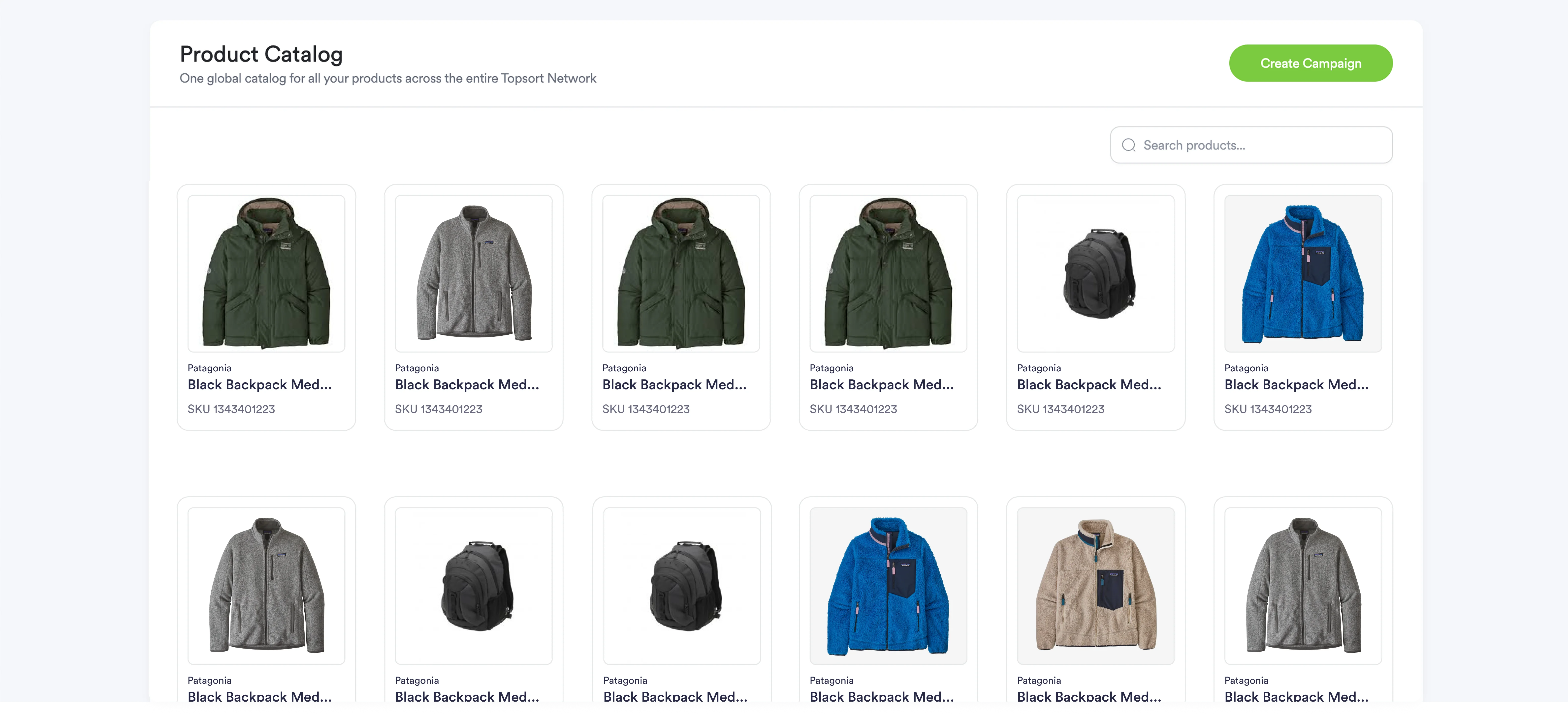
We've launched the **Toppie Catalog Tab**, featuring a Global Product Catalog that provides centralized product management across all retail partners. This unified catalog eliminates SKU complexity and ensures consistent product data throughout the Topsort Network, streamlining campaign creation and performance tracking.
## Global Product Catalog Features
### Centralized Product Database
The Global Product Catalog creates a single source of truth for your product data, automatically managing the complexity of different retailer identifiers and catalog structures.
### AI-Powered SKU Mapping
* **Automatic Product Matching** - AI connects your products to equivalent items across retail partner catalogs
* **Cross-Retailer Consistency** - Same product targeting logic works across all retail partners
* **Validation Workflow** - Review and confirm mappings to ensure accuracy
## Catalog Management Options
### Upload Methods
* **CSV Upload** - Standard product data files with required fields
* **API Integration** - Real-time catalog synchronization
* **Manual Entry** - Direct product addition through the interface
### Required Product Information
* Product Name and SKU/Product ID
* Category and Brand classification
* Product descriptions and image URLs
* Optional pricing information for enhanced mapping
## Using the Catalog Tab
1. **Upload Product Catalog** - Import your master catalog via CSV, API, or manual entry
2. **Review AI Mapping** - Confirm automatic product matches across retail partner catalogs
3. **Validate Mappings** - Ensure product connections are accurate for all retailers
4. **Create Campaigns** - Select products from your unified catalog for any campaign type
5. **Monitor Performance** - Track how the same products perform across different retail environments
### Catalog Updates and Maintenance
* **Scheduled Sync** - Automatic updates via API integration
* **Manual Updates** - Replace or append catalog data through CSV uploads
* **Individual Product Edits** - Modify specific product details directly in the interface
### Campaign Integration Benefits
* **Multi-Retailer Campaigns** - Consistent targeting across all retail partners
* **Automatic Retail Mapping** - System handles SKU differences transparently
* **Unified Attribution** - Proper product-level tracking regardless of retailer-specific identifiers
* **Simplified Product Selection** - No need to map products individually for each retailer
***
The Toppie Catalog Tab is now available in your Toppie dashboard. This Global Product Catalog foundation enables seamless campaign management and unified performance tracking across the entire Topsort Network.
 ## Global Product Catalog Features
### Centralized Product Database
The Global Product Catalog creates a single source of truth for your product data, automatically managing the complexity of different retailer identifiers and catalog structures.
### AI-Powered SKU Mapping
* **Automatic Product Matching** - AI connects your products to equivalent items across retail partner catalogs
* **Cross-Retailer Consistency** - Same product targeting logic works across all retail partners
* **Validation Workflow** - Review and confirm mappings to ensure accuracy
## Catalog Management Options
### Upload Methods
* **CSV Upload** - Standard product data files with required fields
* **API Integration** - Real-time catalog synchronization
* **Manual Entry** - Direct product addition through the interface
### Required Product Information
* Product Name and SKU/Product ID
* Category and Brand classification
* Product descriptions and image URLs
* Optional pricing information for enhanced mapping
## Using the Catalog Tab
1. **Upload Product Catalog** - Import your master catalog via CSV, API, or manual entry
2. **Review AI Mapping** - Confirm automatic product matches across retail partner catalogs
3. **Validate Mappings** - Ensure product connections are accurate for all retailers
4. **Create Campaigns** - Select products from your unified catalog for any campaign type
5. **Monitor Performance** - Track how the same products perform across different retail environments
### Catalog Updates and Maintenance
* **Scheduled Sync** - Automatic updates via API integration
* **Manual Updates** - Replace or append catalog data through CSV uploads
* **Individual Product Edits** - Modify specific product details directly in the interface
### Campaign Integration Benefits
* **Multi-Retailer Campaigns** - Consistent targeting across all retail partners
* **Automatic Retail Mapping** - System handles SKU differences transparently
* **Unified Attribution** - Proper product-level tracking regardless of retailer-specific identifiers
* **Simplified Product Selection** - No need to map products individually for each retailer
***
The Toppie Catalog Tab is now available in your Toppie dashboard. This Global Product Catalog foundation enables seamless campaign management and unified performance tracking across the entire Topsort Network.
## Global Product Catalog Features
### Centralized Product Database
The Global Product Catalog creates a single source of truth for your product data, automatically managing the complexity of different retailer identifiers and catalog structures.
### AI-Powered SKU Mapping
* **Automatic Product Matching** - AI connects your products to equivalent items across retail partner catalogs
* **Cross-Retailer Consistency** - Same product targeting logic works across all retail partners
* **Validation Workflow** - Review and confirm mappings to ensure accuracy
## Catalog Management Options
### Upload Methods
* **CSV Upload** - Standard product data files with required fields
* **API Integration** - Real-time catalog synchronization
* **Manual Entry** - Direct product addition through the interface
### Required Product Information
* Product Name and SKU/Product ID
* Category and Brand classification
* Product descriptions and image URLs
* Optional pricing information for enhanced mapping
## Using the Catalog Tab
1. **Upload Product Catalog** - Import your master catalog via CSV, API, or manual entry
2. **Review AI Mapping** - Confirm automatic product matches across retail partner catalogs
3. **Validate Mappings** - Ensure product connections are accurate for all retailers
4. **Create Campaigns** - Select products from your unified catalog for any campaign type
5. **Monitor Performance** - Track how the same products perform across different retail environments
### Catalog Updates and Maintenance
* **Scheduled Sync** - Automatic updates via API integration
* **Manual Updates** - Replace or append catalog data through CSV uploads
* **Individual Product Edits** - Modify specific product details directly in the interface
### Campaign Integration Benefits
* **Multi-Retailer Campaigns** - Consistent targeting across all retail partners
* **Automatic Retail Mapping** - System handles SKU differences transparently
* **Unified Attribution** - Proper product-level tracking regardless of retailer-specific identifiers
* **Simplified Product Selection** - No need to map products individually for each retailer
***
The Toppie Catalog Tab is now available in your Toppie dashboard. This Global Product Catalog foundation enables seamless campaign management and unified performance tracking across the entire Topsort Network.