> ## Documentation Index
> Fetch the complete documentation index at: https://docs.topsort.com/llms.txt
> Use this file to discover all available pages before exploring further.
# Sponsored Listings Forecasting
> See expected campaign performance with forecasting insights during campaign creation
export const ChangelogActions = () => {
return <>
;
};
September 10, 2025Ad PlatformNew Feature
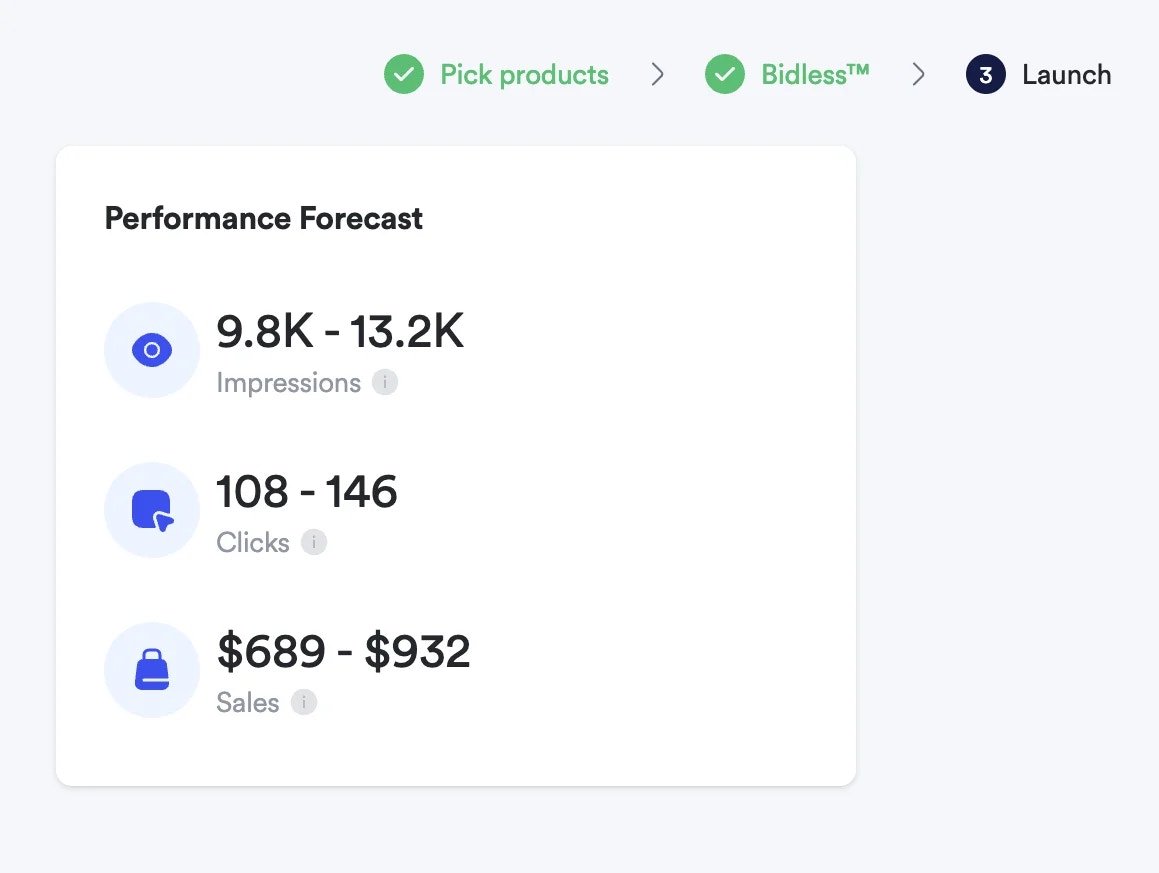
We've introduced **Sponsored Listings Forecasting** to help advertisers make informed campaign decisions by showing expected performance metrics before launch. This feature integrates directly into the campaign creation flow, providing data-driven insights on impressions, clicks, and sales projections based on your campaign configuration.
## Key Benefits
**Data-Driven Planning**:
See projected impressions, clicks, and sales before launching campaigns
**Budget Optimization**:
Test different budget amounts and ROAS targets to maximize campaign
performance
**Configuration Testing**:
Compare different campaign setups to find the most effective approach
**Timeline Insights**:
View daily and total projections, with monthly aggregation for longer
campaigns
**Informed Decision Making**:
Launch campaigns with confidence based on performance forecasts
## How Forecasting Works
The forecasting engine analyzes your campaign parameters to provide realistic performance projections:
### Required Campaign Parameters
* **Selected Products** - Which products you're promoting
* **Target ROAS** - Your desired return on ad spend (**BIDLESS™** strategy)
* **Budget Configuration** - Amount and budget type (daily/total)
* **Campaign Duration** - Start and end dates
* **Targeting Parameters** - Selected triggers including target ID and type
### Forecasted Metrics
* **Daily Impressions** - Expected ad views per day
* **Daily Clicks** - Projected click-through performance
* **Daily Sales** - Anticipated conversion volume
## Using Campaign Forecasting
1. **Configure Campaign Parameters** - Set up your campaign with products, budget, ROAS target, and targeting options
2. **Generate Forecast** - The system automatically calculates expected performance based on your configuration
3. **Review Projections** - Analyze daily and total metrics including impressions, clicks, and sales
4. **Test Configurations** - Adjust parameters to see how changes impact projected performance
5. **Optimize Setup** - Fine-tune your campaign based on forecasting insights before launch
### Campaign Duration Considerations
* **Campaigns up to 1 month** - Daily metrics shown for the entire duration
* **Campaigns over 1 month** - Monthly aggregated metrics for easier analysis
* **Flexible Testing** - Modify dates, budgets, and targeting to compare different scenarios
***
Sponsored Listings Forecasting is now available in the sponsored listings campaign creation flow. Use these insights to optimize your campaign strategy and launch with confidence in your expected performance outcomes.
 ## Key Benefits
**Data-Driven Planning**:
See projected impressions, clicks, and sales before launching campaigns
**Budget Optimization**:
Test different budget amounts and ROAS targets to maximize campaign
performance
**Configuration Testing**:
Compare different campaign setups to find the most effective approach
**Timeline Insights**:
View daily and total projections, with monthly aggregation for longer
campaigns
**Informed Decision Making**:
Launch campaigns with confidence based on performance forecasts
## How Forecasting Works
The forecasting engine analyzes your campaign parameters to provide realistic performance projections:
### Required Campaign Parameters
* **Selected Products** - Which products you're promoting
* **Target ROAS** - Your desired return on ad spend (**BIDLESS™** strategy)
* **Budget Configuration** - Amount and budget type (daily/total)
* **Campaign Duration** - Start and end dates
* **Targeting Parameters** - Selected triggers including target ID and type
### Forecasted Metrics
* **Daily Impressions** - Expected ad views per day
* **Daily Clicks** - Projected click-through performance
* **Daily Sales** - Anticipated conversion volume
## Using Campaign Forecasting
1. **Configure Campaign Parameters** - Set up your campaign with products, budget, ROAS target, and targeting options
2. **Generate Forecast** - The system automatically calculates expected performance based on your configuration
3. **Review Projections** - Analyze daily and total metrics including impressions, clicks, and sales
4. **Test Configurations** - Adjust parameters to see how changes impact projected performance
5. **Optimize Setup** - Fine-tune your campaign based on forecasting insights before launch
### Campaign Duration Considerations
* **Campaigns up to 1 month** - Daily metrics shown for the entire duration
* **Campaigns over 1 month** - Monthly aggregated metrics for easier analysis
* **Flexible Testing** - Modify dates, budgets, and targeting to compare different scenarios
***
Sponsored Listings Forecasting is now available in the sponsored listings campaign creation flow. Use these insights to optimize your campaign strategy and launch with confidence in your expected performance outcomes.
## Key Benefits
**Data-Driven Planning**:
See projected impressions, clicks, and sales before launching campaigns
**Budget Optimization**:
Test different budget amounts and ROAS targets to maximize campaign
performance
**Configuration Testing**:
Compare different campaign setups to find the most effective approach
**Timeline Insights**:
View daily and total projections, with monthly aggregation for longer
campaigns
**Informed Decision Making**:
Launch campaigns with confidence based on performance forecasts
## How Forecasting Works
The forecasting engine analyzes your campaign parameters to provide realistic performance projections:
### Required Campaign Parameters
* **Selected Products** - Which products you're promoting
* **Target ROAS** - Your desired return on ad spend (**BIDLESS™** strategy)
* **Budget Configuration** - Amount and budget type (daily/total)
* **Campaign Duration** - Start and end dates
* **Targeting Parameters** - Selected triggers including target ID and type
### Forecasted Metrics
* **Daily Impressions** - Expected ad views per day
* **Daily Clicks** - Projected click-through performance
* **Daily Sales** - Anticipated conversion volume
## Using Campaign Forecasting
1. **Configure Campaign Parameters** - Set up your campaign with products, budget, ROAS target, and targeting options
2. **Generate Forecast** - The system automatically calculates expected performance based on your configuration
3. **Review Projections** - Analyze daily and total metrics including impressions, clicks, and sales
4. **Test Configurations** - Adjust parameters to see how changes impact projected performance
5. **Optimize Setup** - Fine-tune your campaign based on forecasting insights before launch
### Campaign Duration Considerations
* **Campaigns up to 1 month** - Daily metrics shown for the entire duration
* **Campaigns over 1 month** - Monthly aggregated metrics for easier analysis
* **Flexible Testing** - Modify dates, budgets, and targeting to compare different scenarios
***
Sponsored Listings Forecasting is now available in the sponsored listings campaign creation flow. Use these insights to optimize your campaign strategy and launch with confidence in your expected performance outcomes.