> ## Documentation Index
> Fetch the complete documentation index at: https://docs.topsort.com/llms.txt
> Use this file to discover all available pages before exploring further.
# Topsort MCP Servers
> Connect AI assistants to Topsort's documentation and analytics platform
export const ChangelogActions = () => {
return <>
;
};
October 22, 2025
Ad Server
New Feature
We've added the **Topsort MCP Server** that connects AI assistants directly to Topsort's complete API documentation. This integration enables developers to access accurate, up-to-date information about our APIs without leaving their development environment, making integration faster and reducing context switching.
The MCP server works with popular AI development tools including **GitHub Copilot** in **VS Code**, **ChatGPT**, **Claude**, **Cursor**, **Windsurf**, and other MCP-compatible clients.
Developers can now ask questions about API endpoints, authentication methods, request schemas, and implementation patterns directly within their workflow, with responses drawing from the latest Topsort documentation.
## Key Benefits
**In-Context Documentation**:
Access complete API documentation directly from your IDE or AI assistant
without browser switching
**Accurate Code Generation**:
AI assistants generate more accurate integration code using current API
schemas and examples
**Faster Troubleshooting**:
Quickly diagnose integration issues with instant access to error codes and
API specifications
**Always Current**:
Documentation stays synchronized automatically without manual updates or
version checking
## Developer Experience
The MCP server provides read-only access to Topsort's API documentation through a standardized protocol. When configured, developers can ask their AI assistant questions like:
* "How do I create a banner campaign?"
* "What are the required fields for the auctions API?"
* "How do I authenticate with the Topsort API?"
* "What's the request format for the bidding endpoint?"
AI assistants respond with answers drawn directly from the documentation, complete with code examples and implementation guidance.
### Quick Setup Across Clients
Configuration is straightforward and takes just a few minutes:
* **GitHub Copilot in VS Code** - Add a simple JSON configuration to your settings
* **ChatGPT Plus/Team** - Add the server through Connections settings
* **Claude Desktop** - Configure through the MCP settings panel
* **Other clients** - Follow standard MCP configuration patterns
Each setup provides immediate access to the full documentation within your preferred development environment.
***
## Two MCP Servers
Topsort now offers two MCP servers for different use cases:
| Server | URL | Purpose |
| ----------------------------------- | --------------------------------------- | ----------------------------------------------------- |
| [Documentation MCP](/api/mcp) | `https://docs.topsort.com/mcp` | Access API docs, schemas, and integration guidance |
| [Analytics MCP](/api/mcp-analytics) | `https://mcp-server.api.topsort.ai/mcp` | Real-time analytics, campaign metrics, and benchmarks |
The Documentation MCP is publicly accessible, while the Analytics MCP requires authentication. Contact your Topsort sales representative for Analytics MCP access.
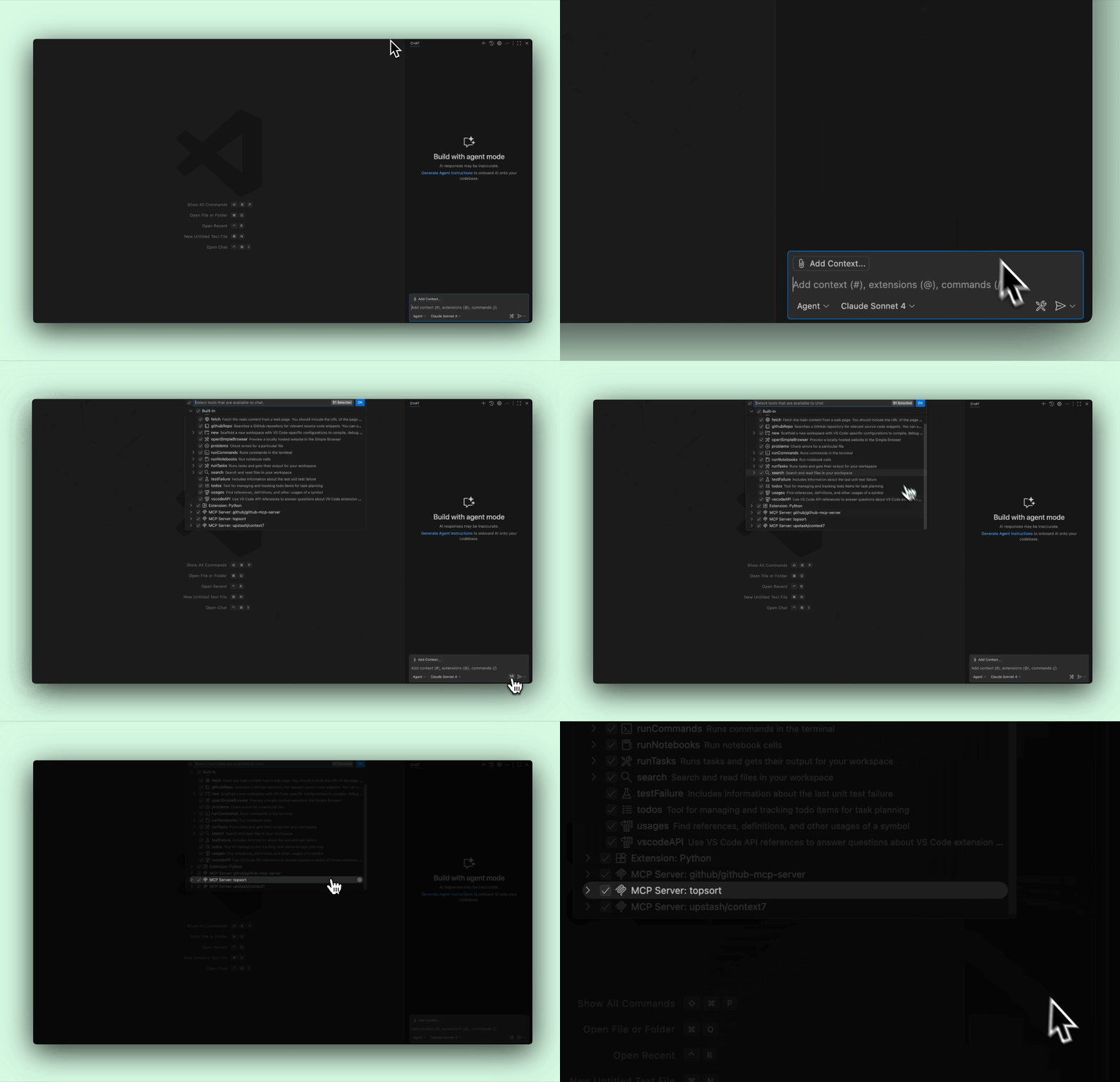 The MCP server works with popular AI development tools including **GitHub Copilot** in **VS Code**, **ChatGPT**, **Claude**, **Cursor**, **Windsurf**, and other MCP-compatible clients.
Developers can now ask questions about API endpoints, authentication methods, request schemas, and implementation patterns directly within their workflow, with responses drawing from the latest Topsort documentation.
## Key Benefits
**In-Context Documentation**:
Access complete API documentation directly from your IDE or AI assistant
without browser switching
**Accurate Code Generation**:
AI assistants generate more accurate integration code using current API
schemas and examples
**Faster Troubleshooting**:
Quickly diagnose integration issues with instant access to error codes and
API specifications
**Always Current**:
Documentation stays synchronized automatically without manual updates or
version checking
## Developer Experience
The MCP server provides read-only access to Topsort's API documentation through a standardized protocol. When configured, developers can ask their AI assistant questions like:
* "How do I create a banner campaign?"
* "What are the required fields for the auctions API?"
* "How do I authenticate with the Topsort API?"
* "What's the request format for the bidding endpoint?"
AI assistants respond with answers drawn directly from the documentation, complete with code examples and implementation guidance.
### Quick Setup Across Clients
Configuration is straightforward and takes just a few minutes:
* **GitHub Copilot in VS Code** - Add a simple JSON configuration to your settings
* **ChatGPT Plus/Team** - Add the server through Connections settings
* **Claude Desktop** - Configure through the MCP settings panel
* **Other clients** - Follow standard MCP configuration patterns
Each setup provides immediate access to the full documentation within your preferred development environment.
***
## Two MCP Servers
Topsort now offers two MCP servers for different use cases:
| Server | URL | Purpose |
| ----------------------------------- | --------------------------------------- | ----------------------------------------------------- |
| [Documentation MCP](/api/mcp) | `https://docs.topsort.com/mcp` | Access API docs, schemas, and integration guidance |
| [Analytics MCP](/api/mcp-analytics) | `https://mcp-server.api.topsort.ai/mcp` | Real-time analytics, campaign metrics, and benchmarks |
The Documentation MCP is publicly accessible, while the Analytics MCP requires authentication. Contact your Topsort sales representative for Analytics MCP access.
The MCP server works with popular AI development tools including **GitHub Copilot** in **VS Code**, **ChatGPT**, **Claude**, **Cursor**, **Windsurf**, and other MCP-compatible clients.
Developers can now ask questions about API endpoints, authentication methods, request schemas, and implementation patterns directly within their workflow, with responses drawing from the latest Topsort documentation.
## Key Benefits
**In-Context Documentation**:
Access complete API documentation directly from your IDE or AI assistant
without browser switching
**Accurate Code Generation**:
AI assistants generate more accurate integration code using current API
schemas and examples
**Faster Troubleshooting**:
Quickly diagnose integration issues with instant access to error codes and
API specifications
**Always Current**:
Documentation stays synchronized automatically without manual updates or
version checking
## Developer Experience
The MCP server provides read-only access to Topsort's API documentation through a standardized protocol. When configured, developers can ask their AI assistant questions like:
* "How do I create a banner campaign?"
* "What are the required fields for the auctions API?"
* "How do I authenticate with the Topsort API?"
* "What's the request format for the bidding endpoint?"
AI assistants respond with answers drawn directly from the documentation, complete with code examples and implementation guidance.
### Quick Setup Across Clients
Configuration is straightforward and takes just a few minutes:
* **GitHub Copilot in VS Code** - Add a simple JSON configuration to your settings
* **ChatGPT Plus/Team** - Add the server through Connections settings
* **Claude Desktop** - Configure through the MCP settings panel
* **Other clients** - Follow standard MCP configuration patterns
Each setup provides immediate access to the full documentation within your preferred development environment.
***
## Two MCP Servers
Topsort now offers two MCP servers for different use cases:
| Server | URL | Purpose |
| ----------------------------------- | --------------------------------------- | ----------------------------------------------------- |
| [Documentation MCP](/api/mcp) | `https://docs.topsort.com/mcp` | Access API docs, schemas, and integration guidance |
| [Analytics MCP](/api/mcp-analytics) | `https://mcp-server.api.topsort.ai/mcp` | Real-time analytics, campaign metrics, and benchmarks |
The Documentation MCP is publicly accessible, while the Analytics MCP requires authentication. Contact your Topsort sales representative for Analytics MCP access.