> ## Documentation Index
> Fetch the complete documentation index at: https://docs.topsort.com/llms.txt
> Use this file to discover all available pages before exploring further.
# Frequency Cap with Clicks
> Set frequency caps based on clicks or impressions for Banner and Video ads
export const ChangelogActions = () => {
return <>
;
};
December 22, 2025
Ad Platform
New Feature
**Why It's Important**
Advertisers now have more granular control over ad exposure. Previously, frequency caps could only be set based on impressions. Now you can choose between clicks or impressions, giving teams greater flexibility to balance reach, engagement, and efficiency.
The frequency cap feature now supports both clicks and impressions as cap types, available for Banner and Video ad campaigns.
## What's New
**Click-based frequency capping**: Set limits based on how many times a user clicks on your ad, not just how many times they see it. This is ideal for campaigns focused on engagement metrics.
**Flexible cap selection**: Choose between "Impressions" or "Clicks" in the frequency cap dropdown when configuring your campaign settings.
## Who This Helps
**Performance-focused advertisers**: If your campaign goals are centered around clicks and engagement rather than brand awareness, click-based caps let you optimize for what matters most.
**Teams managing ad fatigue**: Balance user experience by capping based on actual engagement, ensuring users aren't overwhelmed while still maximizing campaign reach.
## Availability
This feature is available for:
* [Banner ads](/en/knowledge-base/ad-platform/banners/banner-ads-campaigns/)
* [Video ads](/en/knowledge-base/ad-platform/video-ads/)
🎄 **Happy Holidays from the Topsort team!** 🎄
Wishing you joy and celebration wherever you are in the world — Merry Christmas, Happy Hanukkah, Joyeux Noël, Feliz Navidad, Frohe Weihnachten, Buon Natale, メリークリスマス, 圣诞快乐, Счастливого Рождества, and a wonderful holiday season to all! 🌍✨
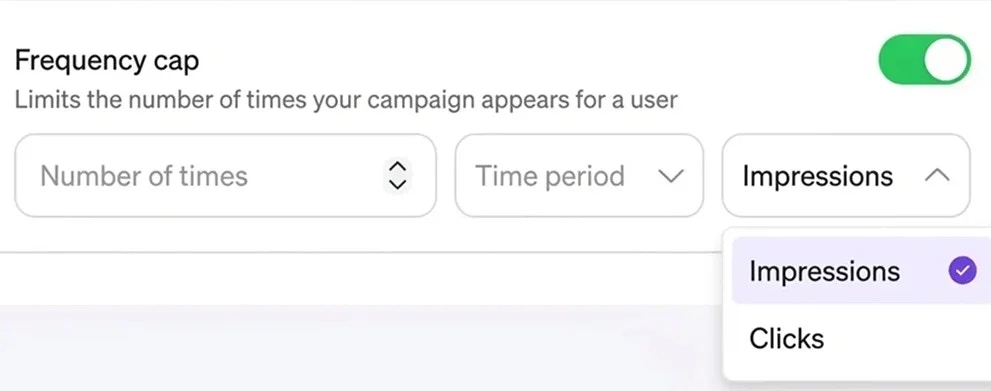 The frequency cap feature now supports both clicks and impressions as cap types, available for Banner and Video ad campaigns.
## What's New
**Click-based frequency capping**: Set limits based on how many times a user clicks on your ad, not just how many times they see it. This is ideal for campaigns focused on engagement metrics.
**Flexible cap selection**: Choose between "Impressions" or "Clicks" in the frequency cap dropdown when configuring your campaign settings.
## Who This Helps
**Performance-focused advertisers**: If your campaign goals are centered around clicks and engagement rather than brand awareness, click-based caps let you optimize for what matters most.
**Teams managing ad fatigue**: Balance user experience by capping based on actual engagement, ensuring users aren't overwhelmed while still maximizing campaign reach.
## Availability
This feature is available for:
* [Banner ads](/en/knowledge-base/ad-platform/banners/banner-ads-campaigns/)
* [Video ads](/en/knowledge-base/ad-platform/video-ads/)
🎄 **Happy Holidays from the Topsort team!** 🎄
Wishing you joy and celebration wherever you are in the world — Merry Christmas, Happy Hanukkah, Joyeux Noël, Feliz Navidad, Frohe Weihnachten, Buon Natale, メリークリスマス, 圣诞快乐, Счастливого Рождества, and a wonderful holiday season to all! 🌍✨
The frequency cap feature now supports both clicks and impressions as cap types, available for Banner and Video ad campaigns.
## What's New
**Click-based frequency capping**: Set limits based on how many times a user clicks on your ad, not just how many times they see it. This is ideal for campaigns focused on engagement metrics.
**Flexible cap selection**: Choose between "Impressions" or "Clicks" in the frequency cap dropdown when configuring your campaign settings.
## Who This Helps
**Performance-focused advertisers**: If your campaign goals are centered around clicks and engagement rather than brand awareness, click-based caps let you optimize for what matters most.
**Teams managing ad fatigue**: Balance user experience by capping based on actual engagement, ensuring users aren't overwhelmed while still maximizing campaign reach.
## Availability
This feature is available for:
* [Banner ads](/en/knowledge-base/ad-platform/banners/banner-ads-campaigns/)
* [Video ads](/en/knowledge-base/ad-platform/video-ads/)
🎄 **Happy Holidays from the Topsort team!** 🎄
Wishing you joy and celebration wherever you are in the world — Merry Christmas, Happy Hanukkah, Joyeux Noël, Feliz Navidad, Frohe Weihnachten, Buon Natale, メリークリスマス, 圣诞快乐, Счастливого Рождества, and a wonderful holiday season to all! 🌍✨