> ## Documentation Index
> Fetch the complete documentation index at: https://docs.topsort.com/llms.txt
> Use this file to discover all available pages before exploring further.
# Improve security and support
> We are excited to announce key updates to the Topsort platform, focusing on enhanced security and an improved customer support experience. These updates are designed to give marketplace users more control over access to information and make it easier for clients to find the help they need.
export const ChangelogActions = () => {
return <>
;
};
October 2, 2024Ad PlatformImprovement
# Roles and Permissions
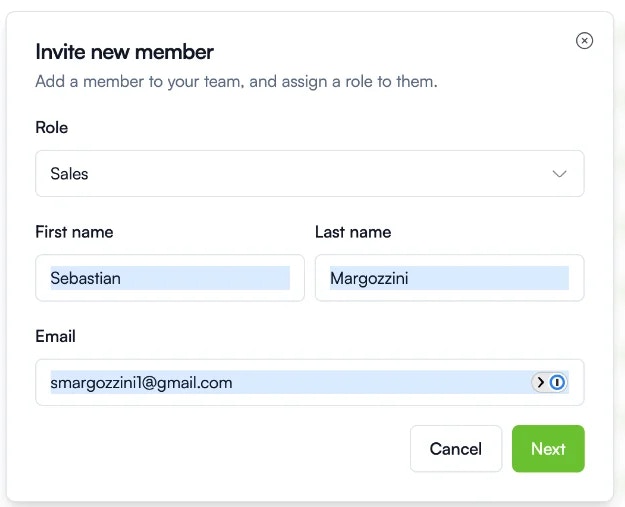
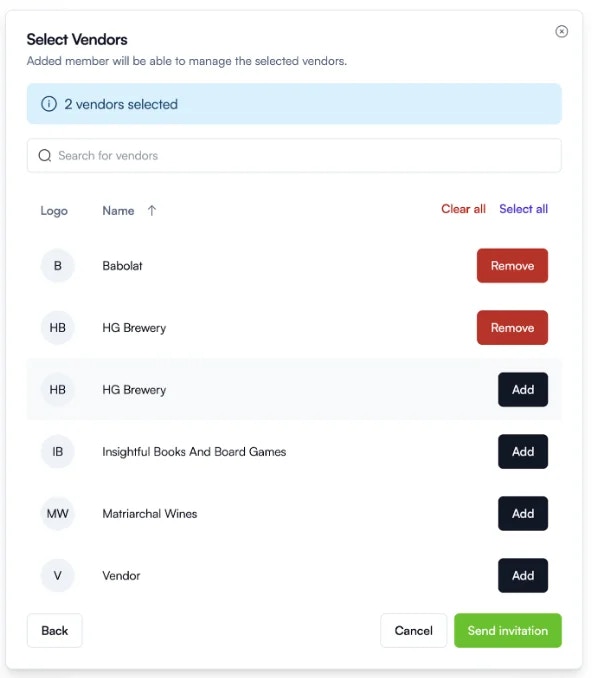
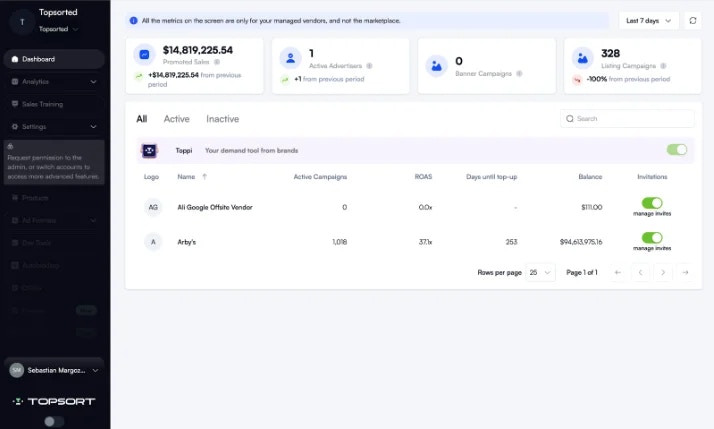
With the introduction of Sales user roles, marketplace admins now have more control over access to sensitive information. Admin users can invite Sales users who will only have access to specific vendors. These Sales users can manage campaigns, view metrics, and top up wallets for their assigned vendors, without being able to access aggregated marketplace data, manage users, or modify marketplace settings.
## Key benefits
* Privacy: Limit access to resources for different users within the platform, maintaining data security.
* Simplicity: Ensure users only see relevant views and options, creating a more streamlined experience.
## How it works
A new Sales role has been introduced for marketplace users.
In settings, Admin users can invite Sales users and assign them to specific vendors.
This sales users can:
* Manage Campaigns: Create, read, update, and delete campaigns for assigned vendors.
* Access Vendor-Specific Analytics: View dashboards and metrics for selected vendors only.
* Top Up Vendor Wallets: Manage finances for the vendors they are assigned to.
They have a limited view of the platform.
# Topsupport
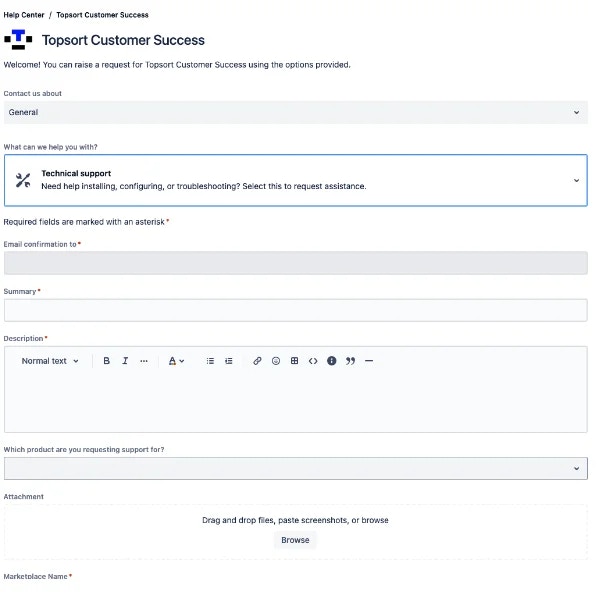
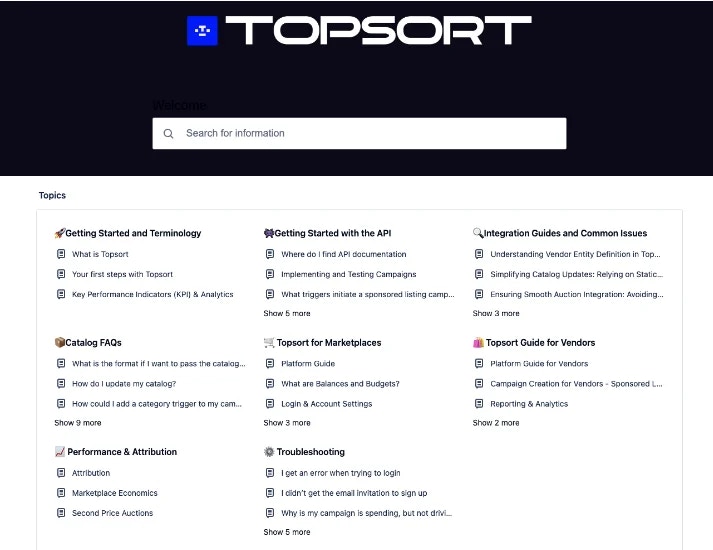
Topsort has prioritized improving the customer support experience. By integrating Jira’s help center service, a knowledge base, and AI tools, we’ve built a comprehensive Topsupport help center to better serve our clients and streamline issue resolution.
With this the customer experience is enhanced, and clients can find the help they need faster and more efficiently. A well-defined help center, FAQs, and AI integrations enable faster and more effective resolution of client issues.
## How it works
You can now access the Topsupport Help Center through the following link:
[https://help.center.topsort.com/servicedesk/customer/portals](https://help.center.topsort.com/servicedesk/customer/portals)
From here, you can:
* Navigate the Knowledge Base: Browse through Topsort's knowledge base to find answers to frequently asked questions.
* Request Help: If your question isn't answered by the knowledge base, contact the customer success team for general assistance or to request a demo.
 This sales users can:
* Manage Campaigns: Create, read, update, and delete campaigns for assigned vendors.
* Access Vendor-Specific Analytics: View dashboards and metrics for selected vendors only.
* Top Up Vendor Wallets: Manage finances for the vendors they are assigned to.
They have a limited view of the platform.
This sales users can:
* Manage Campaigns: Create, read, update, and delete campaigns for assigned vendors.
* Access Vendor-Specific Analytics: View dashboards and metrics for selected vendors only.
* Top Up Vendor Wallets: Manage finances for the vendors they are assigned to.
They have a limited view of the platform.
 # Topsupport
Topsort has prioritized improving the customer support experience. By integrating Jira’s help center service, a knowledge base, and AI tools, we’ve built a comprehensive Topsupport help center to better serve our clients and streamline issue resolution.
With this the customer experience is enhanced, and clients can find the help they need faster and more efficiently. A well-defined help center, FAQs, and AI integrations enable faster and more effective resolution of client issues.
## How it works
You can now access the Topsupport Help Center through the following link:
[https://help.center.topsort.com/servicedesk/customer/portals](https://help.center.topsort.com/servicedesk/customer/portals)
From here, you can:
* Navigate the Knowledge Base: Browse through Topsort's knowledge base to find answers to frequently asked questions.
# Topsupport
Topsort has prioritized improving the customer support experience. By integrating Jira’s help center service, a knowledge base, and AI tools, we’ve built a comprehensive Topsupport help center to better serve our clients and streamline issue resolution.
With this the customer experience is enhanced, and clients can find the help they need faster and more efficiently. A well-defined help center, FAQs, and AI integrations enable faster and more effective resolution of client issues.
## How it works
You can now access the Topsupport Help Center through the following link:
[https://help.center.topsort.com/servicedesk/customer/portals](https://help.center.topsort.com/servicedesk/customer/portals)
From here, you can:
* Navigate the Knowledge Base: Browse through Topsort's knowledge base to find answers to frequently asked questions.
 * Request Help: If your question isn't answered by the knowledge base, contact the customer success team for general assistance or to request a demo.