> ## Documentation Index
> Fetch the complete documentation index at: https://docs.topsort.com/llms.txt
> Use this file to discover all available pages before exploring further.
# New: Toppie
> Toppie serves as a new investment channel for agencies and brands, which enables them to reach several marketplaces from one place. We are super excited not only to help agencies and brands optimize their operations but also Topsort’s retailers by giving them the opportunity to access new demand and gain additional ad revenue.
export const ChangelogActions = () => {
return <>
;
};
October 2, 2024Ad PlatformNew Feature
With Toppie, agencies can now manage all of their retail media marketing efforts in one place, eliminating the need to use multiple platforms. By leveraging the Topsort Ad Network, they can expand their reach to a wider audience across multiple online marketplaces, saving time and resources.
## Benefits
* Centralized Management: Advertise products across the entire Topsort Ad Network in just a few steps.
* Efficient Campaign Management: Handle all retail media marketing campaigns from a single, user-friendly platform.
* Expanded Reach: Access Topsort's network of retailers and marketplaces to grow marketing efforts.
* Cost Savings: Reduce expenses by avoiding the complexity of managing separate platforms for each marketplace.
* Boost for Marketplaces: Marketplaces can benefit from increased ad spending by activating this feature.
## Overview
### Campaigns:
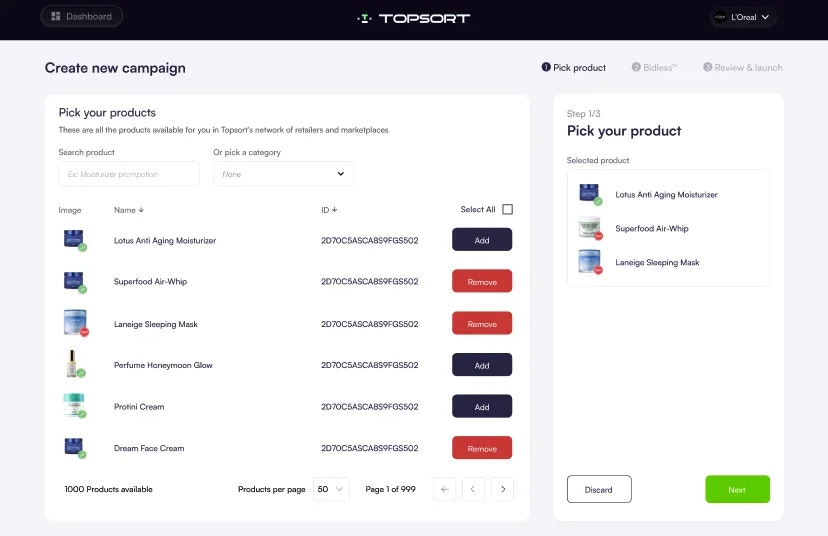
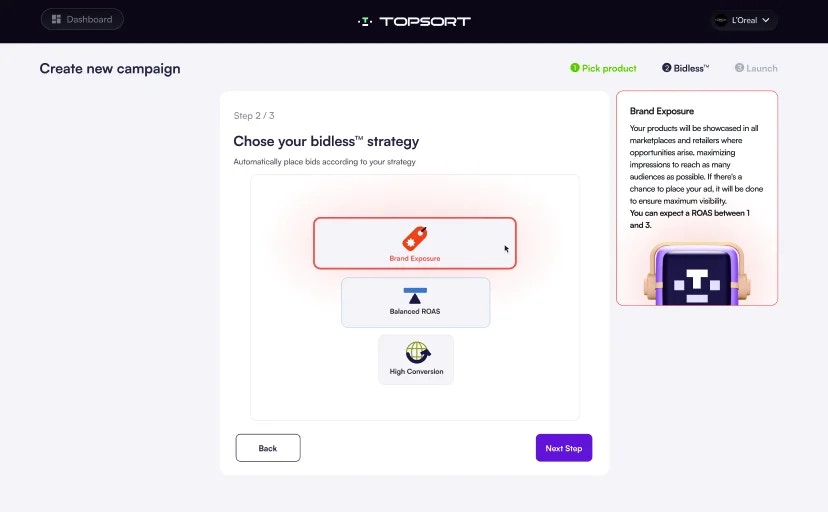
Agencies and brands can create and manage Sponsored Listing campaigns across the Topsort network of marketplaces and retailers. Campaigns can be created in just 3 simple steps:
* Select Products: Choose from the available inventory in participating marketplaces.
* Autobidding: Balance between maximizing reach and optimizing for ROAS (Return on Ad Spend).
* Set Budget: Define the budget, and the campaign is ready to launch.
### Marketplaces:
Marketplaces now have the option to enable agency and brand campaigns from their dashboard, allowing brands to advertise products on their site. This feature can be activated or deactivated at any time, giving marketplaces full control.
### Reporting
Agencies will gain access to detailed reporting on all past and ongoing campaigns, including:
* Performance Metrics: ROAS, CPC (Cost per Click), total impressions, clicks, and attributed sales at both the campaign and product level.
* Real-Time Monitoring: Track performance across all marketplaces and make adjustments as needed.
Marketplaces will also see the impact of the agencies' campaigns within their own dashboard.
 * Autobidding: Balance between maximizing reach and optimizing for ROAS (Return on Ad Spend).
 * Set Budget: Define the budget, and the campaign is ready to launch.
 ### Marketplaces:
Marketplaces now have the option to enable agency and brand campaigns from their dashboard, allowing brands to advertise products on their site. This feature can be activated or deactivated at any time, giving marketplaces full control.
### Reporting
Agencies will gain access to detailed reporting on all past and ongoing campaigns, including:
* Performance Metrics: ROAS, CPC (Cost per Click), total impressions, clicks, and attributed sales at both the campaign and product level.
* Real-Time Monitoring: Track performance across all marketplaces and make adjustments as needed.
### Marketplaces:
Marketplaces now have the option to enable agency and brand campaigns from their dashboard, allowing brands to advertise products on their site. This feature can be activated or deactivated at any time, giving marketplaces full control.
### Reporting
Agencies will gain access to detailed reporting on all past and ongoing campaigns, including:
* Performance Metrics: ROAS, CPC (Cost per Click), total impressions, clicks, and attributed sales at both the campaign and product level.
* Real-Time Monitoring: Track performance across all marketplaces and make adjustments as needed.
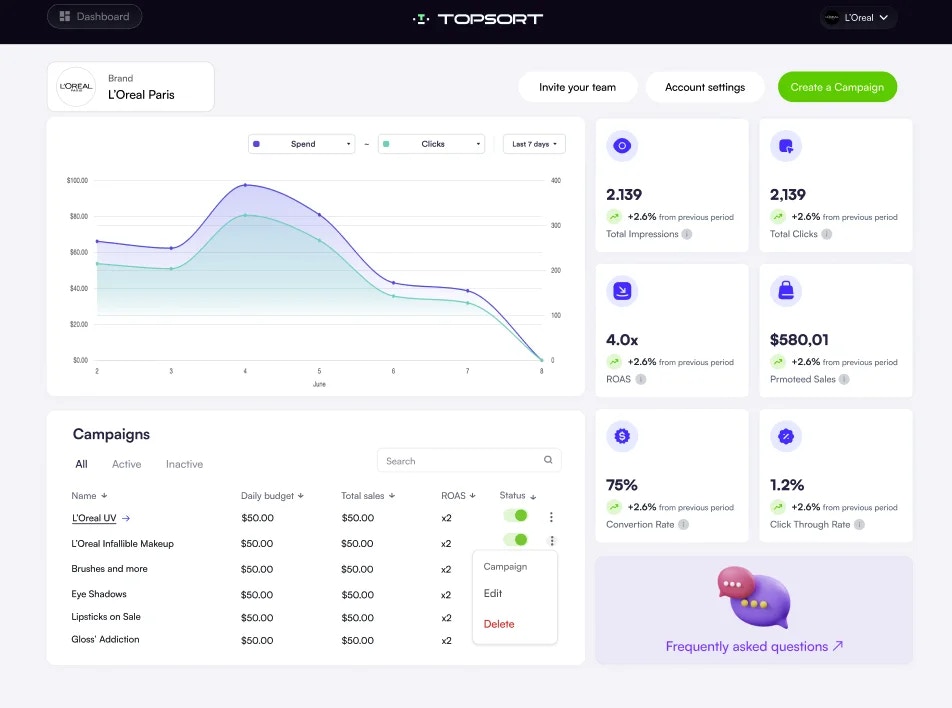 Marketplaces will also see the impact of the agencies' campaigns within their own dashboard.