> ## Documentation Index
> Fetch the complete documentation index at: https://docs.topsort.com/llms.txt
> Use this file to discover all available pages before exploring further.

# Creating Campaigns

export const LastUpdated = ({date, lang = "en"}) => {
  const translations = {
    en: "Last updated:",
    es: "Última actualización:",
    pt: "Última atualização:",
    fr: "Dernière mise à jour:",
    de: "Zuletzt aktualisiert:"
  };
  const label = translations[lang] || translations.en;
  return <>
<style>{`
.last-updated-component {
display: inline-flex;
align-items: center;
gap: 8px;
padding: 10px 16px;
border-radius: 8px;
margin-top: 12px;
margin-bottom: 16px;
font-size: 14px;
background-color: rgba(0, 0, 0, 0.05);
border: 1px solid rgba(0, 0, 0, 0.12);
color: rgba(0, 0, 0, 0.75);
line-height: 1;
}

        .last-updated-component svg {
          flex-shrink: 0;
          vertical-align: middle;
        }

        .last-updated-component span {
          display: inline-flex !important;
          align-items: center !important;
          line-height: 1 !important;
        }

        [data-theme="dark"] .last-updated-component {
          background-color: #3a3a3a;
          border: 2px solid #888888;
          color: #ffffff;
        }

        [data-theme="dark"] .last-updated-component svg {
          stroke: #ffffff;
        }
      `}</style>
      <div className="last-updated-component">
        <svg width="16" height="16" viewBox="0 0 24 24" fill="none" stroke="currentColor" strokeWidth="2" strokeLinecap="round" strokeLinejoin="round">
          <circle cx="12" cy="12" r="10" />
          <polyline points="12 6 12 12 16 14" />
        </svg>
        <span>
          <strong style={{
    fontWeight: 600
  }}>{label}</strong> 
          <time dateTime={date}>{date}</time>
        </span>
      </div>
    </>;
};

<div style={{ textAlign: "justify", marginBottom: "1.5rem" }}>
  Topsort allows the creation of 4 types of campaigns:
</div>

<div style={{ textAlign: "justify", marginBottom: "1.5rem" }}>
  1. **[Sponsored Listings](/en/knowledge-base/ad-platform/listings/)** Boost
     product visibility by placing listings in high-traffic areas like search
     results and category pages.
</div>

<div style={{ textAlign: "justify", marginBottom: "1.5rem" }}>
  2. **[Banner
     Ads](/en/knowledge-base/ad-platform/banners/banner-ads-campaigns/)** Feature
     creatives on homepages, category pages, or during checkout to capture user
     attention and create brand awareness.
</div>

<div style={{ textAlign: "justify", marginBottom: "1.5rem" }}>
  3. **[Video Ads](/en/knowledge-base/ad-platform/video-ads/)** Engage the
     shopper with short videos, suitable for placements across different site
     sections.
</div>

<div style={{ textAlign: "justify", marginBottom: "1.5rem" }}>
  4. **[Sponsored Brands](/en/knowledge-base/ad-platform/sponsored-brands/)**
     Combine brand logos, compelling headlines, and selected products to enhance
     brand awareness and product discovery.
</div>

<div style={{ textAlign: "justify", marginBottom: "1.5rem" }}>
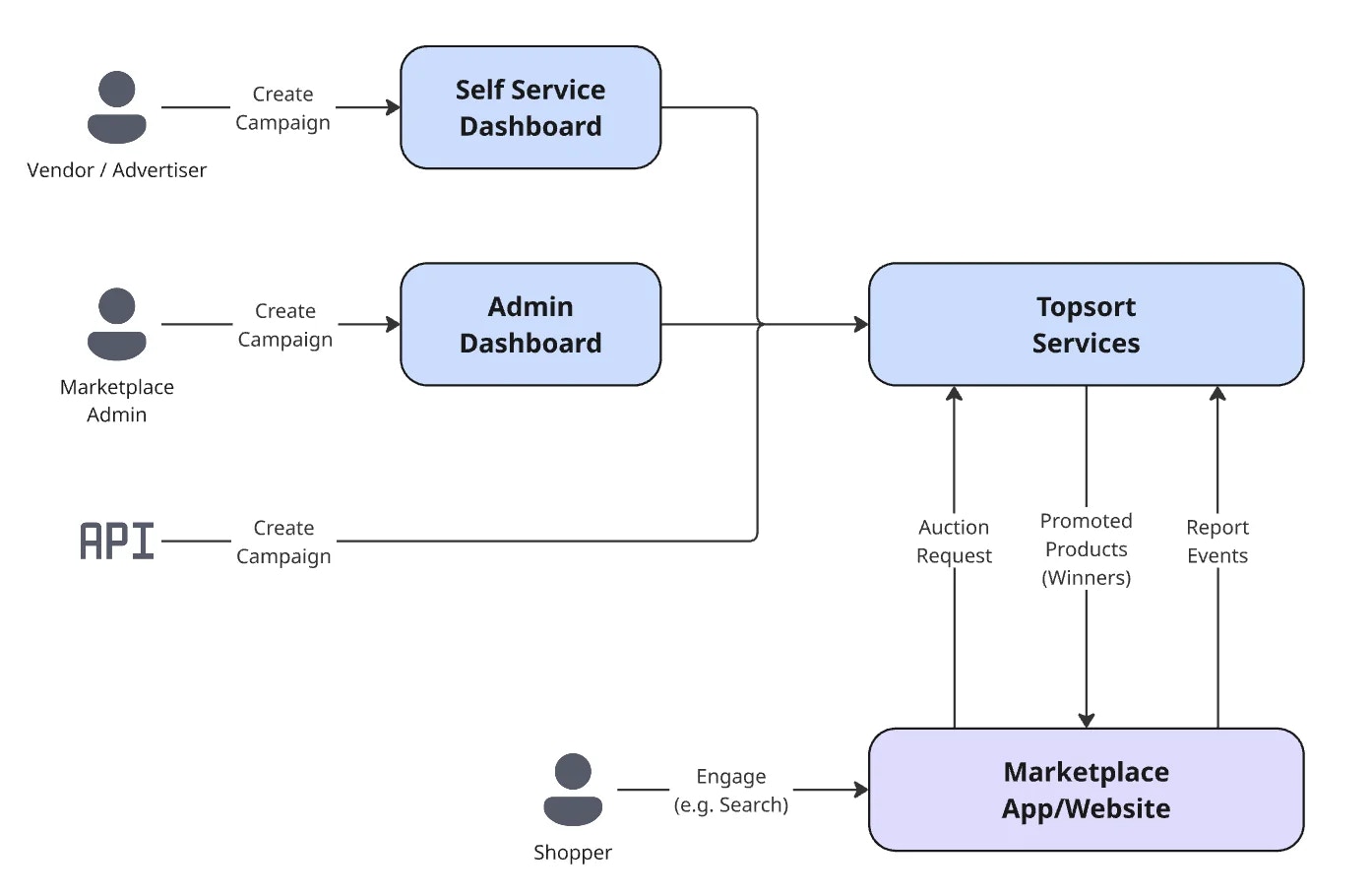
  All campaigns can be created by the admin using Topsort's dashboard or using
  our API. Vendors can also create campaigns if the self-service mode is
  enabled.
</div>

<Frame>
  <img src="https://mintcdn.com/topsort/FVdFH6-GAInpFZWG/images/knowledge-base/ad-platform-campaign-creation-diagram.webp?fit=max&auto=format&n=FVdFH6-GAInpFZWG&q=85&s=2b91f6bc7d9eee2130b7c38ea4325961" alt="Diagram of the admin dashboard showing for advertising campaign management." width="1394" height="910" data-path="images/knowledge-base/ad-platform-campaign-creation-diagram.webp" />
</Frame>

***

<LastUpdated date="2025-12-15" />
