> ## Documentation Index
> Fetch the complete documentation index at: https://docs.topsort.com/llms.txt
> Use this file to discover all available pages before exploring further.

# Catalog Synchronization

export const LastUpdated = ({date, lang = "en"}) => {
  const translations = {
    en: "Last updated:",
    es: "Última actualización:",
    pt: "Última atualização:",
    fr: "Dernière mise à jour:",
    de: "Zuletzt aktualisiert:"
  };
  const label = translations[lang] || translations.en;
  return <>
<style>{`
.last-updated-component {
display: inline-flex;
align-items: center;
gap: 8px;
padding: 10px 16px;
border-radius: 8px;
margin-top: 12px;
margin-bottom: 16px;
font-size: 14px;
background-color: rgba(0, 0, 0, 0.05);
border: 1px solid rgba(0, 0, 0, 0.12);
color: rgba(0, 0, 0, 0.75);
line-height: 1;
}

        .last-updated-component svg {
          flex-shrink: 0;
          vertical-align: middle;
        }

        .last-updated-component span {
          display: inline-flex !important;
          align-items: center !important;
          line-height: 1 !important;
        }

        [data-theme="dark"] .last-updated-component {
          background-color: #3a3a3a;
          border: 2px solid #888888;
          color: #ffffff;
        }

        [data-theme="dark"] .last-updated-component svg {
          stroke: #ffffff;
        }
      `}</style>
      <div className="last-updated-component">
        <svg width="16" height="16" viewBox="0 0 24 24" fill="none" stroke="currentColor" strokeWidth="2" strokeLinecap="round" strokeLinejoin="round">
          <circle cx="12" cy="12" r="10" />
          <polyline points="12 6 12 12 16 14" />
        </svg>
        <span>
          <strong style={{
    fontWeight: 600
  }}>{label}</strong> 
          <time dateTime={date}>{date}</time>
        </span>
      </div>
    </>;
};

<div style={{ textAlign: "justify", marginBottom: "1.5rem" }}>
  Having an accurate catalog is essential to guarantee that promoted products
  have the most up-to-date information. To check the product, catalog, category,
  and vendor definition, please refer to our [**Ad Server -
  Catalog**](/en/ad-server/catalog/) documentation.
</div>

## How It Works

<div style={{ textAlign: "justify", marginBottom: "1.5rem" }}>
  With the Catalog Sync process, product data (such as title, description,
  image, price, etc) and availability are synced regularly with Topsort. To
  check on the methods available to sync your catalog with Topsort, please refer
  to our [**Ad Server - Catalog**](/en/ad-server/catalog/) documentation.
</div>

## Product availability

<div style={{ textAlign: "justify", marginBottom: "1.5rem" }}>
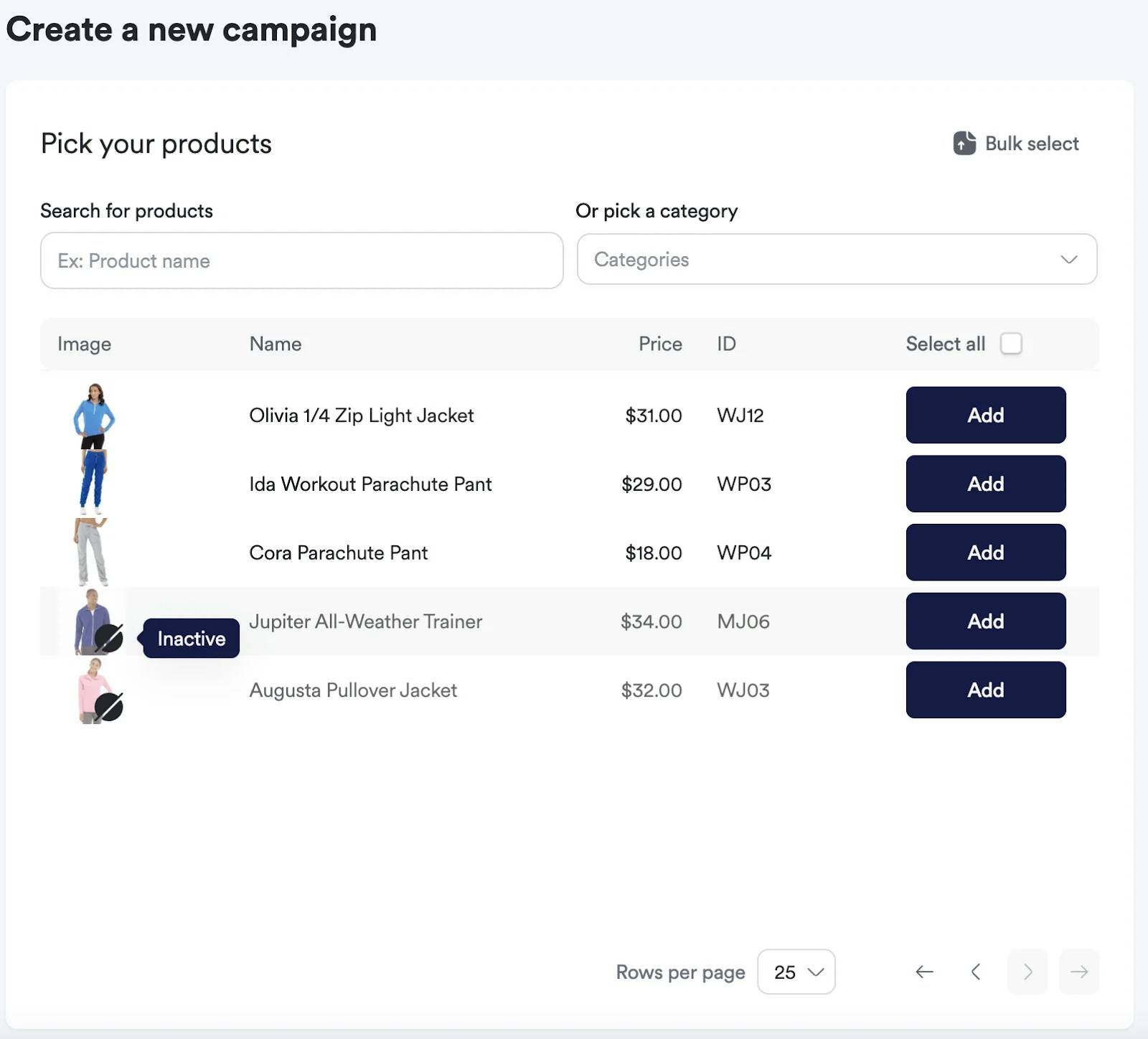
  To indicate a product is not available, the “active” flag should be set to
  `false`. When a product has the flag active: `false`, here's what happens:
</div>

<div style={{ textAlign: "justify", marginBottom: "1.5rem" }}>
  * The product stops being listed in the Catalog Tab. \* The product is marked
    as inactive in the campaign creation flow.
</div>

<Note>
  It is still possible to create a campaign with an inactive product, although
  it will not be considered a winner while its status is set to `false`.
</Note>

<Frame>
  <img src="https://mintcdn.com/topsort/FVdFH6-GAInpFZWG/images/knowledge-base/ad-platform-catalog-management-catalog-synchronization.webp?fit=max&auto=format&n=FVdFH6-GAInpFZWG&q=85&s=0d31897078cd8a2d3ac8d13b44f1549f" alt="Screenshot showing for catalog synchronization functionality." width="1600" height="1448" data-path="images/knowledge-base/ad-platform-catalog-management-catalog-synchronization.webp" />
</Frame>

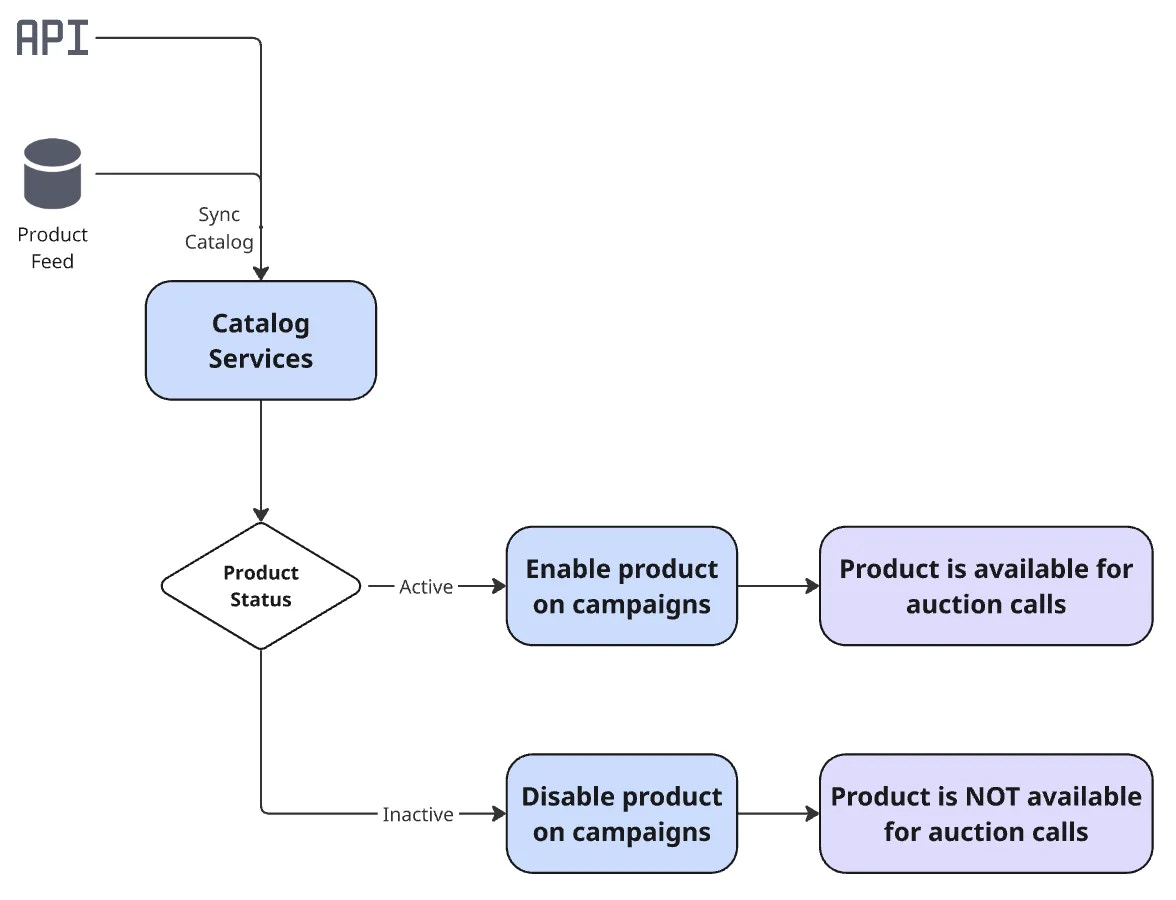
* The product is deactivated from ongoing campaigns.

<Note>
  It will be automatically reactivated in the campaign when the status changes
  back to active: `true` via integration.

</Note>

<Frame>
  <img src="https://mintcdn.com/topsort/FVdFH6-GAInpFZWG/images/knowledge-base/ad-platform-catalog-management-catalog-synchronization-2.webp?fit=max&auto=format&n=FVdFH6-GAInpFZWG&q=85&s=4ae2c8f5254c886b76215e9e8cb672d4" alt="Screenshot showing for catalog synchronization functionality." width="1600" height="241" data-path="images/knowledge-base/ad-platform-catalog-management-catalog-synchronization-2.webp" />
</Frame>

This diagram summarizes the activation and deactivation of products on campaign, due to catalog syncs.
<Frame>
  <img src="https://mintcdn.com/topsort/FVdFH6-GAInpFZWG/images/knowledge-base/ad-platform-catalog-management-catalog-synchronization-diagram.webp?fit=max&auto=format&n=FVdFH6-GAInpFZWG&q=85&s=021a4e90fcae6edc92abf41848c87f89" alt="Diagram showing for catalog synchronization functionality." width="1176" height="900" data-path="images/knowledge-base/ad-platform-catalog-management-catalog-synchronization-diagram.webp" />
</Frame>

## Troubleshooting

If a product stops winning auctions, it can be related to its active status.

<Steps>
  <Step title="Check its status (active: `true` is required for a product to win auctions)." />

  <Step title="Check if it's assigned to the campaign." />

  <Step title="Check if the vendor has balance." />

  <Step title="Check if the campaign has enough budget." />
</Steps>

<Tip>
  Check details about the [Catalog API](/en/ad-server/catalog/) in our
  Integration Guide.
</Tip>

***

<LastUpdated date="2025-11-18" />
