> ## Documentation Index
> Fetch the complete documentation index at: https://docs.topsort.com/llms.txt
> Use this file to discover all available pages before exploring further.

# Create Sponsored Brands Campaigns

> Creating sponsored brands campaigns with template selection and enhanced features

export const LastUpdated = ({date, lang = "en"}) => {
  const translations = {
    en: "Last updated:",
    es: "Última actualización:",
    pt: "Última atualização:",
    fr: "Dernière mise à jour:",
    de: "Zuletzt aktualisiert:"
  };
  const label = translations[lang] || translations.en;
  return <>
<style>{`
.last-updated-component {
display: inline-flex;
align-items: center;
gap: 8px;
padding: 10px 16px;
border-radius: 8px;
margin-top: 12px;
margin-bottom: 16px;
font-size: 14px;
background-color: rgba(0, 0, 0, 0.05);
border: 1px solid rgba(0, 0, 0, 0.12);
color: rgba(0, 0, 0, 0.75);
line-height: 1;
}

        .last-updated-component svg {
          flex-shrink: 0;
          vertical-align: middle;
        }

        .last-updated-component span {
          display: inline-flex !important;
          align-items: center !important;
          line-height: 1 !important;
        }

        [data-theme="dark"] .last-updated-component {
          background-color: #3a3a3a;
          border: 2px solid #888888;
          color: #ffffff;
        }

        [data-theme="dark"] .last-updated-component svg {
          stroke: #ffffff;
        }
      `}</style>
      <div className="last-updated-component">
        <svg width="16" height="16" viewBox="0 0 24 24" fill="none" stroke="currentColor" strokeWidth="2" strokeLinecap="round" strokeLinejoin="round">
          <circle cx="12" cy="12" r="10" />
          <polyline points="12 6 12 12 16 14" />
        </svg>
        <span>
          <strong style={{
    fontWeight: 600
  }}>{label}</strong> 
          <time dateTime={date}>{date}</time>
        </span>
      </div>
    </>;
};

<div style={{textAlign: 'justify', marginBottom: '1.5rem'}}>
  Sponsored Brands is an ad format combining a brand logo, creative assets, a headline and multiple products. Its goal is to build brand awareness and help customers discover products.
</div>

## Campaign Creation Flow

<div style={{textAlign: 'justify', marginBottom: '1.5rem'}}>
  All sponsored brands campaigns start from one of three available templates, then follow a streamlined creation process.
</div>

<Steps>
  <Step title="Select Template">
    <div style={{textAlign: 'justify', marginBottom: '1.5rem'}}>
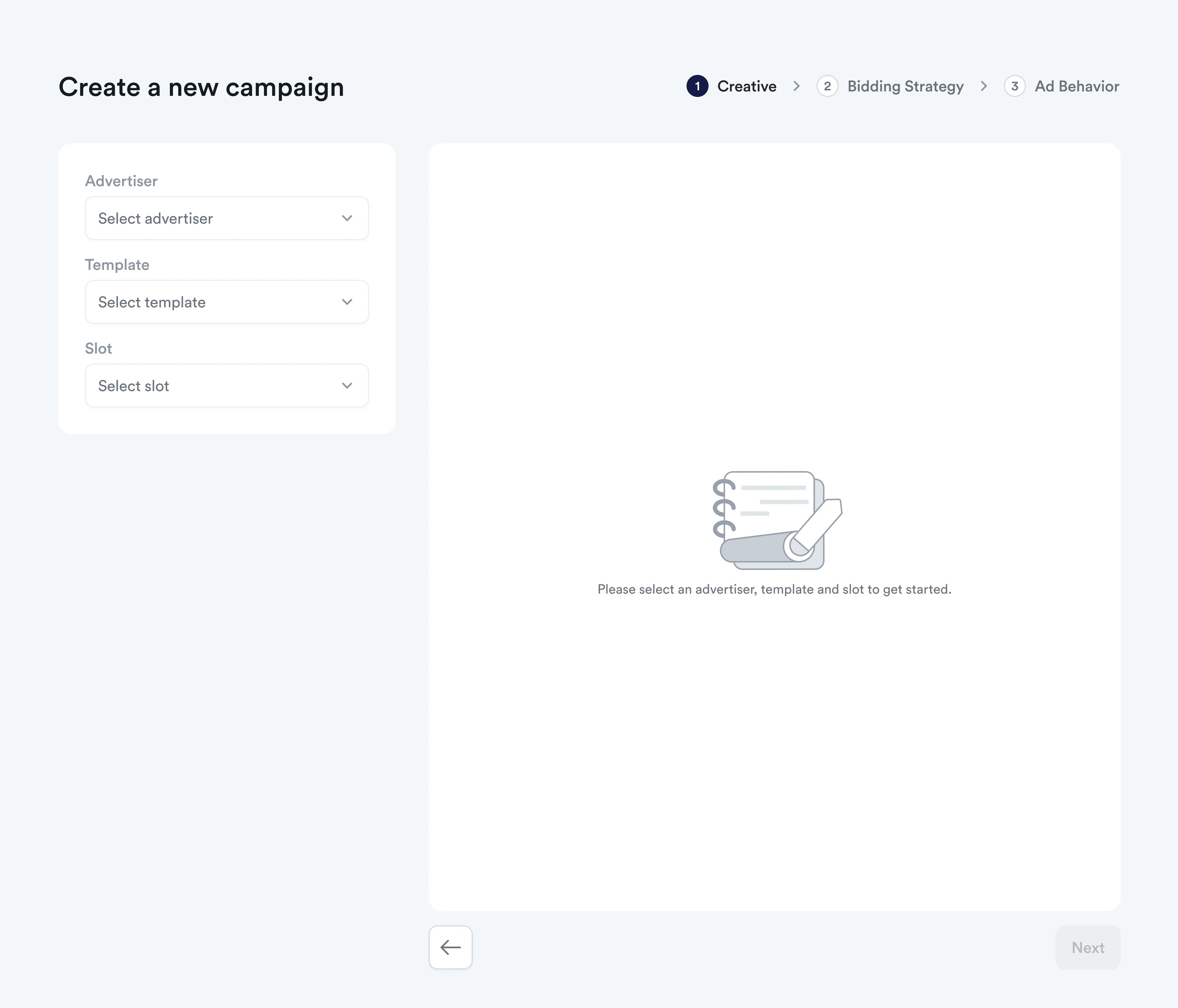
      Begin by choosing from one of three pre-built sponsored brands templates:
    </div>

    * **Product Collection**: Multiple products on one landing page for comprehensive product discovery
    * **Product Highlight**: Single product and a creative
    * **Store Spotlight**: Drive traffic to a store page for brand awareness

    <div style={{textAlign: 'justify', marginBottom: '1.5rem'}}>
      **<Frame>      <img src="https://mintcdn.com/topsort/6z2OGMIoIAfrcYlw/images/knowledge-base/spb-empty.webp?fit=max&auto=format&n=6z2OGMIoIAfrcYlw&q=85&s=b552b9e77f8d9a6a96cc93792813d8e8" alt="Screenshot of sponsored brands template selection" width="4276" height="3660" data-path="images/knowledge-base/spb-empty.webp" /></Frame>**
    </div>
  </Step>

  <Step title="Creative Setup">
    <div style={{textAlign: 'justify', marginBottom: '1.5rem'}}>
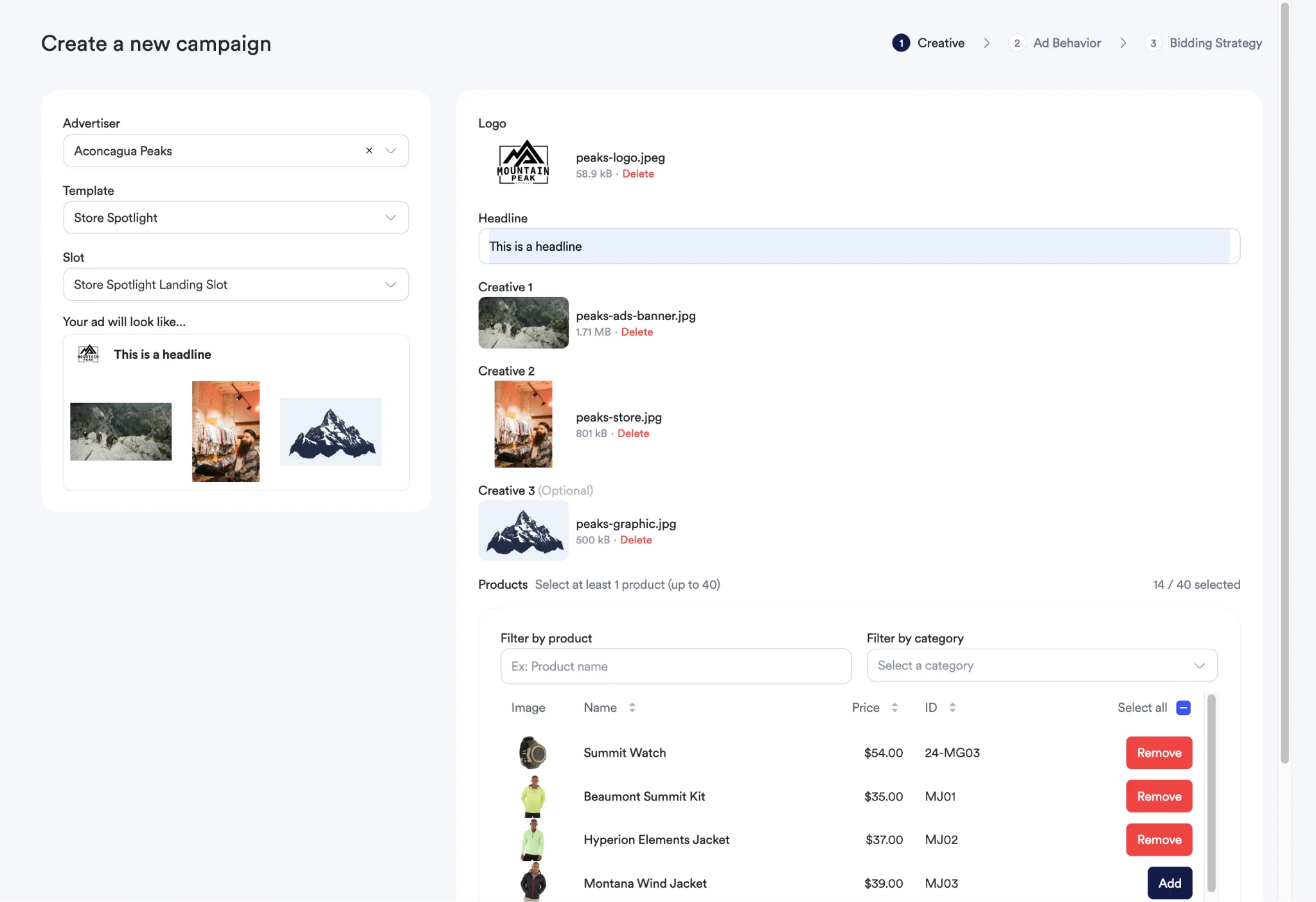
      Configure your brand and creative assets:
    </div>

    * **Upload Brand Logo**: Add your brand logo following template specifications
    * **Campaign Headline**: Create compelling headlines aligned with your campaign objectives
    * **Additional Creatives**: Upload videos or additional images based on template requirements
    * **Attach Products**: Select products to promote with your creatives

    <div style={{textAlign: 'justify', marginBottom: '1.5rem'}}>
      #### Content Requirements
    </div>

    * **Supported formats**: JPEG, PNG, WEBP, GIF, MP4
    * **Max file size**: 5MB per creative/video

    <Note>
      The creatives, headline and `productId` will be returned in the auction
      request separately. You can render those elements the way it best fits your
      needs in the frontend. Refer to the [Sponsored Brands
      Auction](/en/knowledge-base/ad-platform/sponsored-brands/sponsored-brands-auction/)
      section to learn more about auction requests and responses.
    </Note>
  </Step>

  <div style={{textAlign: 'justify', marginBottom: '1.5rem'}}>
    **<Frame>    <img src="https://mintcdn.com/topsort/6z2OGMIoIAfrcYlw/images/knowledge-base/spb-upload.webp?fit=max&auto=format&n=6z2OGMIoIAfrcYlw&q=85&s=50bc9eb4bb9a6f9644ac768714a1c244" alt="Screenshot of creative setup step" width="2048" height="1403" data-path="images/knowledge-base/spb-upload.webp" /></Frame>**
  </div>

  <Step title="Ad Behavior">
    <div style={{textAlign: 'justify', marginBottom: '1.5rem'}}>
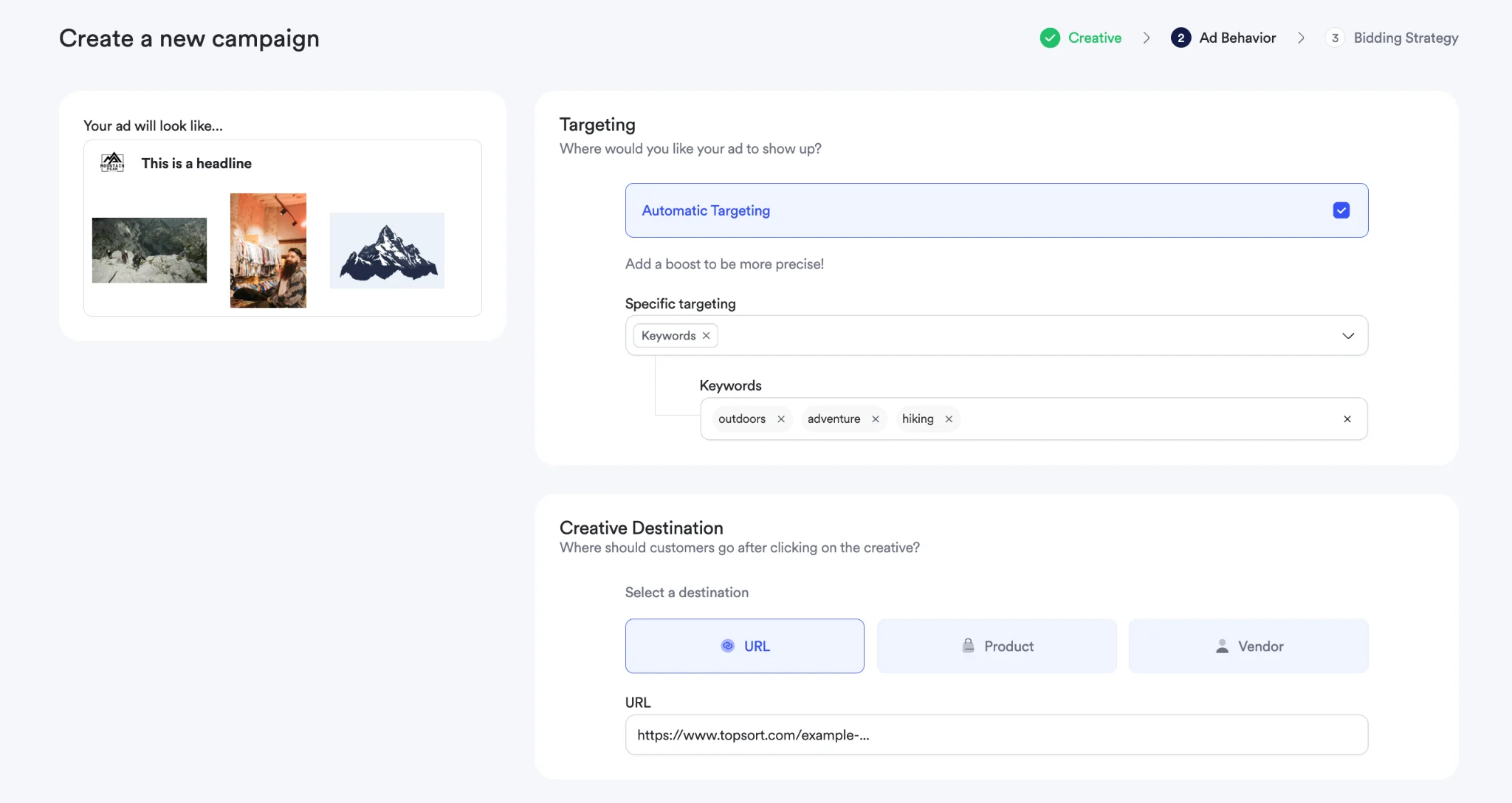
      Specify targeting and destination settings:
    </div>

    * **Targeting Configuration**: Set keywords, categories, and audience targeting
    * **Destination URLs**: Choose where clicks should direct users (product pages, vendor pages, custom URLs)
    * **Geographic Targeting**: Select from pre-configured locations to target specific regions, cities, or markets
    * **Audience Segments**: Apply demographic or behavioral targeting

    <div style={{textAlign: 'justify', marginBottom: '1.5rem'}}>
      **<Frame>      <img src="https://mintcdn.com/topsort/6z2OGMIoIAfrcYlw/images/knowledge-base/spb-targeting.webp?fit=max&auto=format&n=6z2OGMIoIAfrcYlw&q=85&s=c40a693ca623924ef6fff9a2fb5165dc" alt="Screenshot of ad behavior configuration" width="2048" height="1088" data-path="images/knowledge-base/spb-targeting.webp" /></Frame>**
    </div>

    ### Geographic Targeting Details

    <div style={{textAlign: 'justify', marginBottom: '1.5rem'}}>
      Geographic targeting allows you to show your Sponsored Brands campaigns only to users in specific locations:
    </div>

    * **Location Selection**: Choose from locations configured by your marketplace administrator
    * **Multiple Targeting**: Select multiple locations to reach broader geographic areas
    * **Campaign Filtering**: Only users in targeted locations will see your campaigns during auctions
    * **No Restrictions**: Leave geographic targeting empty to show campaigns to all users regardless of location

    <Note>
      Geographic targeting options only appear if locations have been configured for your marketplace. Contact your administrator if geolocation options are not available.
    </Note>
  </Step>

  <Step title="Bidding Strategy & Campaign Settings">
    <div style={{textAlign: 'justify', marginBottom: '1.5rem'}}>
      Complete your campaign setup:
    </div>

    * **Campaign Name**: Provide a descriptive name for easy identification
    * **Campaign Objective**: Choose your primary goal (brand awareness, clicks, conversions)
    * **Campaign Duration**: Set start and end dates
    * **Budget Settings**: Define daily or total campaign budgets
    * **Bidding Strategy**: Select between [**BIDLESS™**](/en/knowledge-base/ad-platform/campaign-creation/bidding-types/), manual CPC, or CPM bidding
    * **Budget Pacing**: Configure how budget should be distributed over campaign duration

    <div style={{textAlign: 'justify', marginBottom: '1.5rem'}}>
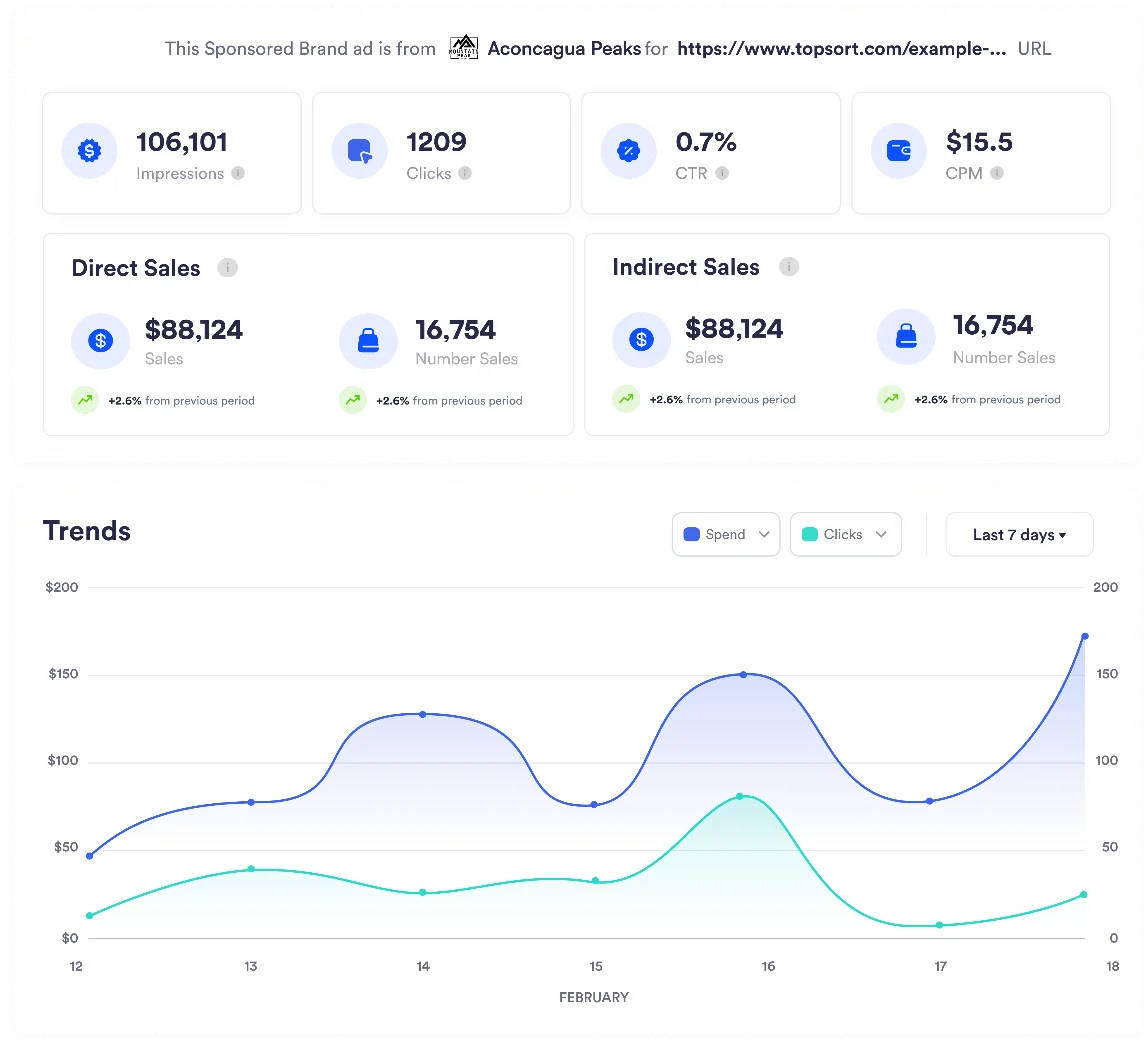
      **<Frame>      <img src="https://mintcdn.com/topsort/6z2OGMIoIAfrcYlw/images/knowledge-base/spb-view.webp?fit=max&auto=format&n=6z2OGMIoIAfrcYlw&q=85&s=40e6bd1befb83b329ed158650d5b919c" alt="Screenshot of viewing sponsored brands campaign" width="1147" height="1046" data-path="images/knowledge-base/spb-view.webp" /></Frame>**
    </div>
  </Step>

  <Step title="Launch Campaign">
    <div style={{textAlign: 'justify', marginBottom: '1.5rem'}}>
      Review and launch your sponsored brands campaign:
    </div>

    * **Campaign Preview**: Review how your campaign will appear across different placements
    * **Template Validation**: Ensure all required fields are completed correctly
    * **Product Verification**: Confirm all selected products are active and destinations work
    * **Creative Quality Check**: Verify uploads meet platform requirements
    * **Deploy Campaign**: Launch and begin performance monitoring
  </Step>
</Steps>

## Best Practices

### Template Selection

<div style={{textAlign: 'justify', marginBottom: '1.5rem'}}>
  * Choose **Product Collection** for showcasing product variety and driving category exploration
  * Use **Product Highlight** for featuring a single product with compelling content that showcases product benefits
  * Use **Store Spotlight** for brand building and directing traffic to your store
</div>

### Creative Quality

<div style={{textAlign: 'justify', marginBottom: '1.5rem'}}>
  * Use high-resolution images and videos that showcase products clearly
  * Ensure all creative elements align with your brand guidelines
  * Keep headlines concise and focused on key value propositions
  * Test different creative combinations to optimize performance
</div>

### Campaign Optimization

<div style={{textAlign: 'justify', marginBottom: '1.5rem'}}>
  * Start with proven templates before customizing campaigns extensively
  * Monitor which products drive the best results and adjust selection accordingly
  * Regularly review campaign analytics and adjust targeting and bidding strategies
  * Apply insights from successful campaigns to new campaign creation
</div>

<div style={{textAlign: 'justify', marginBottom: '1.5rem'}}>
  Refer to the [Sponsored Brands Auction](/en/knowledge-base/ad-platform/sponsored-brands/sponsored-brands-auction/) section to learn more about how auction requests and responses work, and the [View Sponsored Brands Details](/en/knowledge-base/ad-platform/sponsored-brands/sponsored-brands-details/) section for campaign performance tracking.
</div>

***

<LastUpdated date="2025-11-18" />