> ## Documentation Index
> Fetch the complete documentation index at: https://docs.topsort.com/llms.txt
> Use this file to discover all available pages before exploring further.
# Sponsored Brands Slot Configuration
> Configure sponsored brands ad slots and template assignments
export const LastUpdated = ({date, lang = "en"}) => {
const translations = {
en: "Last updated:",
es: "Última actualización:",
pt: "Última atualização:",
fr: "Dernière mise à jour:",
de: "Zuletzt aktualisiert:"
};
const label = translations[lang] || translations.en;
return <>
;
};
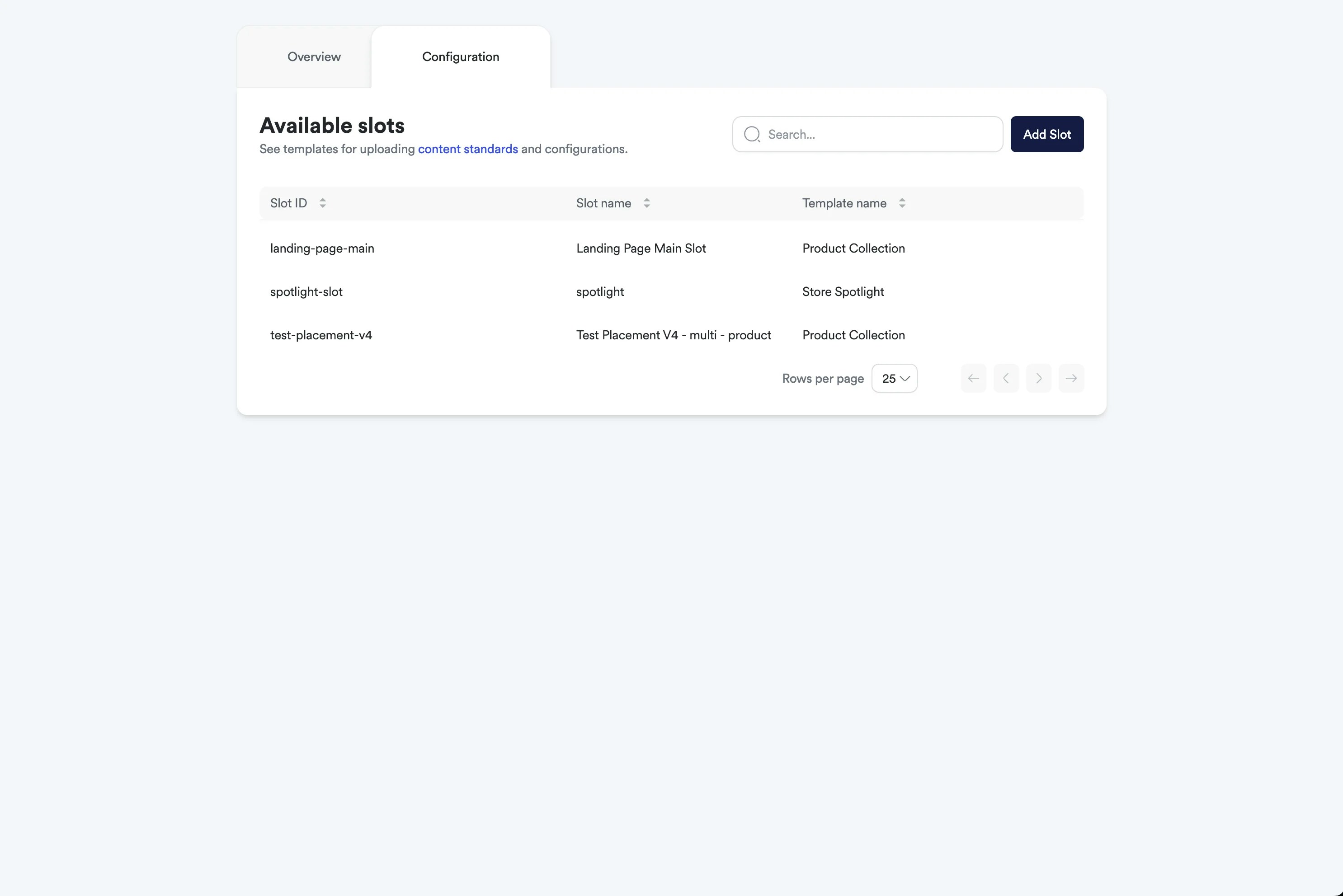
Sponsored Brands slot configuration allows you to create and manage ad slots that determine where sponsored brands campaigns can be displayed. Unlike the previous single default slot, you now have the flexibility to create multiple slots with specific template assignments.
## Slot Configuration Overview
Sponsored brands slots define placement opportunities where campaigns can appear. Each slot can be configured with specific templates and targeting parameters to ensure campaigns display appropriately across your platform.
 ## Creating Sponsored Brands Slots
Navigate to the Ad Formats section in your admin dashboard and select Sponsored Brands slot management.
Configure the basic slot information:
* **Slot Name**: Descriptive name for easy identification
* **Slot ID**: Unique identifier used in auction requests
* **Template Assignment**: Select which template this slot will use:
* Product Collection
* Store Spotlight
* Video
Set up additional slot parameters:
* **Placement Rules**: Define where this slot can appear
* **Size Specifications**: Set dimensions and layout requirements
* **Targeting Options**: Configure audience and content targeting
* **Performance Goals**: Set optimization objectives for this slot
 Link the slot to specific sponsored brands templates:
* **Template Restriction**: Campaigns using this slot must use the assigned template
* **Creative Requirements**: Template-specific asset requirements are enforced
* **Product Count Limits**: Template product limits (1-5) apply to campaigns in this slot
Review and activate your configured slot:
* **Validation**: Ensure all required fields are completed
* **Template Compatibility**: Verify template assignment works with placement requirements
* **Auction Integration**: Confirm slot ID is properly configured for auction requests
## Slot Management Features
### Multiple Slot Support
Link the slot to specific sponsored brands templates:
* **Template Restriction**: Campaigns using this slot must use the assigned template
* **Creative Requirements**: Template-specific asset requirements are enforced
* **Product Count Limits**: Template product limits (1-5) apply to campaigns in this slot
Review and activate your configured slot:
* **Validation**: Ensure all required fields are completed
* **Template Compatibility**: Verify template assignment works with placement requirements
* **Auction Integration**: Confirm slot ID is properly configured for auction requests
## Slot Management Features
### Multiple Slot Support
* **Flexible Placement**: Create multiple slots for different page locations or contexts
* **Template Specialization**: Assign specific templates to optimize for different placements
* **Performance Optimization**: Configure slots with different objectives and targeting
### Template Assignment Benefits
* **Consistent Experience**: Ensure specific placements always use appropriate templates
* **Creative Standards**: Maintain consistent creative quality across different slot types
* **Campaign Matching**: Automatically match campaigns to suitable slots based on template choice
### Advanced Configuration Options
* **Slot Priority**: Set priority levels for multiple slots in auction requests
* **Dynamic Assignment**: Allow flexible template usage when appropriate
* **Performance Tracking**: Monitor slot-specific performance metrics
Slot configuration changes may require coordination with your development team to update auction request implementations. Ensure proper slot IDs are used in placement requests to receive appropriate sponsored brands campaigns.
## Best Practices
### Slot Planning
* **Strategic Placement**: Create slots for high-visibility areas where sponsored brands perform best
* **Template Matching**: Assign templates that align with the placement context and user intent
* **Performance Monitoring**: Track slot performance to optimize template assignments
### Template Assignment Strategy
* **Product Collection Slots**: Best for category pages, search results, and product discovery areas
* **Store Spotlight Slots**: Ideal for homepage placements and brand-focused sections
* **Video Slots**: Optimize for mobile placements and content-rich environments
### Slot Optimization
* **Regular Review**: Monitor slot performance and adjust template assignments as needed
* **A/B Testing**: Test different template assignments to optimize slot performance
* **Campaign Feedback**: Use campaign performance data to improve slot configuration
## Integration with Auctions
Configured slots integrate directly with the sponsored brands auction system:
* **Placement Requests**: Use slot IDs in auction requests to target specific placements
* **Template Filtering**: Auction responses only include campaigns compatible with slot templates
* **Performance Attribution**: Track results back to specific slot configurations for optimization
Refer to the [Sponsored Brands Auction](/en/knowledge-base/ad-platform/sponsored-brands/sponsored-brands-auction/) section for details on using slot IDs in auction requests.
***