> ## Documentation Index
> Fetch the complete documentation index at: https://docs.topsort.com/llms.txt
> Use this file to discover all available pages before exploring further.
# Overview
export const LastUpdated = ({date, lang = "en"}) => {
const translations = {
en: "Last updated:",
es: "Última actualización:",
pt: "Última atualização:",
fr: "Dernière mise à jour:",
de: "Zuletzt aktualisiert:"
};
const label = translations[lang] || translations.en;
return <>
;
};
Topsort offers transparent and targeted advertising with reliable metrics, powered by our advanced Ad-Purchase Attribution system, which accurately links purchases to customer interactions with ads.
## Ad-Purchase Attribution System
This system links purchases to ad interactions, optimizing campaigns for advertisers, and creating a feedback loop for our **BIDLESS™** algorithm. The link between ads and purchase is based on the user ID sent with the tracked event (click or purchase) and the purchase.
### Viewability Requirements for Attribution
Per IAB/MRC Retail Media Measurement Guidelines, only **viewable impressions** are eligible for attribution:
* **Display Ads (Banners)**: 50% of pixels visible for 1+ continuous second
* **Video Ads**: 50% of pixels visible for 2+ continuous seconds
* **Large Display Ads (242,500+ pixels)**: 30% of pixels visible for 1+ continuous second
Non-viewable impressions are excluded from attribution calculations, ensuring outcomes are only credited to ads that had a genuine opportunity to influence consumer behavior.
## Flexible Attribution by Ad Format
Our APIs let marketplaces customize attribution models at the ad format level, recognizing that different formats serve different purposes in the customer journey:
* **Sponsored Listings**: Typically drive immediate purchase decisions (bottom-funnel)
* **Sponsored Brands**: Influence consideration and brand awareness (mid-funnel)
* **Banner/Native/Video Ads**: Build awareness and discovery (top-funnel)
Each format can have its own:
* **Attribution Model**: Last-click or last-impression
* **Attribution Window**: 1-30 days
This granular control ensures accurate measurement of each format's true contribution to conversions.
### Example Configuration
| Ad Format | Attribution Model | Window | Use Case |
| ------------------ | ----------------- | ------- | ---------------------------- |
| Sponsored Listings | Last-click | 7 days | Direct response purchases |
| Sponsored Brands | Last-click | 14 days | Brand consideration period |
| Banner/Video Ads | Last-impression | 30 days | Awareness-driven conversions |
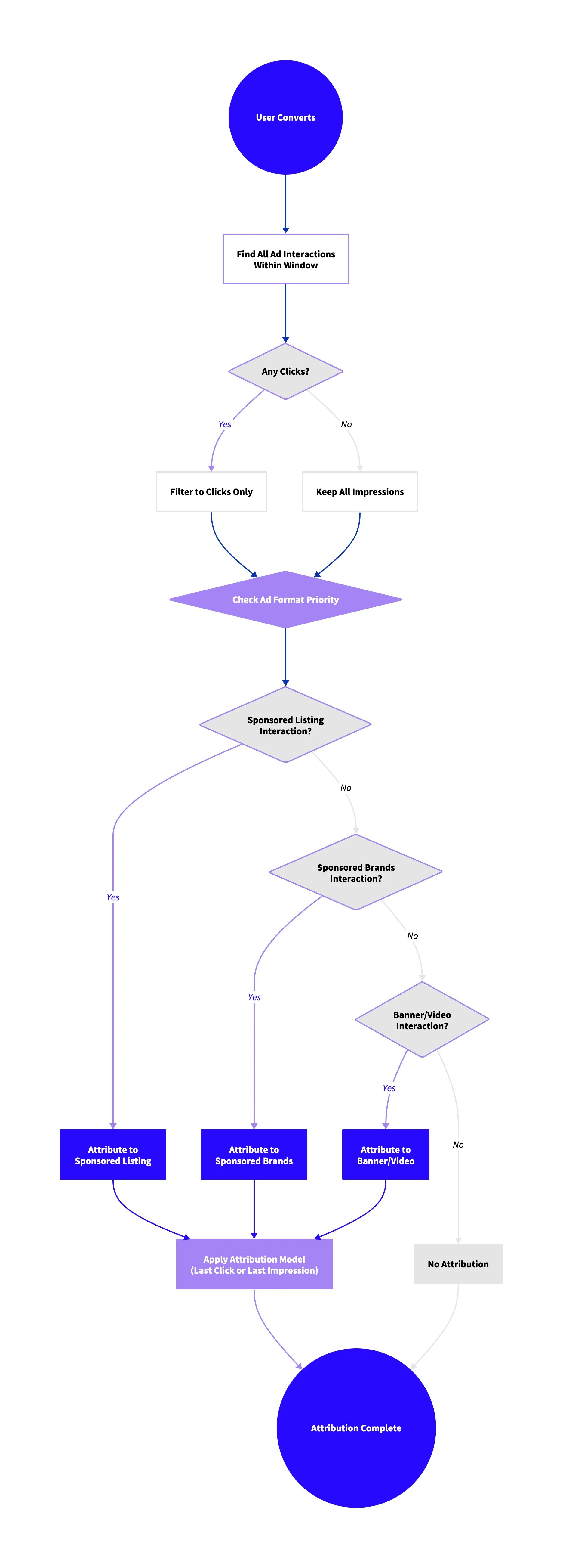
## Attribution Priority Rules
When multiple ad interactions occur within their respective windows:
1. **Clicks take priority over impressions**
2. **Direct attribution has priority over halo attribution**
3. Each conversion is attributed to **only one** ad interaction
This ensures clear, actionable insights while avoiding double-counting.
**
**