> ## Documentation Index
> Fetch the complete documentation index at: https://docs.topsort.com/llms.txt
> Use this file to discover all available pages before exploring further.
# Additional Attribution
export const LastUpdated = ({date, lang = "en"}) => {
const translations = {
en: "Last updated:",
es: "Última actualización:",
pt: "Última atualização:",
fr: "Dernière mise à jour:",
de: "Zuletzt aktualisiert:"
};
const label = translations[lang] || translations.en;
return <>
;
};
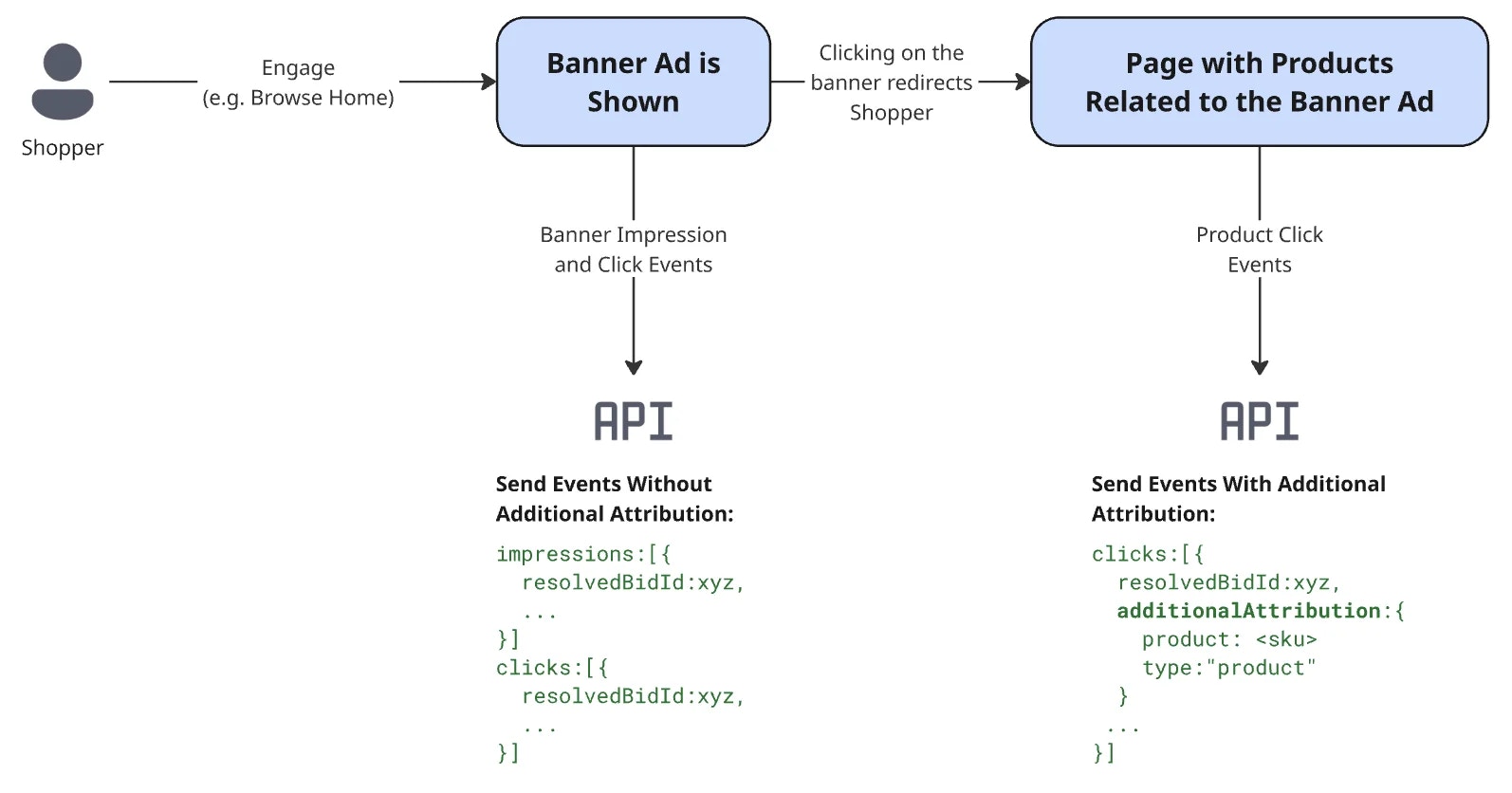
The additional attribution feature is useful when an attributing event, such as an impression or click, boosts the conversion of multiple products. This feature is particularly relevant for banner ads, where a click might lead to a page displaying several products. With additional attribution, you can report interactions with these products and ensure the ad campaign is correctly attributed.
Additional attribution is available under any attribution model and therefore does not need any special configuration. To use this feature, a marketplace just needs to fill in an additional object when [reporting an event](/en/api-reference/events/report-events).
## How It Works
The additional attribution method is often used in banner campaigns as an alternative to [banner attribution](/en/api-reference/examples/sponsored-banners/attribution). After the ad is shown to the user, the marketplace should send an additional attribution impression event for each product related to the banner. Alternatively, if the banner redirects to a PLP, the marketplace can send an additional attribution impression event for each product on that page.
If the user clicks on one of the products related to the banner, the marketplace should send an additional attribution click event so that the banner is correctly attributed. The additional Attribution object should contain:
* `id`: The ID of the clicked product.
* `type`: Set as "product".
 Use additional attribution only when an event is meant to be directly linked to a product purchase within the attribution window. When applied, this attribution will override other attribution rules.
***
Use additional attribution only when an event is meant to be directly linked to a product purchase within the attribution window. When applied, this attribution will override other attribution rules.
***