> ## Documentation Index
> Fetch the complete documentation index at: https://docs.topsort.com/llms.txt
> Use this file to discover all available pages before exploring further.

# Linking Users

export const LastUpdated = ({date, lang = "en"}) => {
  const translations = {
    en: "Last updated:",
    es: "Última actualización:",
    pt: "Última atualização:",
    fr: "Dernière mise à jour:",
    de: "Zuletzt aktualisiert:"
  };
  const label = translations[lang] || translations.en;
  return <>
<style>{`
.last-updated-component {
display: inline-flex;
align-items: center;
gap: 8px;
padding: 10px 16px;
border-radius: 8px;
margin-top: 12px;
margin-bottom: 16px;
font-size: 14px;
background-color: rgba(0, 0, 0, 0.05);
border: 1px solid rgba(0, 0, 0, 0.12);
color: rgba(0, 0, 0, 0.75);
line-height: 1;
}

        .last-updated-component svg {
          flex-shrink: 0;
          vertical-align: middle;
        }

        .last-updated-component span {
          display: inline-flex !important;
          align-items: center !important;
          line-height: 1 !important;
        }

        [data-theme="dark"] .last-updated-component {
          background-color: #3a3a3a;
          border: 2px solid #888888;
          color: #ffffff;
        }

        [data-theme="dark"] .last-updated-component svg {
          stroke: #ffffff;
        }
      `}</style>
      <div className="last-updated-component">
        <svg width="16" height="16" viewBox="0 0 24 24" fill="none" stroke="currentColor" strokeWidth="2" strokeLinecap="round" strokeLinejoin="round">
          <circle cx="12" cy="12" r="10" />
          <polyline points="12 6 12 12 16 14" />
        </svg>
        <span>
          <strong style={{
    fontWeight: 600
  }}>{label}</strong> 
          <time dateTime={date}>{date}</time>
        </span>
      </div>
    </>;
};

<div style={{textAlign: 'justify', marginBottom: '1.5rem'}}>
  Accurate attribution requires connecting user activity across logged-out and logged-in states. Topsort provides API tools to solve this issue, enabling you to link two opaque user IDs.
</div>

### How It Works

<div style={{textAlign: 'justify', marginBottom: '1.5rem'}}>
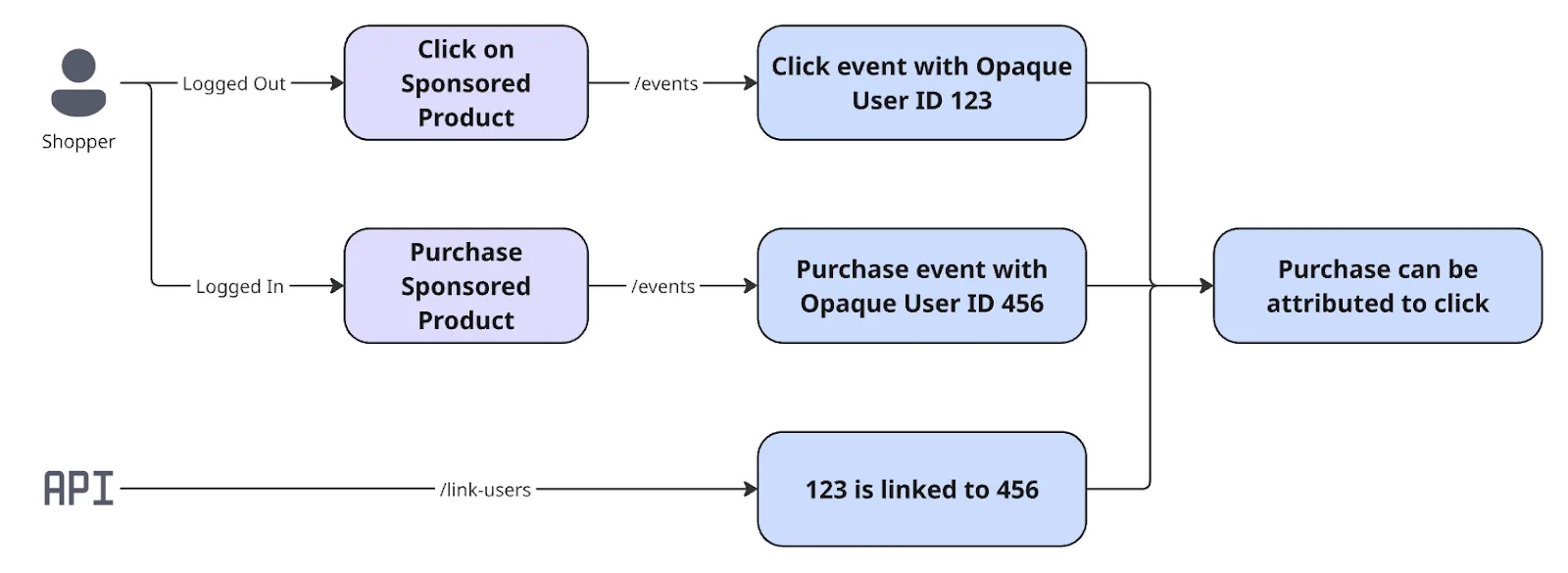
  Users often interact with ads while logged out (e.g., `user_id` = 123) and later, they log in, gaining a distinct user ID (e.g., `user_id` = 456). Without linking these IDs, activities from the logged-out session are disconnected from post-login actions, leading to inaccurate attribution.
</div>

<Frame>
  <img src="https://mintcdn.com/topsort/JfdWUceY7Se3NW-0/images/knowledge-base/ad-server-attribution-linking-users-diagram.webp?fit=max&auto=format&n=JfdWUceY7Se3NW-0&q=85&s=a95bf07d341eb22f45e41d5da682c819" alt="Diagram of API Link Users API." width="1600" height="585" data-path="images/knowledge-base/ad-server-attribution-linking-users-diagram.webp" />
</Frame>

Our [Link Users API](http://api.docs.topsort.com/api-reference/events/\[beta]-report-link-users#beta-report-link-users) enables you to inform Topsort that two opaque user IDs belong to the same person. Improving attribution accuracy. Required fields to use our API:

<table><tbody><tr><td><p><strong>Field</strong></p></td><td><p><strong>Type</strong></p></td><td><p><strong>Required</strong></p></td><td><p><strong>Description</strong></p></td></tr><tr><td><p><strong>`from`</strong></p></td><td><p>**STRING**</p></td><td><p>yes</p></td><td><p>The original (e.g., logged-out) opaque user ID. (1-64 chars)</p></td></tr><tr><td><p><strong>`to`</strong></p></td><td><p>**STRING**</p></td><td><p>yes</p></td><td><p>The target (e.g., logged-in) opaque user ID. (1-64 chars)</p></td></tr></tbody></table>

<Note>`from` and `to` IDs must not be identical.</Note>

***

<LastUpdated date="2025-11-18" />
