> ## Documentation Index
> Fetch the complete documentation index at: https://docs.topsort.com/llms.txt
> Use this file to discover all available pages before exploring further.
# Digital Asset Management
> Connect Topsort with Digital Asset Management platforms for streamlined creative workflows
export const LastUpdated = ({date, lang = "en"}) => {
const translations = {
en: "Last updated:",
es: "Última actualización:",
pt: "Última atualização:",
fr: "Dernière mise à jour:",
de: "Zuletzt aktualisiert:"
};
const label = translations[lang] || translations.en;
return <>
;
};
# Connecting Topsort with Digital Asset Management Systems
**Digital Asset Management (DAM)** systems like Adobe Experience Manager
Assets, Bynder, and others centralize creative assets and generate optimized
URLs for campaign use. Unlike OMS connectivity, DAM connectivity is currently
feasible with Topsort's existing APIs.
This guide explains how to integrate Topsort's APIs with DAM systems for
streamlined creative workflows and automated asset management.

 ## How DAM Systems Work with Topsort
DAM systems like Adobe Experience Manager Assets, Bynder, or Webdam:
1. **Centralize Assets**: Store all banners, product images, videos in one organized repository
2. **Generate CDN URLs**: Create optimized, publicly accessible URLs for each asset
3. **Manage Versions**: Track approved versions and prevent outdated assets from being used
4. **Control Brand Compliance**: Ensure only approved, on-brand assets reach campaigns
## Workflows
DAM integration involves four distinct workflows for different roles and
timing:
| **Workflow** | **Who** | **When** | **Purpose** |
| --------------------------------------------------------------- | ----------------------------- | --------------- | --------------------------------------------------------- |
| [Implementation Guide](#implementation-guide) | DevOps/Integration Team | One-time setup | Establish automated DAM ↔ Topsort sync |
| [UI Workflow](#ui-workflow) | Vendors/Marketplace Admins | Per campaign | Create banner campaigns via dashboard with DAM URLs |
| [API Workflow](#api-workflow-complete-banner-campaign-creation) | Campaign Managers/Advertisers | Per campaign | Create banner campaigns programmatically using DAM assets |
| [Auction & Display](#auction-response-with-dam-urls) | Marketplace Developers | Every page load | Show winning banners to users |
### Creating Banner Campaigns with DAM Assets
#### UI Workflow
**Role:** Vendors/Marketplace Admins | **Frequency:** Per campaign setup
\*\*
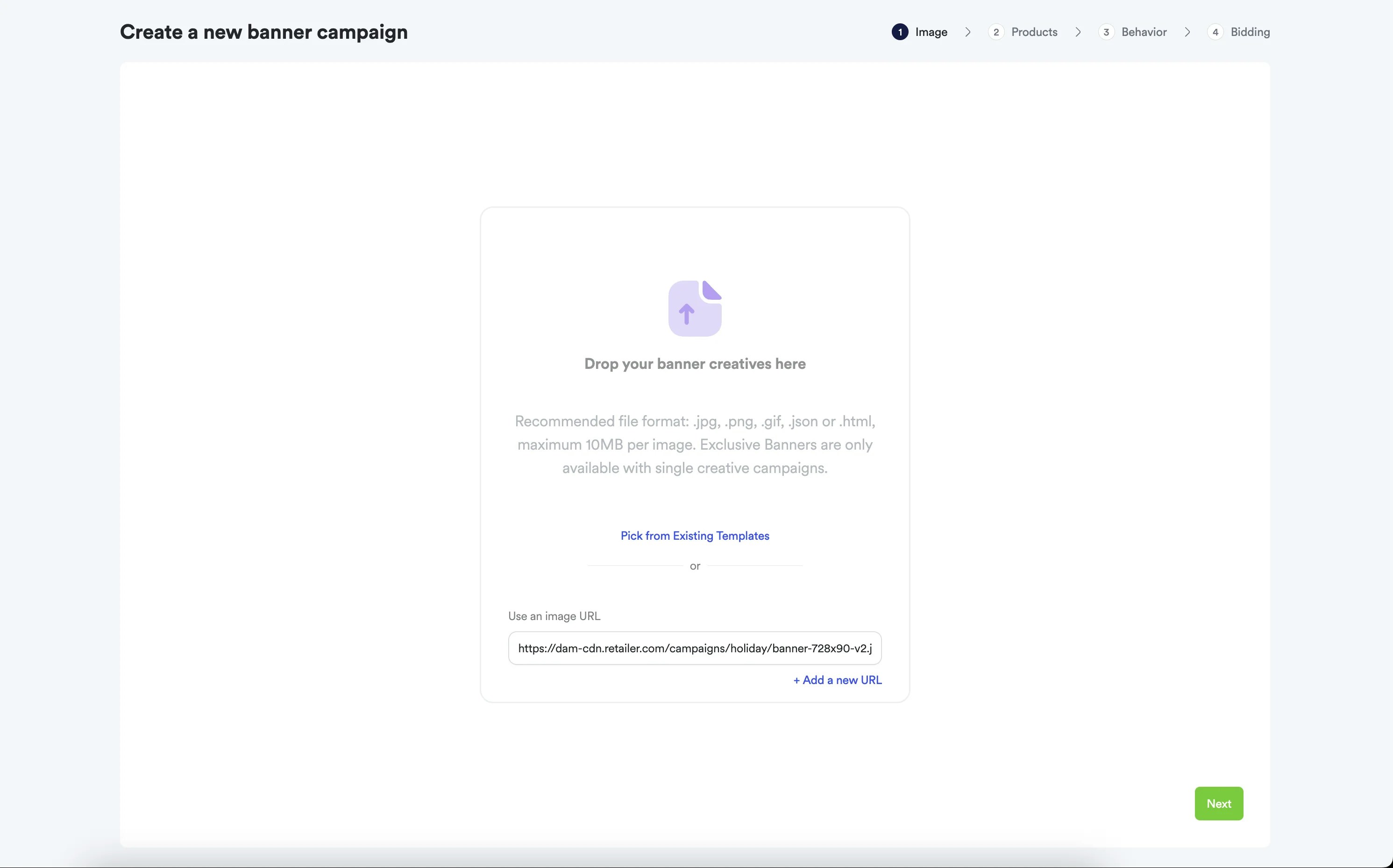
\*\*
**Role:** Campaign Managers/Advertisers | **Frequency:** Per campaign setup
First, create an asset in Topsort that references your DAM URL:
```javascript theme={null}
const assetResponse = await fetch("https://api.topsort.com/v2/assets", {
method: "POST",
headers: {
Authorization: "Bearer YOUR_API_KEY",
"Content-Type": "application/json",
},
body: JSON.stringify({
name: "Holiday Banner 728x90 - Approved v2",
url: "https://dam-cdn.retailer.com/campaigns/holiday/banner-728x90-v2.jpg",
dimensions: {
width: 728,
height: 90,
},
metadata: {
approved: true,
brand_compliant: true,
expiry_date: "2024-12-31",
version: "v2",
},
}),
});
const asset = await assetResponse.json();
```
Next, create a banner campaign that references the asset you just created:
```javascript theme={null}
const campaignResponse = await fetch("https://api.topsort.com/v2/campaigns", {
method: "POST",
headers: {
Authorization: "Bearer YOUR_API_KEY",
"Content-Type": "application/json",
},
body: JSON.stringify({
name: "Holiday Banner Campaign",
type: "banners",
vendor_id: "vendor-123",
bidding_strategy: "target_roas",
target_roas: 4.5,
budget: {
amount: 5000,
currency: "USD",
period: "lifetime",
},
start_date: "2024-11-01",
end_date: "2024-12-31",
assets: [asset.id], // Reference the created asset
slot_id: "homepage_banner_top",
}),
});
const campaign = await campaignResponse.json();
```
#### Auction Response with DAM URLs
**Role:** Marketplace Developers | **Frequency:** Every page load
Request an auction for the banner slot where your DAM-based campaign can compete:
```javascript theme={null}
const auctionResponse = await fetch("https://api.topsort.com/v2/auctions", {
method: "POST",
headers: {
Authorization: "Bearer YOUR_API_KEY",
"Content-Type": "application/json",
},
body: JSON.stringify({
auctions: [
{
type: "banners",
slots: 1,
slotId: "homepage_banner_top",
device: "desktop",
},
],
}),
});
const auctionResult = await auctionResponse.json();
```
When your banner campaign wins, the auction response includes the original DAM URL:
```json theme={null}
{
"results": [
{
"winners": [
{
"rank": 1,
"type": "product",
"id": "p_PJbnN",
"resolvedBidId": "WyJlX1BKYm5OIiwiMTJhNTU4MjgtOGVhZC00Mjk5LTgzMjctY2ViYjAwMmEwZmE4IiwiYmFubmVyQWRzIiwiZGVmYXVsdCIsIiJd",
"asset": [
{
"url": "https://dam-cdn.retailer.com/campaigns/holiday/banner-728x90-v2.jpg"
}
]
}
],
"error": false
}
]
}
```
Use the returned URL to display the banner and track performance:
```javascript theme={null}
// Extract the DAM URL from auction response
const winner = auctionResult.results[0].winners[0];
const damImageUrl = winner.asset[0].url;
const resolvedBidId = winner.resolvedBidId;
// Render banner in your UI
const bannerElement = document.createElement("img");
bannerElement.src = damImageUrl;
bannerElement.addEventListener("click", () => {
// Track click event for billing and attribution
fetch("/api/topsort/events", {
method: "POST",
body: JSON.stringify({
type: "click",
resolvedBidId: resolvedBidId,
}),
});
});
```
### Key Benefits of DAM Integration
* **Brand Consistency**: Only approved, compliant assets reach ad campaigns -
**Workflow Efficiency**: Creative teams work in familiar DAM tools, assets
sync automatically - **Version Control**: When creatives update in DAM,
campaign assets update automatically - **Rights Management**: Track usage
licensing and prevent expired assets from being used - **Global Asset
Distribution**: One asset repository serves multiple marketing channels
## Implementation Guide
**Role:** DevOps/Integration Team | **Frequency:** One-time setup
Set up your DAM system for optimal connectivity with Topsort:
- Asset Organization: Structure assets with campaign-specific folders and metadata
- CDN Configuration: Ensure DAM generates publicly accessible, optimized URLs
- Approval Workflows: Set up processes to mark assets as campaign-ready
- Metadata Standards: Define consistent tagging for dimensions, versions, expiry dates
Configure the connectivity between your DAM and Topsort:
- Authentication: Configure Topsort API credentials
- URL Validation: Ensure DAM URLs are accessible to Topsort systems
- Automated Sync: Set up webhooks or scheduled jobs to sync approved assets
- Error Handling: Implement retry logic for failed asset references
Implement automated asset synchronization:
```javascript theme={null}
// Example automated asset sync from DAM to Topsort
const syncApprovedAssets = async () => {
const approvedAssets = await dam.getAssetsByStatus("approved");
for (const asset of approvedAssets) {
if (!asset.syncedToTopsort) {
await topsortAssetsAPI.create({
name: asset.name,
url: asset.cdnUrl,
dimensions: asset.dimensions,
metadata: asset.metadata,
});
await dam.markAsSynced(asset.id);
}
}
};
```
## API Reference
### Topsort APIs for DAM Integration
| API | Integration Use Case | Status | Documentation |
| ---------------------------------------------------------- | -------------------------------- | ----------- | ---------------------------------- |
| [Assets API](/en/ad-server/additional-apis/assets-api) | Reference DAM URLs in campaigns | ✅ Available | Asset management and collections |
| [Campaign API](/en/ad-server/additional-apis/campaign-api) | Create campaigns with DAM assets | ✅ Available | Full campaign lifecycle management |
### Authentication
```http theme={null}
Authorization: Bearer YOUR_API_KEY
Content-Type: application/json
```
## Best Practices
### Asset Management
* **Optimize URLs**: Ensure DAM generates fast-loading, CDN-optimized URLs -
**Version Control**: Implement clear versioning to prevent outdated assets in
campaigns - **Metadata Standards**: Use consistent tagging for dimensions,
campaign types, approval status - **Access Control**: Ensure asset URLs are
publicly accessible to Topsort systems
### Workflow Automation
* **Approval Gates**: Only sync approved, brand-compliant assets to Topsort -
**Automated Cleanup**: Remove expired or outdated assets from active campaigns
* **Error Monitoring**: Track failed asset references and sync issues
## Troubleshooting
### Common DAM Integration Issues
1. **Asset URL Problems**
* Verify DAM URLs are publicly accessible (not behind authentication) - Check
that URLs return proper HTTP status codes (200) - Ensure CDN URLs are
optimized for fast loading - Validate asset dimensions match Topsort
requirements
2. **Sync Failures**
* Check API authentication and permissions - Verify asset metadata format
compatibility - Monitor webhook delivery success rates - Implement proper
error logging for failed syncs
3. **Version Control Issues** - Ensure updated assets trigger campaign asset
updates - Verify expired assets are removed from active campaigns - Check that
only approved asset versions sync to Topsort
### General API Issues
1. **Authentication Failures**
* Verify API key validity and scope permissions - Check authentication header
format - Monitor for token expiration
2. **Rate Limiting** - Implement proper rate limiting in connectivity code -
Use bulk operations when available - Add retry logic with exponential backoff
## Getting Started
### Implementation Steps
1. **Assessment**: Review your current DAM system's URL generation and API capabilities
2. **API Credentials**: Obtain Topsort API keys and configure authentication
3. **Proof of Concept**: Start with a small set of assets to test the connectivity workflow
4. **Automation**: Implement automated sync processes for approved assets
5. **Monitoring**: Set up tracking for asset sync success and campaign performance
## Related Resources
* [OMS Integration Guide](/en/knowledge-base/ad-server/oms-connectivity) -
Order Management System connectivity - [Assets API
Documentation](/en/ad-server/additional-apis/assets-api) - [Campaign API
Documentation](/en/ad-server/additional-apis/campaign-api)
*This documentation reflects current Topsort API capabilities. DAM
connectivity is available now using existing APIs. For custom connectivity
development, please contact your Topsort representative.*
***