> ## Documentation Index
> Fetch the complete documentation index at: https://docs.topsort.com/llms.txt
> Use this file to discover all available pages before exploring further.
# Managed vs Self-Service
> Understanding the difference between Managed and Self-Service
export const LastUpdated = ({date, lang = "en"}) => {
const translations = {
en: "Last updated:",
es: "Última actualización:",
pt: "Última atualização:",
fr: "Dernière mise à jour:",
de: "Zuletzt aktualisiert:"
};
const label = translations[lang] || translations.en;
return <>
;
};
Topsort supports both **Managed** and **Self-Service** advertising models. You can choose the best fit for your marketplace based on your vendor relationships, internal staff, or strategy.
 ## Managed Advertising
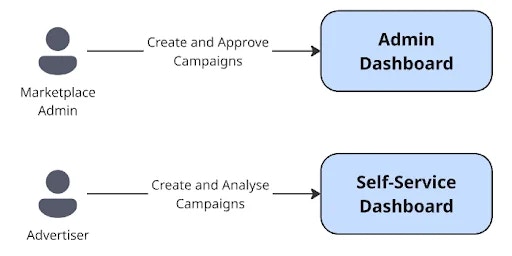
In the managed model, the marketplace team is responsible for setting up and maintaining all vendor campaigns, handling execution, reporting, and optimization. This model works well when vendors already rely on the marketplace for promotional services or the marketplace prefers to keep control of the flows.
The admin dashboard gives admins real-time access to campaign performance across all vendors. Admins and ad ops staff can also create campaigns, add credits, and view metrics such as ad spend, impressions, clicks, and conversions.
## Self-Service Advertising
In the self-service model, advertisers can create and manage campaigns, set campaign budgets, and monitor performance. The self-service dashboard provides vendors with real-time performance data and campaign history. It also includes tools to manage team members and access help resources. While most campaign types can be managed independently, banner creatives may still require marketplace approval.
At the same time, in the self-service model, the admin keeps all the managed mode tools and access, still being able to create and manage campaigns for their self-service vendors. The self-service mode can be activated on a vendor level. Please refer to the [Self-Service](/en/knowledge-base/ad-platform/self-service-and-access/) section for more details.
## Choosing the Right Model
Many marketplaces use a hybrid approach, starting with Managed advertising and gradually offering Self-Service options as vendors become more confident.
***