> ## Documentation Index
> Fetch the complete documentation index at: https://docs.topsort.com/llms.txt
> Use this file to discover all available pages before exploring further.
# API Key Management
> Programmatic access to manage campaigns and analytics across retail media networks
export const LastUpdated = ({date, lang = "en"}) => {
const translations = {
en: "Last updated:",
es: "Última actualización:",
pt: "Última atualização:",
fr: "Dernière mise à jour:",
de: "Zuletzt aktualisiert:"
};
const label = translations[lang] || translations.en;
return <>
;
};
API keys enable secure, programmatic access to Toppie's unified retail media platform. Whether you're automating campaign management, building custom dashboards, or integrating Toppie data into existing workflows, API keys provide the foundation for scaling retail media operations beyond the UI.
Toppie API keys provide secure, token-based authentication for programmatic access to all Toppie endpoints. This enables automation of campaign management, data integration, and custom reporting workflows.
## Key Benefits
Build workflows that create, manage, and optimize campaigns across multiple retailers without manual intervention
Connect Toppie data to BI tools, reporting dashboards, or internal systems for unified retail media analytics
Role-based permissions ensure team members only access the data and capabilities they need
## Creating API Keys
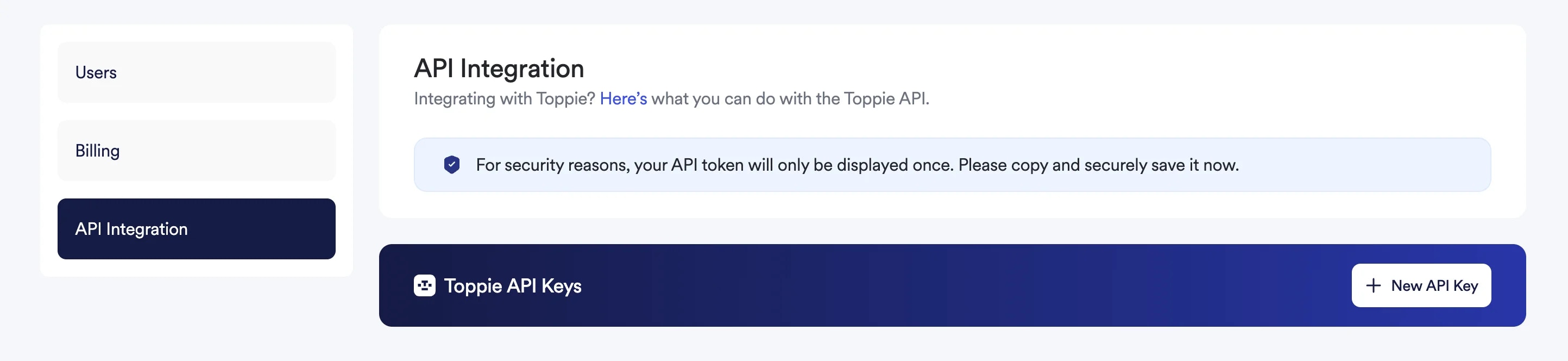
Access **Settings** in your Toppie dashboard navigation
Choose **API Integration** from the left-hand navigation menu
Click the **"+ New API Key"** button to generate a new key
Copy and save your API key immediately—it will only be displayed once for security reasons
Store your API key in a secure location such as a password manager or secrets management system
 ## Using API Keys
Include your API key in request headers for authentication when making calls to the Toppie API.
### Authentication Header
```bash theme={null}
curl -X GET https://api.topsort.com/toppie/v1/campaigns \
-H "Authorization: Bearer YOUR_API_KEY_HERE" \
-H "Content-Type: application/json"
```
### Available API Endpoints
Access comprehensive functionality through the Toppie API:
* **Product Catalog Management** - Upload, update, and manage product catalogs
* **Campaign Lifecycle Operations** - Create, modify, and monitor campaigns
* **Advanced Analytics and Reporting** - Access detailed performance data
* **Budget and Bid Management** - Programmatic budget allocation and optimization
## API Documentation
For complete API reference documentation, visit the [Toppie API Reference](/en/api-reference/toppie-api/%5Bbeta%5D-get-toppie-campaigns).
The documentation includes:
* Endpoint specifications and parameters
* Request/response examples
* Error handling guidelines
* Rate limiting information
* SDK examples in multiple languages
## Security Best Practices
**Security Guidelines**
* Never share API keys in code repositories or public channels
* Rotate keys regularly for enhanced security
* Use environment variables or secure vaults to store keys
* Monitor API usage for any unusual activity
* Implement proper access controls in your applications
### Key Management
## Using API Keys
Include your API key in request headers for authentication when making calls to the Toppie API.
### Authentication Header
```bash theme={null}
curl -X GET https://api.topsort.com/toppie/v1/campaigns \
-H "Authorization: Bearer YOUR_API_KEY_HERE" \
-H "Content-Type: application/json"
```
### Available API Endpoints
Access comprehensive functionality through the Toppie API:
* **Product Catalog Management** - Upload, update, and manage product catalogs
* **Campaign Lifecycle Operations** - Create, modify, and monitor campaigns
* **Advanced Analytics and Reporting** - Access detailed performance data
* **Budget and Bid Management** - Programmatic budget allocation and optimization
## API Documentation
For complete API reference documentation, visit the [Toppie API Reference](/en/api-reference/toppie-api/%5Bbeta%5D-get-toppie-campaigns).
The documentation includes:
* Endpoint specifications and parameters
* Request/response examples
* Error handling guidelines
* Rate limiting information
* SDK examples in multiple languages
## Security Best Practices
**Security Guidelines**
* Never share API keys in code repositories or public channels
* Rotate keys regularly for enhanced security
* Use environment variables or secure vaults to store keys
* Monitor API usage for any unusual activity
* Implement proper access controls in your applications
### Key Management
* **Regeneration** - Rotate API keys periodically or when team members leave
* **Monitoring** - Track API usage patterns and set up alerts for unusual activity
* **Access Control** - Limit API key access to necessary team members only
* **Backup Storage** - Store keys in multiple secure locations with proper access controls
## Common Use Cases
### Campaign Automation
Automate campaign creation, budget adjustments, and performance optimization based on predefined rules and triggers.
### Reporting Integration
Pull Toppie performance data into existing business intelligence tools or custom dashboards for unified reporting.
### Inventory Management
Sync product catalogs automatically and maintain up-to-date inventory across all retail partners.
### Budget Optimization
Implement custom budget allocation algorithms based on performance metrics and business objectives.
***
For assistance with API integration or to discuss advanced programmatic campaign management use cases, contact your Toppie account manager.
***