> ## Documentation Index
> Fetch the complete documentation index at: https://docs.topsort.com/llms.txt
> Use this file to discover all available pages before exploring further.

# Sponsored Listings Campaigns

> Create and manage sponsored listings campaigns across multiple retail partners

export const LastUpdated = ({date, lang = "en"}) => {
  const translations = {
    en: "Last updated:",
    es: "Última actualización:",
    pt: "Última atualização:",
    fr: "Dernière mise à jour:",
    de: "Zuletzt aktualisiert:"
  };
  const label = translations[lang] || translations.en;
  return <>
<style>{`
.last-updated-component {
display: inline-flex;
align-items: center;
gap: 8px;
padding: 10px 16px;
border-radius: 8px;
margin-top: 12px;
margin-bottom: 16px;
font-size: 14px;
background-color: rgba(0, 0, 0, 0.05);
border: 1px solid rgba(0, 0, 0, 0.12);
color: rgba(0, 0, 0, 0.75);
line-height: 1;
}

        .last-updated-component svg {
          flex-shrink: 0;
          vertical-align: middle;
        }

        .last-updated-component span {
          display: inline-flex !important;
          align-items: center !important;
          line-height: 1 !important;
        }

        [data-theme="dark"] .last-updated-component {
          background-color: #3a3a3a;
          border: 2px solid #888888;
          color: #ffffff;
        }

        [data-theme="dark"] .last-updated-component svg {
          stroke: #ffffff;
        }
      `}</style>
      <div className="last-updated-component">
        <svg width="16" height="16" viewBox="0 0 24 24" fill="none" stroke="currentColor" strokeWidth="2" strokeLinecap="round" strokeLinejoin="round">
          <circle cx="12" cy="12" r="10" />
          <polyline points="12 6 12 12 16 14" />
        </svg>
        <span>
          <strong style={{
    fontWeight: 600
  }}>{label}</strong> 
          <time dateTime={date}>{date}</time>
        </span>
      </div>
    </>;
};

<div style={{textAlign: 'justify', marginBottom: '1.5rem'}}>
  **Sponsored Listings** on Toppie enable agencies to promote specific products within search results and category pages across multiple retail partners from a single platform. This is the core advertising format that drives high-intent shoppers to your products at the point of purchase decision.
</div>

<div style={{textAlign: 'justify', marginBottom: '1.5rem'}}>
  Unlike traditional search advertising, sponsored listings place your products directly within the retailer's native shopping experience, ensuring maximum relevance and conversion potential.
</div>

## Key Benefits

<Columns cols={2}>
  <Card title="Multi-Retailer Reach">
    Launch sponsored listings across multiple retail partners simultaneously
    from one interface
  </Card>

  <Card title="Product-Based Targeting">
    Target based on your product catalog without complex keyword management
  </Card>

  <Card title="Native Shopping Experience">
    Products appear naturally within search results and category browsing
  </Card>

  <Card title="High-Intent Traffic">
    Reach shoppers actively searching for products like yours
  </Card>

  <Card title="BIDLESS™ Optimization">
    AI-powered bid management automatically optimizes for your campaign
    objectives
  </Card>
</Columns>

## How Sponsored Listings Work

<div style={{textAlign: 'justify', marginBottom: '1.5rem'}}>
  Sponsored listings promote your products within the natural shopping flow on retail partner sites. When shoppers search for products or browse categories, your sponsored products appear alongside organic results, marked as sponsored content.
</div>

### Targeting Methodology

<Steps>
  <Step title="Product Selection">
    <div style={{textAlign: 'justify', marginBottom: '1.5rem'}}>
      Choose products from your Universal Product Catalog to promote across retail partners
    </div>
  </Step>

  <Step title="Automatic SKU Mapping">
    <div style={{textAlign: 'justify', marginBottom: '1.5rem'}}>
      Toppie maps your products to equivalent SKUs on each retail partner platform
    </div>
  </Step>

  <Step title="Contextual Targeting">
    <div style={{textAlign: 'justify', marginBottom: '1.5rem'}}>
      Products are automatically targeted based on their attributes, categories, and search relevance
    </div>
  </Step>

  <Step title="Cross-Retailer Optimization">
    <div style={{textAlign: 'justify', marginBottom: '1.5rem'}}>
      Campaign performance is optimized across all retail partners simultaneously
    </div>
  </Step>
</Steps>

## Campaign Creation Process

### Prerequisites

<div style={{textAlign: 'justify', marginBottom: '1.5rem'}}>
  * Products uploaded to your Universal Product Catalog
  * Campaign budget allocation
  * Target retail partners selected
</div>

<Steps>
  <Step title="Campaign Creation">
    <div style={{textAlign: 'justify', marginBottom: '1.5rem'}}>
      From the Toppie Dashboard, select "Sponsored Listings" from the Create Campaign button

    </div>

    <Frame>
      <img src="https://mintcdn.com/topsort/Ro7qPN5howJXYxJV/images/knowledge-base/toppie-agencies-brands-toppie-banners-step-1.webp?fit=max&auto=format&n=Ro7qPN5howJXYxJV&q=85&s=12ac7ced4befa28ef0f44d70e7a4ac54" alt="Step 1 of creating banners on Toppie" width="1414" height="111" data-path="images/knowledge-base/toppie-agencies-brands-toppie-banners-step-1.webp" />
    </Frame>
  </Step>

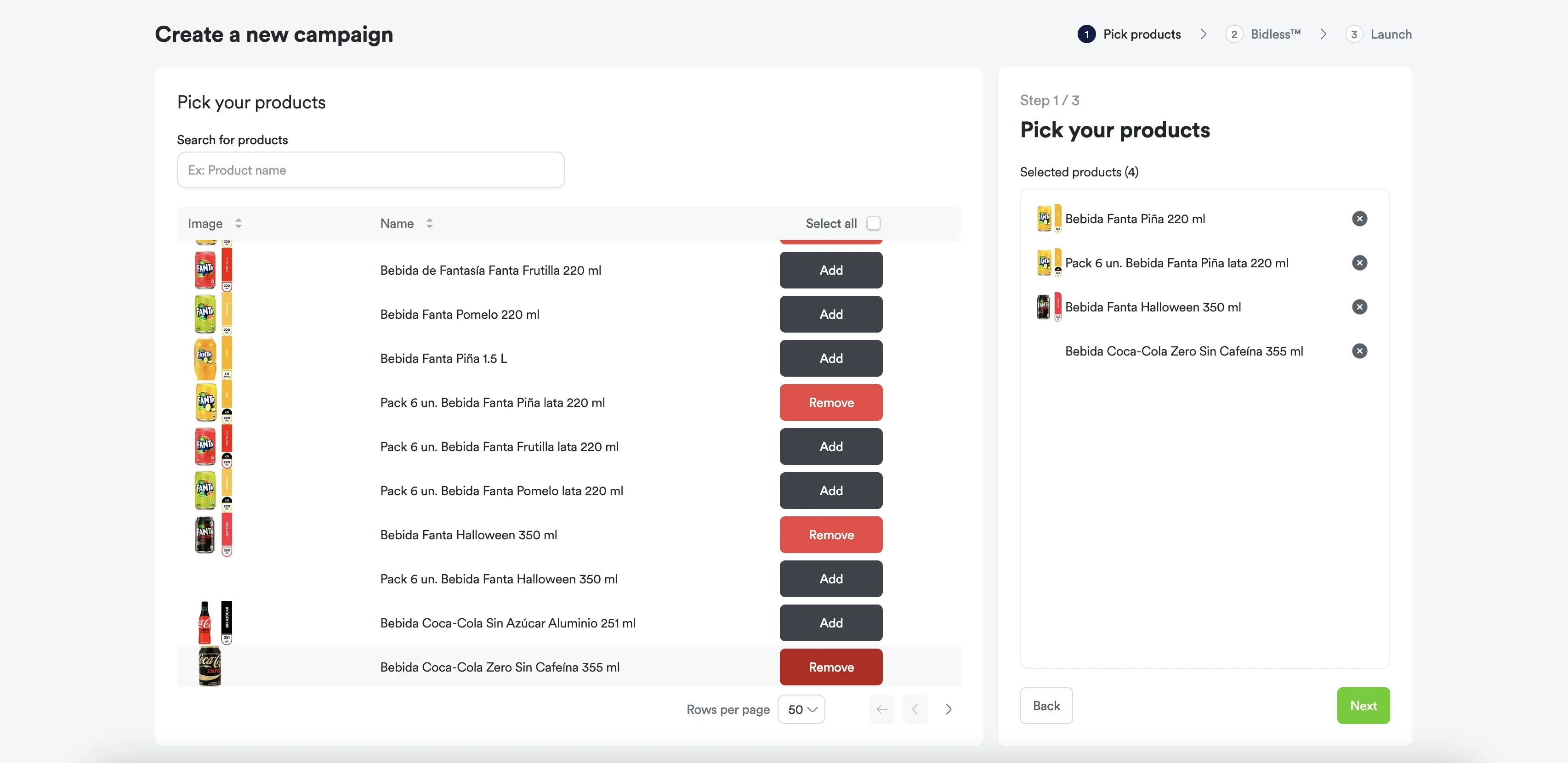
  <Step title="Select Products">
    Select at least one product from the brand's catalog to include in the campaign.
    <Frame>
      <img src="https://mintcdn.com/topsort/Ro7qPN5howJXYxJV/images/knowledge-base/toppie-sponsored-listings-step-1.webp?fit=max&auto=format&n=Ro7qPN5howJXYxJV&q=85&s=f16a751c193650e67ec29dc11e61c96a" alt="Step 1 of creating Sponsored Listings on Toppie: Selecting products" width="3412" height="1661" data-path="images/knowledge-base/toppie-sponsored-listings-step-1.webp" />
    </Frame>
  </Step>

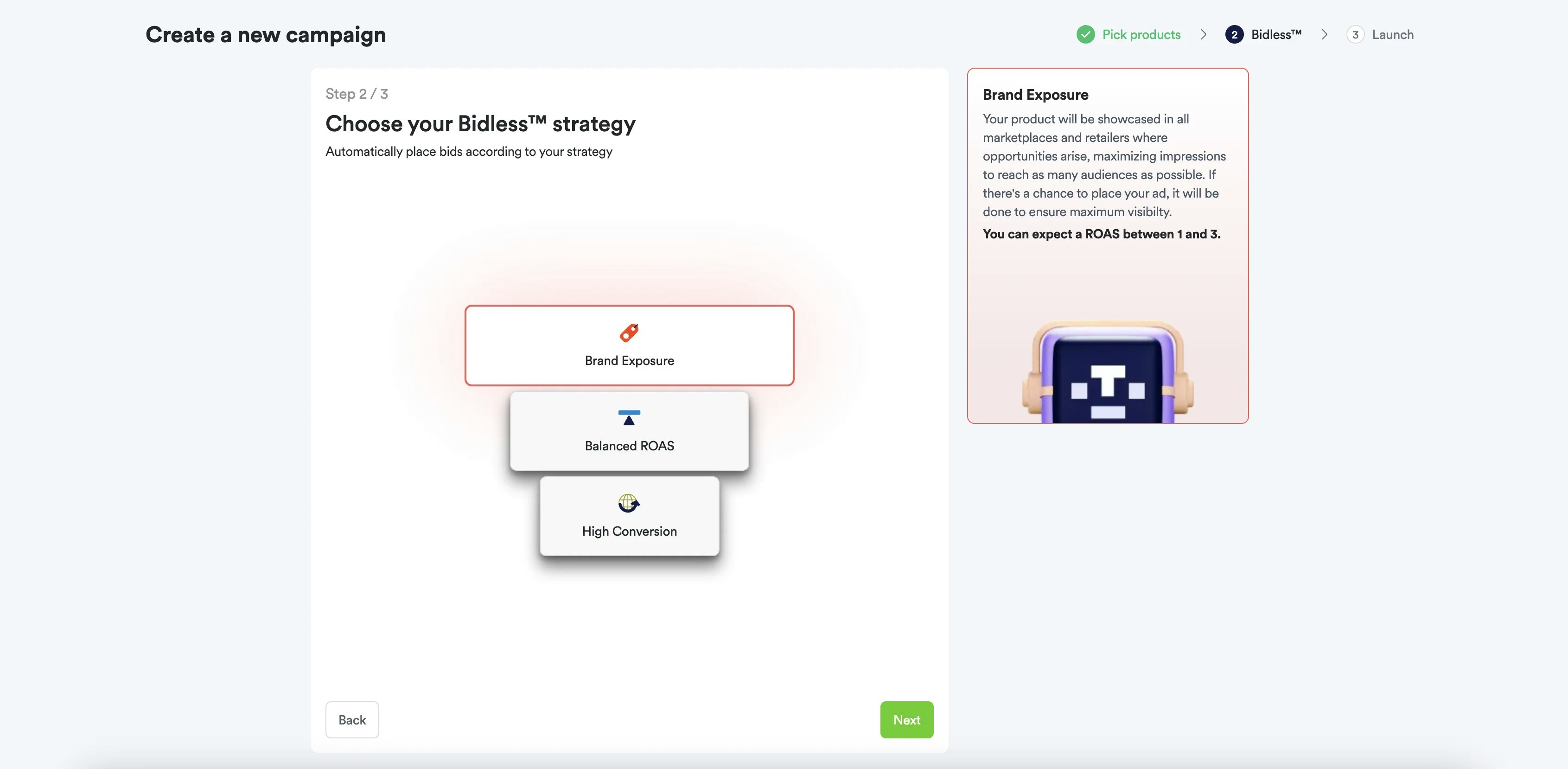
  <Step title="Choose BIDLESS™ Strategy">
    Select a Bidless™ strategy that aligns with your campaign goals—Brand Exposure, Balanced ROAS, or High Conversion.
    <Frame>
      <img src="https://mintcdn.com/topsort/Ro7qPN5howJXYxJV/images/knowledge-base/toppie-sponsored-listings-step-2.webp?fit=max&auto=format&n=Ro7qPN5howJXYxJV&q=85&s=ed8ed1aa3860e9cb8cf581e9357763cd" alt="Step 2: Choosing a Bidless strategy." width="3382" height="1658" data-path="images/knowledge-base/toppie-sponsored-listings-step-2.webp" />
    </Frame>
  </Step>

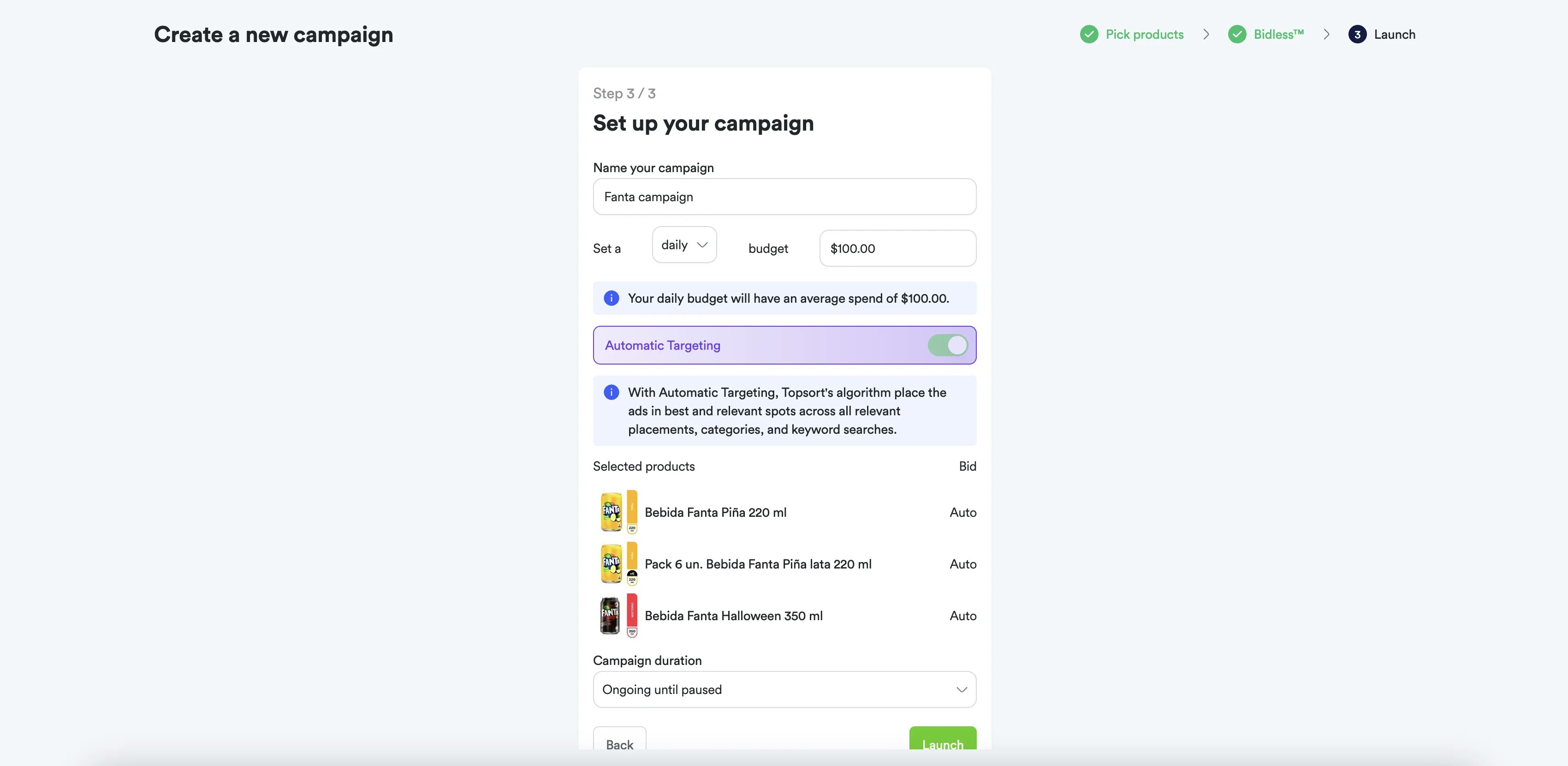
  <Step title="Configure Campaign">
    Set the campaign **name**, **budget**, and **duration**.
    <Frame>
      <img src="https://mintcdn.com/topsort/Ro7qPN5howJXYxJV/images/knowledge-base/toppie-sponsored-listings-step-3.webp?fit=max&auto=format&n=Ro7qPN5howJXYxJV&q=85&s=5096fd74b7ddbe58eb00cb66de7839d3" alt="Step 3: Configuring campaign name, budget, and schedule." width="3400" height="1660" data-path="images/knowledge-base/toppie-sponsored-listings-step-3.webp" />
    </Frame>
  </Step>

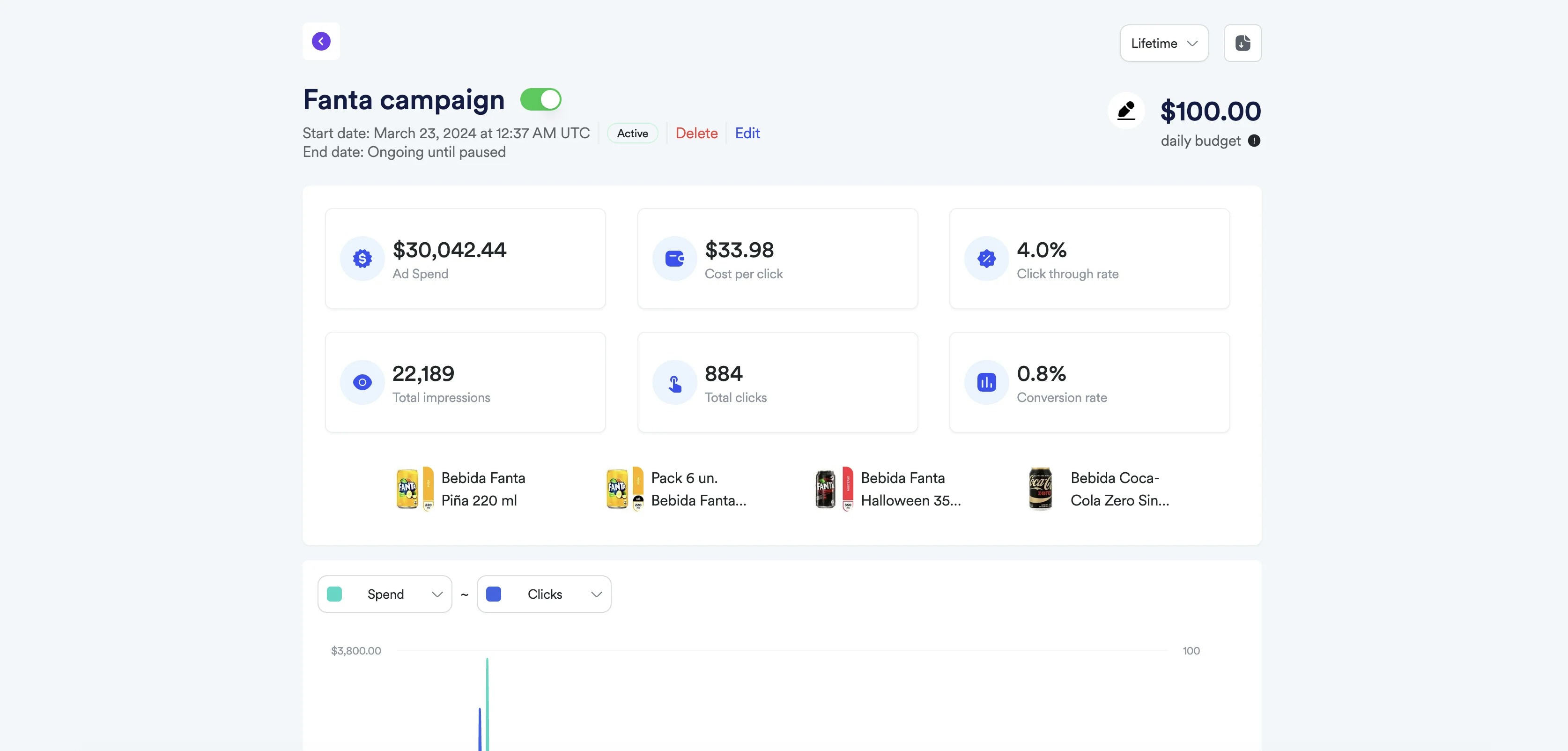
  <Step title="Launch and Monitor">
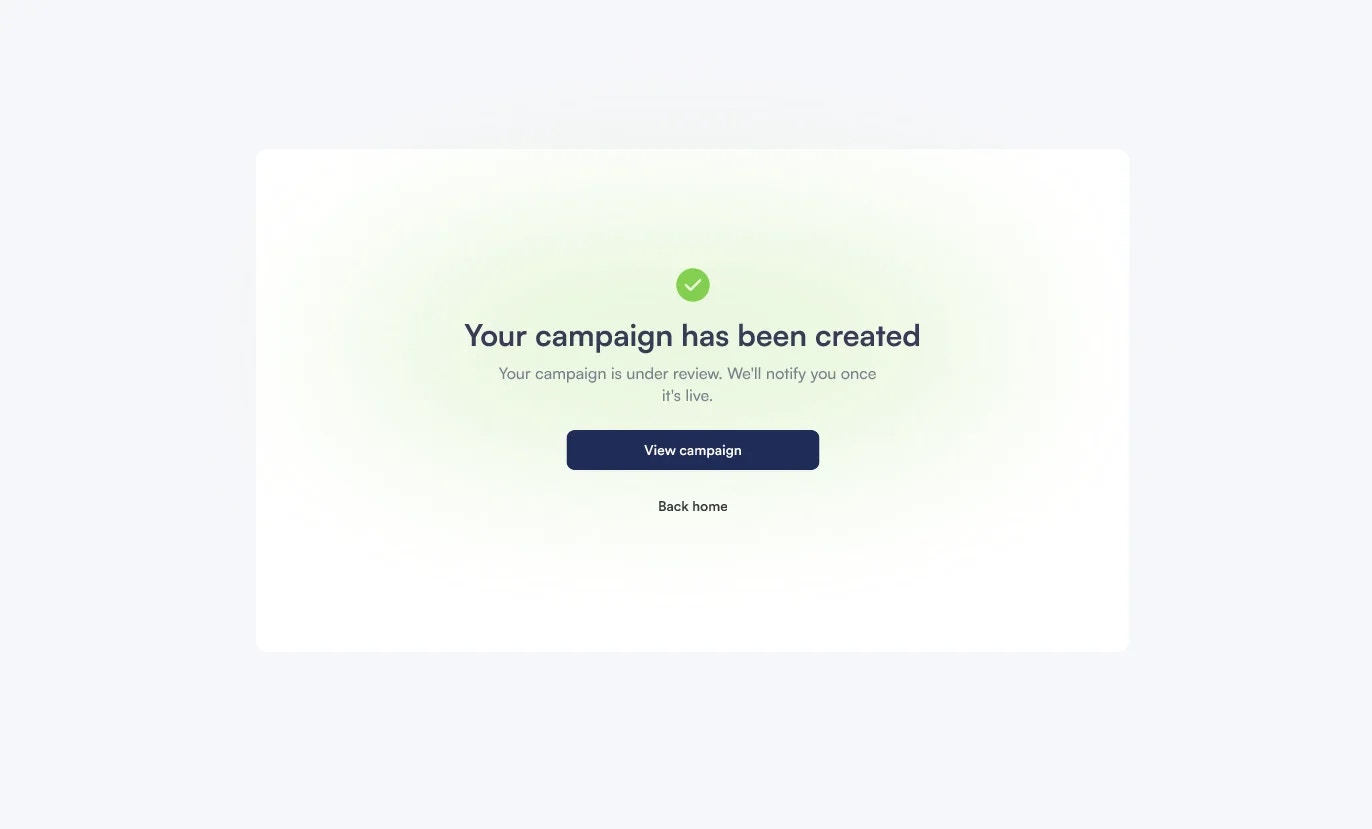
    Activate the campaign and monitor performance across all retail partners
    <Frame>
      <img src="https://mintcdn.com/topsort/Ro7qPN5howJXYxJV/images/knowledge-base/toppie-agencies-brands-toppie-banners-step-5.2.webp?fit=max&auto=format&n=Ro7qPN5howJXYxJV&q=85&s=ab61c3d0d52a4b1c7be82d2984198bcf" alt="Step 5.2 of creating banners on Toppie" width="1372" height="829" data-path="images/knowledge-base/toppie-agencies-brands-toppie-banners-step-5.2.webp" />
    </Frame>

    <Frame>
      <img src="https://mintcdn.com/topsort/Ro7qPN5howJXYxJV/images/knowledge-base/toppie-sponsored-listings-step-4.webp?fit=max&auto=format&n=Ro7qPN5howJXYxJV&q=85&s=e27c3a4b377bfeea16e790b3d7a9b614" alt="Step 4: monitor." width="3348" height="1603" data-path="images/knowledge-base/toppie-sponsored-listings-step-4.webp" />
    </Frame>
  </Step>
</Steps>

## BIDLESS™ Technology

<div style={{textAlign: 'justify', marginBottom: '1.5rem'}}>
  Toppie's **BIDLESS™** technology eliminates manual bid management by using AI to automatically optimize bids across all retail partners based on your campaign objectives.
</div>

### How It Works

<div style={{textAlign: 'justify', marginBottom: '1.5rem'}}>
  * **Real-Time Optimization** - Bids adjust automatically based on performance data
  * **Cross-Retailer Intelligence** - Learnings from one retailer improve performance on others
  * **Budget Efficiency** - Spending is allocated to the highest-performing opportunities
  * **Objective Alignment** - Optimization focuses on your specific goals (ROAS, reach, conversions)
</div>

## Performance Tracking

### Key Metrics

<div style={{textAlign: 'justify', marginBottom: '1.5rem'}}>
  * **Impressions** - How often your products are shown
  * **Clicks** - Engagement with your sponsored listings
  * **Conversions** - Purchases attributed to your campaigns
  * **ROAS** - Return on advertising spend
  * **Market Share** - Your visibility compared to competitors
</div>

### Attribution Model

<div style={{textAlign: 'justify', marginBottom: '1.5rem'}}>
  Sponsored listings use a combination of:
</div>

<div style={{textAlign: 'justify', marginBottom: '1.5rem'}}>
  * **Click Attribution** - Direct purchases from clicking sponsored products
  * **View-Through Attribution** - Purchases after seeing but not clicking sponsored products
  * **Cross-Device Tracking** - Unified measurement across devices and sessions
</div>

## Optimization Best Practices

### Product Selection

<div style={{textAlign: 'justify', marginBottom: '1.5rem'}}>
  * Focus on high-performing products with good margins
  * Include both bestsellers and products needing visibility boost
  * Consider seasonal trends and inventory levels
</div>

### Campaign Structure

<div style={{textAlign: 'justify', marginBottom: '1.5rem'}}>
  * Group related products into themed campaigns
  * Separate campaigns by brand or product category
  * Align budgets with business priorities
</div>

### Performance Monitoring

<div style={{textAlign: 'justify', marginBottom: '1.5rem'}}>
  * Review performance weekly across all retail partners
  * Adjust product selection based on performance data
  * Monitor competitive landscape and market trends
</div>

<Note>
  Sponsored listings typically show results within 24-48 hours of campaign
  activation, with full optimization occurring over 7-14 days as the AI gathers
  performance data.
</Note>

<div style={{textAlign: 'justify', marginBottom: '1.5rem'}}>
  ***
</div>

<div style={{textAlign: 'justify', marginBottom: '1.5rem'}}>
  Sponsored listings form the foundation of retail media advertising, providing direct access to high-intent shoppers at the moment of purchase decision across all your retail partners.
</div>

***

<LastUpdated date="2025-11-18" />