

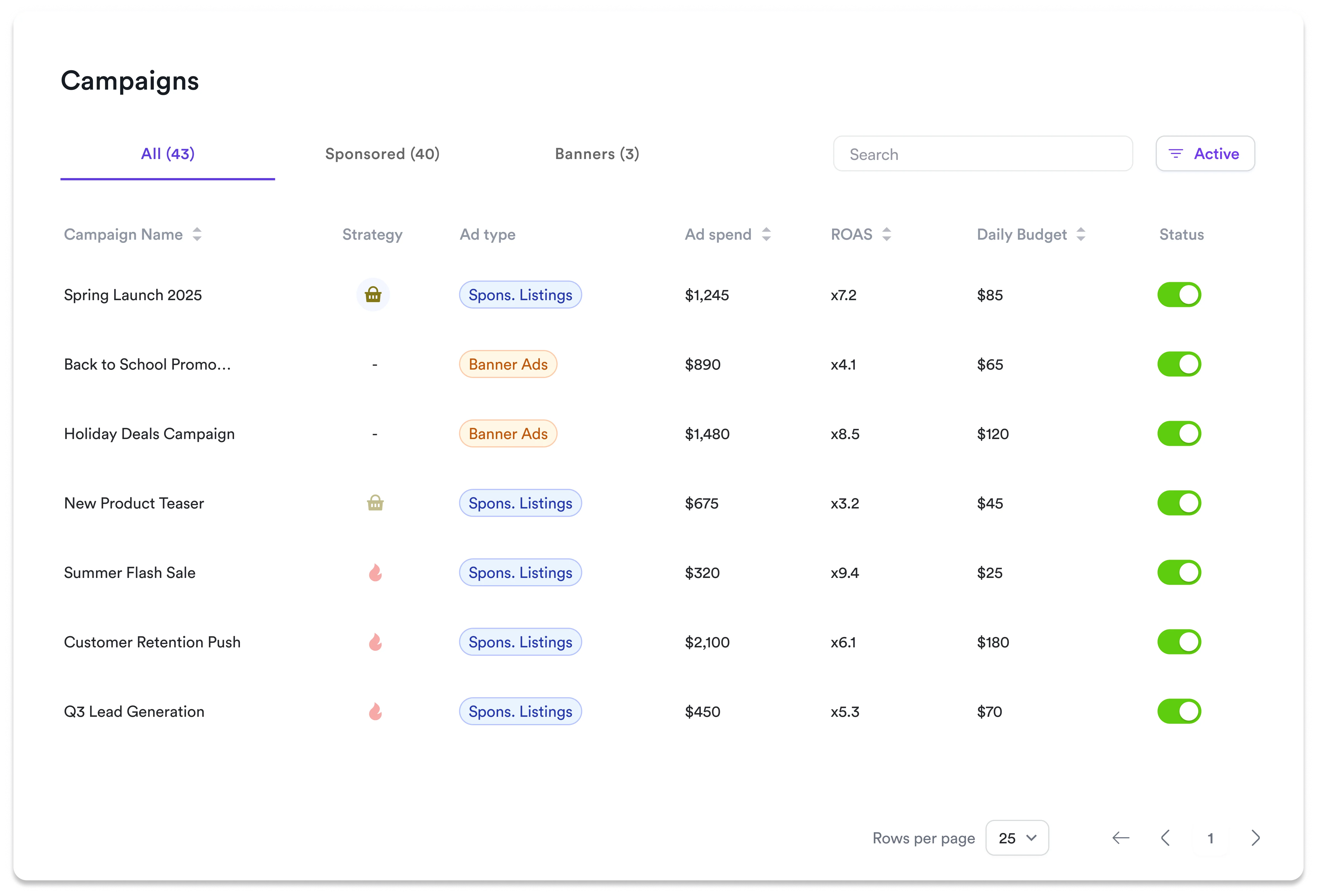
The Campaigns tab in Toppie provides a centralized hub for managing all your advertising campaigns across retail media networks. This unified interface streamlines campaign oversight and enables efficient performance monitoring from one dashboard.
Key Features
Unified Campaign View
View all Sponsored Listings and Banner Ads campaigns in one organized interface
Real-Time Monitoring
Track ad spend, ROAS, and daily budgets with live performance updates
Quick Campaign Control
Instantly activate, pause, or modify campaigns without navigating between pages
Smart Filtering
Filter by campaign type, status, or search by name to find campaigns quickly
Detailed Analytics Access
Click into any campaign for comprehensive performance data and trend analysis
Campaign Overview
The Campaigns tab displays essential performance metrics for each campaign:
- Campaign Name - Clickable to access detailed analytics
- Campaign Type - Sponsored Listings or Banner Ads
- Status - Active/Inactive with toggle controls
- Ad Spend - Total campaign spend to date
- ROAS - Return on advertising spend
- Daily Budget - Configured daily spending limit
Managing Campaigns
1
Navigate to Campaigns
Access the Campaigns tab from your Toppie dashboard navigation
2
Filter and Search
- Use filter tabs to view All, Sponsored, or Banner campaigns
- Use the search bar to find specific campaigns by name
- Sort by any column for quick insights
3
Monitor Performance
Review real-time metrics directly from the list view without drilling into individual campaigns
4
Control Campaign Status
Toggle campaigns Active or Inactive using the status controls
5
Access Detailed Analytics
Click any campaign name to view comprehensive performance data and modify campaign settings
Campaign Types
Sponsored Listings
Traditional product advertising campaigns that promote specific products within search results and category pages across retail partners.
Banner Ads
Display advertising campaigns that show visual creatives across high-visibility placements on retail partner sites, with product-based targeting.
The Campaigns tab centralizes your entire Toppie advertising operation, making it easy to monitor performance and make adjustments across all retail media networks from one location.